Unable to download transactions due to "uninstall cannot complete" message [Edited]

I just updated my Windows Quicken to R65.17 2-3 days ago. When I try to download transactions from my Wells Fargo checking and my tri counties bank checking, I get messages that uninstall cannot complete, that I must close Quicken and restart after the install, but it still won't download or complete the install. I get Error Code 1706.
When will transaction downloads work again?
Best Answers
-
I am not experiencing any issues connecting and/or downloading transactions from Wells Fargo Bank after updating to 65.17, so it's not a Quicken issue. Based on the "…messages that uninstall cannot complete…", I would suggest that something went amiss with the update to your system. 101 things could cause this, but I would try re-installing the Quicken software. Immediately after reinstalling, run validate on your data file.
0 -
Hello @Mark Wandro,
Thank you for letting us know you're seeing this issue. The error code you mentioned is a Windows error code. I believe it usually means there's a problem with the install files it's trying to use. As @RalphC recommended, please try uninstalling and reinstalling your Quicken program. To redownload the Quicken program for the install, please use this article:
Let me know how it goes!
Quicken Kristina
Make sure to sign up for the email digest to see a round up of your top posts.
0


Answers
-
I am not experiencing any issues connecting and/or downloading transactions from Wells Fargo Bank after updating to 65.17, so it's not a Quicken issue. Based on the "…messages that uninstall cannot complete…", I would suggest that something went amiss with the update to your system. 101 things could cause this, but I would try re-installing the Quicken software. Immediately after reinstalling, run validate on your data file.
0 -
Hello @Mark Wandro,
Thank you for letting us know you're seeing this issue. The error code you mentioned is a Windows error code. I believe it usually means there's a problem with the install files it's trying to use. As @RalphC recommended, please try uninstalling and reinstalling your Quicken program. To redownload the Quicken program for the install, please use this article:
Let me know how it goes!
Quicken Kristina
Make sure to sign up for the email digest to see a round up of your top posts.
0 -
Uninstalling and reinstalling my Quicken program worked. Now all is working except I'm not getting the register "cha-ching" when I make entries in my accounts. I can't remember how to fix this, but I'm sure it is simple.
Thanks!
1 -
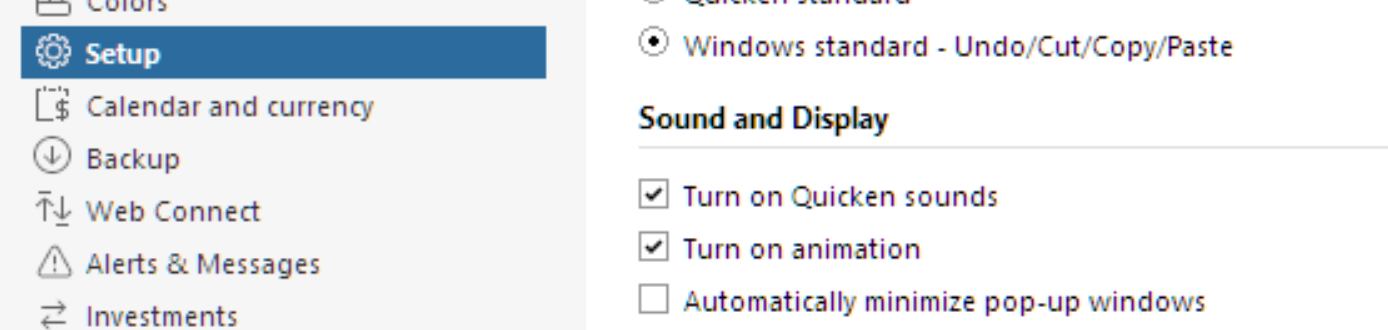
Do you have "Turn on Quicken sounds" enabled?
 0
0 -
Thank you for the follow-up,
I'm glad to hear that the uninstall/reinstall corrected the issue. As @RalphC said, check to make sure sounds are turned on. To do that, navigate to Edit>Preferences>Setup.
If you need further assistance, please feel free to reach out!
Quicken Kristina
Make sure to sign up for the email digest to see a round up of your top posts.
0