Downloaded Transactions were renamed with NO RENAMING RULES

So frustrated with this program right now. I have not been able to download transactions for a while. Today I deactivated all of the accounts and then re-activated them and matched them up with the corresponding account at the bank.
Then I downloaded transactions and IT WORKED!!! Yeah!!! Or so I thought. When I looked through the downloaded transactions that have not been accepted in to the registers yet Quicken had renamed the majority of the transactions to a retailer that I HAVE NEVER BEEN TO IN ANOTHER STATE AND TOWN. I have NO renaming rules set up in my Quicken account.
How does this happen? Can it be fixed? There was around 250 transactions downloaded. It even appears the transactions have been recorded with accounts that they shouldn't be.
I am devastated at the amount of time it is going to take to correct this. Can the downloaded transactions be deleted and re-downloaded correctly? Where did it even come up with a retailer I have NEVER been to in a different State?
Any help appreciated.
Comments
-
Hello @QuiltinMom,
Thank you for letting us know you're encountering this issue. To answer your question, if you delete the transactions, they will not redownload. If you have a recent backup of your file from before the accounts were reactivated, then you should be able to restore that backup to get your file back to a state prior to the incorrect payees all came in.
To help troubleshoot, please provide more information. Did everything change to the same payee name, or did they change to different (but incorrect) payee names? When you right click on the transactions with incorrect payee names, do you see a Revert to option? If you do, does it show the correct payee?

It is possible for Quicken to rename payees without having renaming rules set up. According to our article, if you have renaming rules, it'll use those first. If you don't have renaming rules set up, Quicken does have a database of standardized merchant names that it can use to rename downloaded payees. If that feature is on, you can turn it off by going to Edit>Preferences>Downloaded transactions, and unselecting Automatically apply Quicken's suggested name to payee.
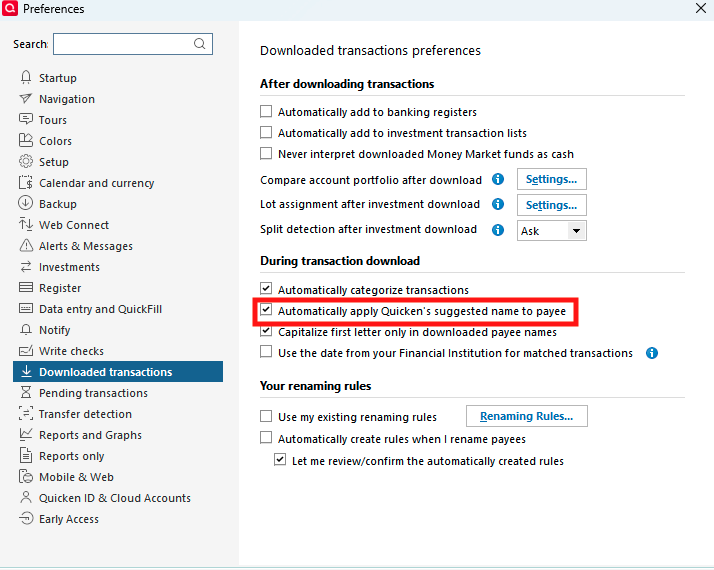
I look forward to your response!
Quicken Kristina
Make sure to sign up for the email digest to see a round up of your top posts.
0 -
Note that I also experience this issue seemingly on a random basis on individual transactions within different accounts. I removed all renaming rules and disabled the options years ago and it worked fine. But at some point over the last few months something has changed. For me the work around is to right click on the individual transactions & select revert within the downloaded transactions interface. It is normally quite evident which transactions have been renamed. But something changed here.
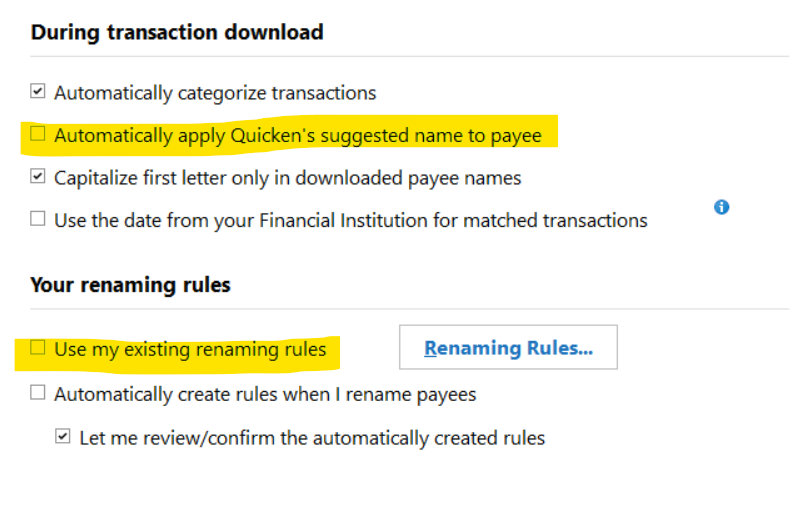 0
0 -
This has been happening to me too, since the recent Quicken update. The downloaded transaction says Wal-mart #2482 Mesa AZ, but it is automatically changed to Wal-mart and throws in a random Category (postage - that we never buy at Wal-mart). The next is Wal-mart #6480 Chandler Az and it does the same thing - Wal-mart and postage. I went back and deleted any renaming rules for Wal-mart and hopefully this will resolve it.
I just did another one for Fry's where the downloaded info was renamed from Fry's-mktplace #607 to Fry's, so I hit the Revert to Original Payee and the data was place into the downloaded transactions list, however when I click on that entry, the Register does not change - it stays renamed as Fry's.
I think I'm going to take MN Brian's suggestion and delete all the renaming rules, restart Quicken and see what happens on the next download. Wish me luck!
0 -
Hello @John Campbell,
Thank you for sharing your experience.
Please let us know if @MN Brian's suggestion corrects the issue for you!
Quicken Kristina
Make sure to sign up for the email digest to see a round up of your top posts.
0 -
[Removed - Duplicate Post]
0
