Unable to reconnect Schwab HSA account

Comments
-
I am having a similar problem, also with Schwab HSA account, I also put mine in Traditional IRA. I've unlinked and tried to relink (through Schwab account deleting third party login info too). Now when I try to relink it just doesn't see that there is an account to login to. I have another account at same Schwab login that it will see.
0 -
Hello @S_Sang,
Thank you for letting us know that you're also encountering an issue with your Schwab HSA account. To clarify, are you encountering this issue on Schwab's website, when trying to authorize the account, or in Quicken, after you have successfully authorized?
There are a few things that can cause an account to not show as an option:
- Are you the primary account-holder?
- If it's a shared account, are you making sure to use the primary account-holder's credentials?
- Have there been transactions in the last 90 days, aside from interest payments?
- Is the account a sub-account of another account?
- Is the account directly through Schwab, or is it serviced by a 3rd party?
I look forward to your reply!
Quicken Kristina
Make sure to sign up for the email digest to see a round up of your top posts.
0 -
I am primary account holder. It's an investment account with daily changes. It is not a sub account. The other Schwab account I have at this login is working fine through Quicken. I don't think it's "serviced by a third party" but it is an HSA investment account originally set up through a HSA bank provider - but it was working just fine for literally years. I have two of these in my Quicken doing this - one for my husband and one for myself and both have stopped working at the same time.
0 -
I have the exact same issue. Schwab HSA account downloading and updating just fine for years up until I think the most recent Quicken update. Now, the account balance reads as $0 and is not an option to add the account even after authorizing to do so from Schwab side. I have two other Schwab accounts (brokerage accounts) that are downloading just fine. Just talked to Schwab, they say it's a Quicken issue. Please advise
0 -
Thank you for your replies,
To troubleshoot for a file issue, please try restoring a backup from before the issue started and test to see if the issue persists in the newly restored file.
Please let me know how it goes!
Quicken Kristina
Make sure to sign up for the email digest to see a round up of your top posts.
-1 -
I am having the same issue. I tried troubleshooting this issue earlier this week and the account still doesn't connect. After spending two hours with Quicken support doing every single troubleshoot, reset, new Quicken file, screenshare, and screenshot, I was told that the account wasn't syncing with Quicken because it did not have any recent activity over $1 and was therefore showing as "closed." That didn't seem true but I instituted a trade just to check and, sure enough, nothing changed with the sync. This is obviously a Quicken issue that needs to be escalated.
0 -
Same issue. Talked to schwab and quicken support and they both point at each other. Started about two weeks ago, I think.
0 -
Exactly. I talked to Quicken, they say it's Schwabb. I talked to Schwabb, they say it's Quicken. Extremely irritating. Please can someone fix this issue?
0 -
Hello All,
Thank you for taking the time to visit the Community to report this issue, though we apologize that you are experiencing this.
We have forwarded this issue to the proper channels to have this further investigated. In the meantime, if you haven't already done so, we request that you please navigate to Help > Report a problem and submit a problem report with log files attached and (if you are willing) a sanitized copy of your data file in order to contribute to the investigation. Please also include a screenshot showing that the account is not showing as an option to add in Quicken.
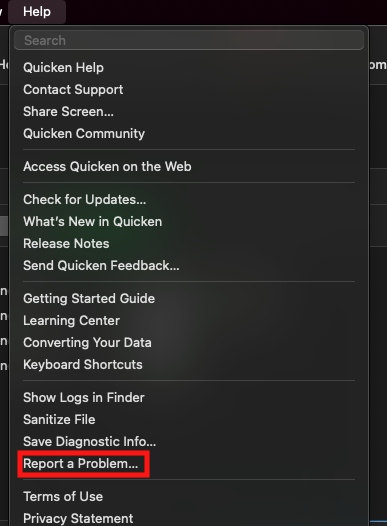
While you will not receive a response through this submission, these reports will help our teams in further investigating the issue. The more problem reports we receive, the better.
We apologize for any inconvenience!
Thank you.
(CTP-15438)
Quicken Kristina
Make sure to sign up for the email digest to see a round up of your top posts.
0 -
Problem reported as requested. Still waiting on a fix please!
1 -
Thank you for sending the problem report with log files attached,
It will help our teams investigate this issue!
Thank you!
Quicken Kristina
Make sure to sign up for the email digest to see a round up of your top posts.
0 -
Exact same issue here. Please escalate and advise.
1 -
Same problem. File logs sent.
1 -
Hello @Kristi Roberts & @Larry G.,
Thank you for letting us know you're also encountering this issue. I added you to the ticket so that our teams know you're also impacted by this.
Thank you!
Quicken Kristina
Make sure to sign up for the email digest to see a round up of your top posts.
0 -
same issue
0 -
Seems like the issue is affecting a lot of customers with a Schwab HSA and third party custodian all of the sudden. Not sure it matters but Lively is the HSA account, Schwab is the brokerage. Please fix!
1 -
My HSA problem began in late November. It has worked fine for years. Now, I cannot get it to link to Quicken. This is a Schwab brokerage account tied to a LivelyMe Health Savings Account.
Recently I tried to re-connect just the HSA account (excluding one other that is tied to the same Schwab login). At the end of the dialog (where you Select accounts on Schwab's site) and where the browser would normally log out of Schwab and pass control back to Quicken, the browser displays a blank window with:
HTTP Status 400 – Bad Requestdisplayed at the top. On one occasion, however, the window showed a simple java script and a message saying the script was invalid, empty, or incomplete — something like that.
Anyway, I have been unable to download my HSA transactions like many others here. The HSA brokerage account shows on the Schwab "account access permission" window after logging into Schwab, but when the program returns (from the browser) back to Quicken, the HSA account is NOT listed in the list of accounts to be "connected". All the other Schwab accounts are there and can be linked via "connect to existing" just fine.
This is a bona fide problem.
0 -
I've been having the same problem since about 11-25-25. One-step update won't download transactions for my Schwab HSA account that is linked to Lively. It was working fine before that, along with my other accounts from Schwab.
0 -
Hello @Larry Nedder, @smutschler, & @Grandma5,
Thank you for letting me know you're also encountering this issue. I added you to the ticket so that our teams will know you're also impacted.
Thank you!
Quicken Kristina
Make sure to sign up for the email digest to see a round up of your top posts.
0 -
I'm having the same problem with my Lively HSA (Schwab Brokerage Account). Last transaction downloaded was on 11/17, and then nothing after that. I tried many times to reset/disconnect account on my Quicken then reauthorize Quicken on Schwab site and then Quicken keeps coming back saying it Can't Connect!
0 -
Why is this taking so long to fix?
2 -
Ditto. I have 14 Schwab accounts of varying types (checking, traditional brokerage, Roth IRA, work-sponsored 401k/PCRA, etc.). Four of which are HSA/HSBA - two from Lively and two from Optum.
The HSAs started silently failing in mid November. They are low volume transaction accounts so I didn't notice a problem until recently when some scheduled transfers didn't show. I went through the whole rigmarole: deactivating them all, clearing out the institution name/account numbers, revoking and restoring my Quicken authorization on the Schwab site, revalidated my file, etc.
When I authorize via the Schwab site/browser (that Quicken redirects me to when adding accounts) all 14 accounts show up. When it sends me back to Quicken to add/link accounts the 4 HSAs do not show up in the list.
2 -
[Removed - Speculation/Inaccurate]
0 -
Hello @petermang & @VinSomething,
Thank you for letting us know you're also impacted by this issue. I added you to the ticket.
Thank you for your reply @Kristi Roberts,
Not all issues can be resolved quickly. Our teams are working with Schwab to resolve this issue.
Thank you!
Quicken Kristina
Make sure to sign up for the email digest to see a round up of your top posts.
0 -
@Quicken Kristina - I'm having the same problem. Can you please add me to the ticket as well?
0 -
I'm having the same Lively/Schwab HSA problem. I used Report a Problem to send information. This is my 2nd ongoing downloading issue (the other being OneAmerica). Super frustrated with Quicken right now.
2 -
I'm having the same Lively/Schwab HSA problem.
Any progress?
It's been over a month now!!!
0 -
any updates?
0 -
Hello @hobie_dave, @dfrobinson1966, and @James Wilbourne,
Thank you for letting me know you're also impacted by this issue. I added you to the ticket.
Thank you for the follow-up @Larry Nedder,
There are no new updates yet. Our teams are still working with Schwab to resolve the issue.
Thank you!
Quicken Kristina
Make sure to sign up for the email digest to see a round up of your top posts.
0 -
Hello All,
We now have a Community Alert for this issue. I recommend bookmarking the alert linked below to be notified of any updates, once available, and to know when the issue is resolved:
If you do not see the bookmark icon at the upper right, please make sure you are logged into the Community.
Thank you!
(Ticket # 12118754/CTP-15438)
Quicken Kristina
Make sure to sign up for the email digest to see a round up of your top posts.
0


