Hiding Accounts Doesn't Work On Home Page Classic View

I go into the account list, or I can right-click on an account from the home page. I check "Hide in transaction entry list" and check "Hide account name in account bar and in account list".
The account still shows up on the home page?? It does stop showing up in the account list when I display it from the tool menu, BUT I want accounts to stop showing up on the home page. These are zero-balance accounts under savings. I need them for tax reports, but don't want to see them on the home page, so I can't close them.
[Edited-Readability]
Comments
-
Hello @Divemaster,
Thank you for sharing your experience.
It sounds to me like what you are describing is the expected behavior. We do have a Help Article that covers this topic, if you want to check it out.
It notes at the bottom that hiding an account in the Account Bar has no effect on reporting or other features. Accounts must be marked as separate to be removed from reporting and other features.
As a workaround, you could mark them as separate to keep them off the Home page, and then undo that anytime you are running reports that you need those accounts to be included in. You can do this from Tools>Managed Hidden Accounts.
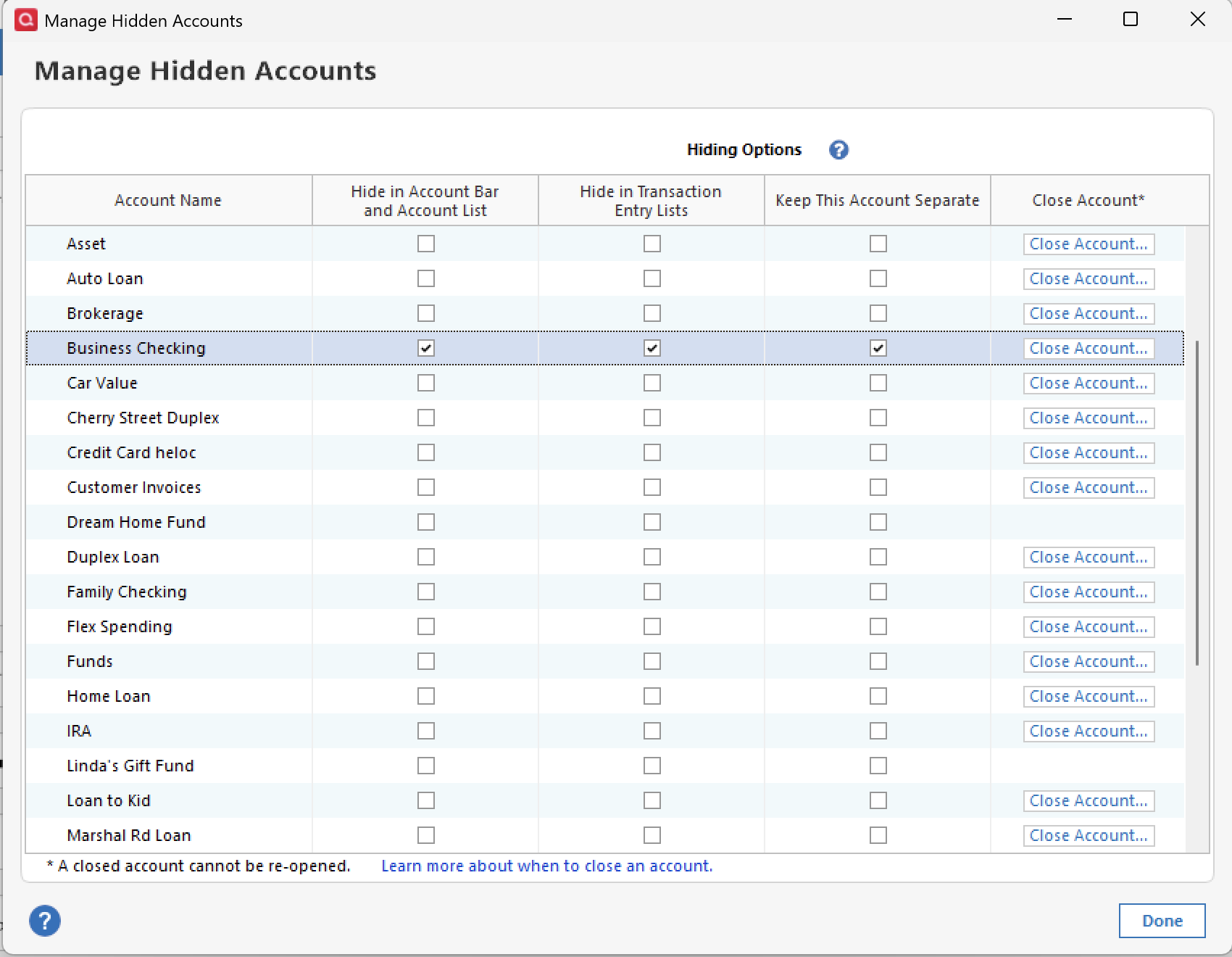
Hope this helps!
Quicken Alyssa
Make sure to sign up for the email digest to see a round up of your top posts.
1 -
Thanks for the information, that seems like an odd way to have to hide from my home page. I doubt I will use the Separate function as knowing me I would forget to undo the Separate when running tax reports. I have about 8 accounts with 0 balance and will never be used again- except for some end of year reports. I was hoping the Hide in Account Bar and Account list would also hide from home page, that seems reasonable. Not sure why Quicken would think I would want to hide from the account list, transactions and account bar- but still have on home page. But I guess I can live with it.
Again, thanks at least I have an answer now.
Jerry
0 -
Thank you for following up!
I can see where you are coming from. What you could do is request this feature to be added in the future by creating an idea post. This way, other users who have the same or a similar request can vote on your idea.
Our Development and Product teams frequently use our idea posts in order to improve Quicken and implement new features requested by customers.
I hope this helps!
Quicken Alyssa
Make sure to sign up for the email digest to see a round up of your top posts.
1 -
Are you using the All Accounts view in your Classic Home page?
How about this workaround …
- remove the All Accounts view and replace with the following views
- add the Spending and Savings Accounts view
- add the Credit Card accounts view
- add Business, Rental or Investment Accounts views as needed
- do not add the Property and Debt Accounts view
- go into Edit Account Details, Display Options tab and change the setting for each of the $0.00 Savings accounts from 'Savings' to 'Asset'.
Your $0.00 Savings accounts will no longer show in any of the above views. And you don't need to mark them Separate.
Of course, this workaround wouldn't be necessary if we could talk the Quicken programmers into turning the All Accounts Home tab view into a All / Selected Accounts view, making it customizable by adding an account selection popup view to the view's gear icon.
1 -
Understand what you are saying, but I have some Assets that get modified, but only a few times a year and I could get to them via account pull down. Think they would still be in reports.
Great Idea and most logical approach programmers should have done from start.
Quicken programmers into turning the All Accounts Home tab view into a All / Selected Accounts view, making it customizable by adding an account selection popup view to the view's gear icon
0 -
Hiding accounts has never worked and it is pretty clear that Quicken Inc has no intention of ever fixing this.
1 -
Makes me wonder why not fix it? After spending 40 some years working in programming, about half as application programmer and then rest as system software tech- it seems like a simple change. But then with all the changes they have made over the years, unless they went back and did some complete rewrites of code, I think they may have real issue with changing some original basic code.
0 -
I'm sorry, I misunderstood the problem here. All you are talking about is fixing one widget on the Home tab. That isn't what I thought the issue was. The main thing that threw me off is the suggestion of using Separate for this. Separate might work, but it is clearly the wrong solution. The widget should be changed.
1 -
I believe that to be true if I understand widget. Old farts like me (retired in 2006) I believe would have called them subroutines or linked programs. One things I have still shown some of these young techs is how to read binary and hexadecimal, but they don't think they will ever need to know it anymore?
I will just get along with leaving the 0 dollar accounts out there for now. I could just make them "assets cash on hand accounts" which would put them way down at the bottom of home page and not fill up Spending, Saving and Credit area of home page. Still could be included in year end reports. However, will have to think about that.
0 -
I have never seen anyone really pin down what to call them. Widget just is one thing I have heard them being called in the past. The term widget comes from the GUI world and really was just a catch all for things in the GUI that aren't text, windows, or dialogs.
1 -
Here’s an idea. At least make the inactive savings accounts easy to discern. Prepend the account names with “Z” and use the Account List to sort the accounts to the bottom of the savings account section.
Quicken user since Q1999. Currently using QW2017.
Questions? Check out the Quicken Windows FAQ list2 -
That is a good idea, but I wouldn't want to add the Z and sort. The reason is I have accounts in order of different facilities right now and want to keep that order. But what I could do is open up tools, account list, rearrange accounts. But then just drag the zero balance down to the bottom in order of the facility. Would be easy to do.
Thanks
0 -
Actually, you do not need to rename the accounts. I see the “All accounts” block on a home page list the accounts in the same order as the Accounts List (Ctrl-a). That listing can be individually ordered as you choose.
1




