"Bank Of America - Quicken" replaced "Bank Of America - All Other States"

I opened a new Bank of America Credit account with the bank yesterday and added it to Quicken today.
Bank Of America - Quicken was listed in the dialogue box for connecting the account.
Bank Of America - All Other States no longer appeared as an option so I selected - Quicken and it added the new account successfully. At the same time two existing savings with the bank were listed as new and the only option I had was to Add to Quicken as new accounts so I did that.
What is puzzling is that the two savings accounts are now connected twice using - All Other States and - Quicken. It appears I missed them announcement regarding decommissioning - All Other States.
All my Bank Of America accounts are now using the new connection named - Quicken and appear to be working.
You Don't Have to Have a Point, To Have A Point
Comments
-
Hello @Pedro504,
Thanks for the details. What likely happened is that Quicken didn’t give you the option to link those savings accounts because they were still active under the “All Other States” connection.
To fix this, you can:
- Deactivate the savings accounts from the old All Other States connection.
- Reactivate them using the Bank Of America - Quicken connection. When you do this, Quicken should give you the option to link the existing accounts instead of creating new ones.
- Once the accounts are properly linked under the new connection, you can safely delete the duplicate accounts that were created.
This should clean up the duplicates and ensure all accounts are using the correct connection.
Hope this helps!
-Quicken Anja
Make sure to sign up for the email digest to see a round up of your top posts.1 -
Thank you, that helps!
You Don't Have to Have a Point, To Have A Point
0 -
You’re welcome!
-Quicken Anja
Make sure to sign up for the email digest to see a round up of your top posts.0 -
I followed the steps you listed after I restored from a backup earlier in the day. The backup did not have the duplicate savings accounts and therefore no need to delete any accounts. There were no new transactions for these accounts in the last few days.
The two saving accounts are now showing Bank Of America - Quicken in the Account List as the Financial Institution.
Next I'll execute transfers into the savings accounts at the Bank of America website to ensure transactions are downloaded however I expect it will work fine.
Thanks again for your expert assistance.
You Don't Have to Have a Point, To Have A Point
0 -
@Pedro504 That’s great to hear—I’m glad everything is now showing correctly under the Bank of America – Quicken connection. Restoring from the backup was a smart move, and it sounds like you’re in good shape moving forward.
If anything unexpected comes up or you run into additional questions, feel free to reach back out.
We’re always here to help!-Quicken Anja
Make sure to sign up for the email digest to see a round up of your top posts.1 -
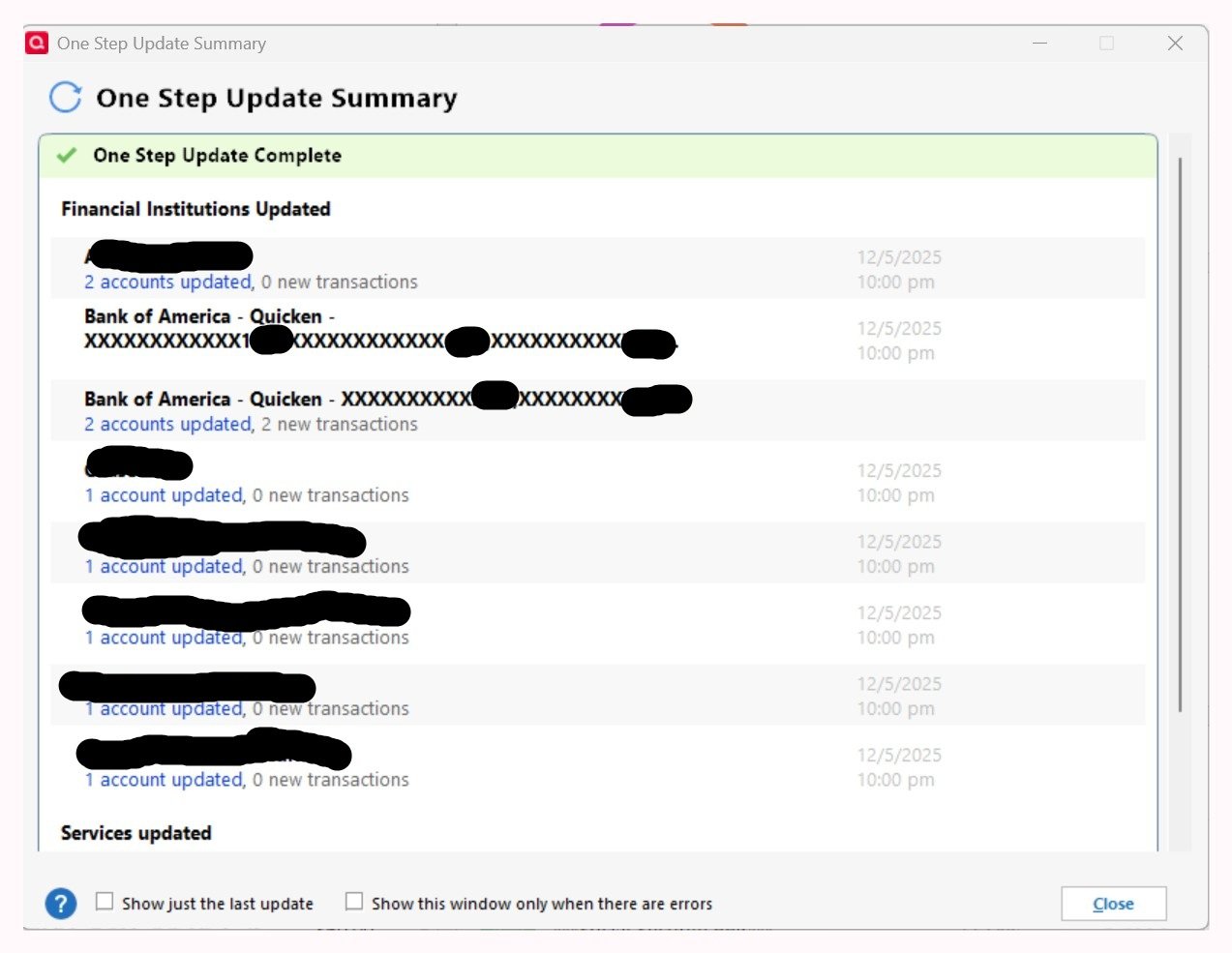
The OSU Summary for Bank of America - Quicken doesn't look right today.
Bank of America - Quicken connection information is now displayed twice.
The first one is for all my accounts (there are 9, CD, Checking & Credit) at the bank excluding the two savings accounts. Notice it does not display the link for the information regarding how many accounts were updated however there were new multiple transactions posted. If I hovered the mouse pointer over that area a grayed out popup box appeared indicating how 9 accounts were updated.
The second one is for the two savings accounts and it displays the link for the accounts updated. The link works as expected displaying information about each account updated.
It appears connection configuration is not identical for all my accounts at Bank of America. and that's cause for concern. All account types should be processed in the same manner as a matter of good practice.
On a positive note the transfers into the savings accounts I initiated yesterday were properly downloaded today.
You Don't Have to Have a Point, To Have A Point
0 -
My suggestion would be to try again …
But this time deactivate ALL accounts (13, if I counted that correctly) and then reactivate them (using Tools / Add Account), making sure to correctly LINK them to their existing Quicken account registers.
I have had similar experience trying to add an account to an existing group of accounts. I ended up with the same two groups of accounts as you are showing in the image above.
Only deactivating them all and re-adding them resolved the issue.
It appears to me that the Add Account process does not merge new accounts into a group of existing, already activated accounts.1 -
I have run into this with Chase and my advise would be to leave it alone unless something comes up where you need to redo one or more accounts. It doesn’t seem to function any different. It is just more visually appealing.
But for sure if you are redoing it, do them all at the same time.
1 -
OK, thanks for your recommendation.
If I understand properly I would deactivate all Financial Institutions then close down Quicken.
Upon restarting Quicken I add all the Bank of America accounts.
At that point I should know if the connection to Bank of America for all my accounts is in one group. Then I add the other Financial Institutions.
You Don't Have to Have a Point, To Have A Point
0 -
If you want to do it, you would deactivate the accounts from BofA, not all of your financial institutions.
1 -
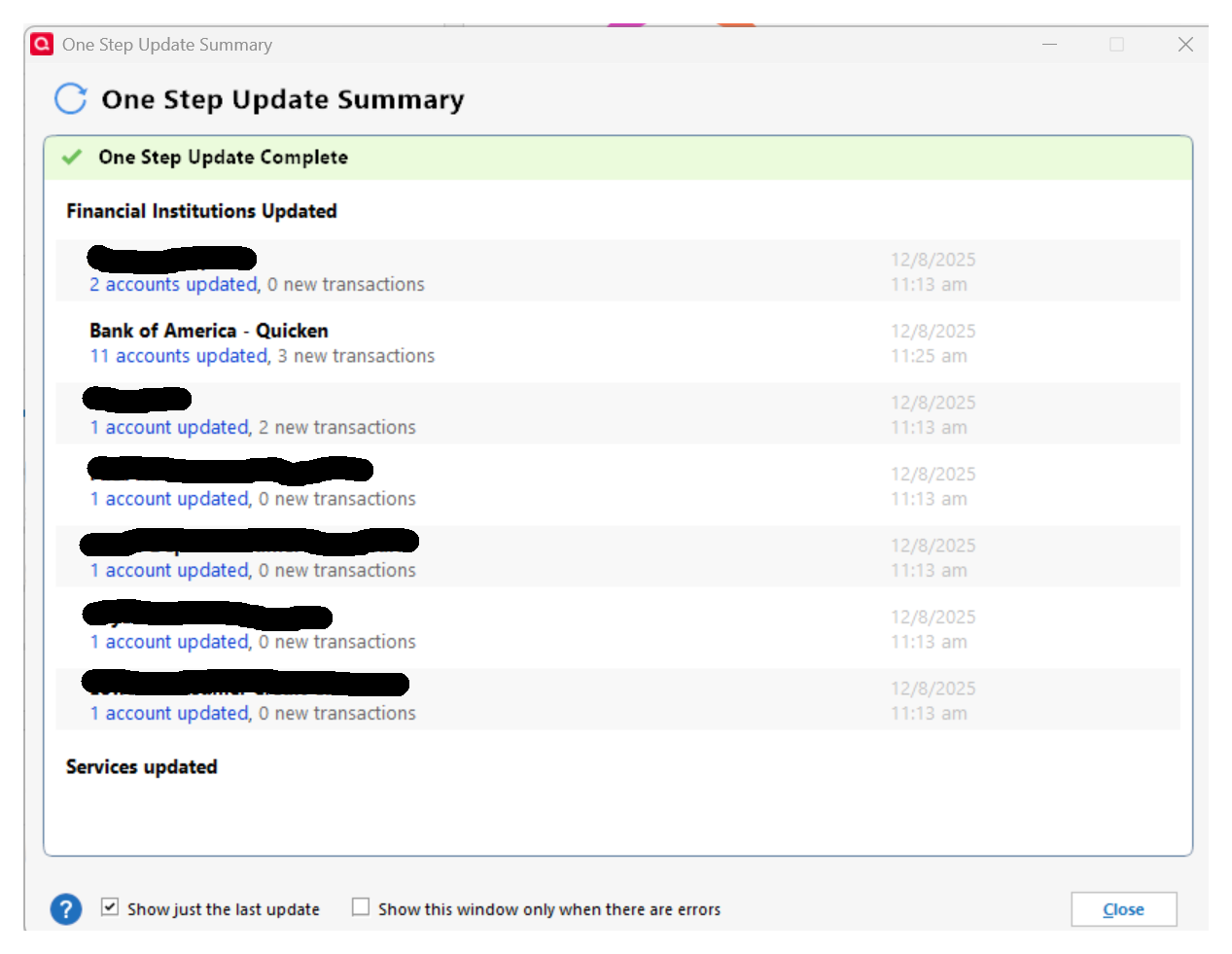
Thank you all for helping. It worked!
This morning I added all 11 of my Bank of America accounts from the Account List on the Tools menu. They are now in one connection group. 😊
You Don't Have to Have a Point, To Have A Point
1 -
@Pedro504 Great to hear that @UKR's suggestion worked, and everything is now properly grouped under the Bank of America – Quicken connection! 😊
If anything unexpected comes up, feel free to reach back out.
Thank you!
-Quicken Anja
Make sure to sign up for the email digest to see a round up of your top posts.1


