Anybody experience Quicken changing Federal/State Estimate Payment Dates?

I have been doing year end planning, and when changing my 4th 1/4 Estimated Payment amounts for end of the year changes, I found that all of my previously entered and correct planned Estimate payment dates had been changed in Quicken Classic Premier R 65.17 build 27.1.65.17.
My January Fed 4th 1/4 2025 was changed from 1/15/26 to 5/15/26….similarly for the State (MN) dates. Also changed were the 2nd Fed and State payment dates from 6/15/2026 to sometime in October, and the 3rd Estimate dates reminder disappeared.
This is very bothersome, and makes me concerned about the reliability of my payment reminders.
I would appreciate anybody's help/or similar experience. I have re-entered the reminders for the correct dates, and hope they will stay there!
Answers
-
Hello @Richard Roberts,
Thank you for sharing your experience. To help troubleshoot, please provide more information. When did you first notice this issue? Do you keep your Quicken file directly on your local hard drive? Is it synced with any cloud services, such as Dropbox, OneDrive, or iCloud? Was there anything that seemed to trigger this behavior? For example, did this happen after a program/computer update?
The dates that you list make is sound like the reminders skipped forward to the next instance. Did the reminders get added into the appropriate register early? Is there any downloaded transaction that they may have incorrectly matched to (same amount or payee, for example)?
I look forward to your reply!
Quicken Kristina
Make sure to sign up for the email digest to see a round up of your top posts.
0 -
Quicken Kristina,
As outlined in my question, I first noticed this issue when doing year end planning for 2025, and I could not find my previously set up reminders for 2025 4th quarter estimates for both Fed and Mn State Estimates…their dates were changed from 1/15 to 5/15 each. The reminders were changed for 2nd quarter Estimates (as noted before) and 3rd quarter estimates were absent.
My reminders for Fed and Mn State Tax Payments were also absent.
I have recently (this past week) gone through and re-set all of the manual reminders for my quarterly estimate payments, and also for the Tax payments for Fed and Mn State, but today, I again find that although my Mn State 4th 1/4 2025 reminder is correctly there for 1/15/26, the Fed 4th 1/4 reminder has again changed date from 1/15/26 this time to later in May, and the recently re-set 1st 1/4 2026 estimates, and Fed and State tax payment reminders are absent completely!
I do have a current copy of the data file on my desktop (HP Z2), and sync with OneDrive as well. I cannot associate this problem with any update specifically as I only noted it when I began my year end planning.
I don't see the reminders inappropriately added to the appropriate registers, and there are no downloaded transactions incorrectly matched.
This is quite frustrating, and I don't understand why it is happening. I look forward to your help resolving this significant problem.
Richard Roberts
0 -
Quicken Christina,
I am still waiting for follow up from you….please respond?
Richard Roberts
0 -
Thank you for your replies,
How far in advance are the reminders set to remind you (30 days, 7 days, 3 days, etc.)? Are you manually entering them into your register prior to the due date? If you are, how far before they due date are they being entered? Are you editing the reminder prior to entering it into your register? Are the reminders vanishing immediately after running One Step Update?
To troubleshoot for possible file-specific issues, I suggest that you start by validating your data file. Please save a backup file prior to performing these steps.
Validate:
- File
- Validate and Repair File...
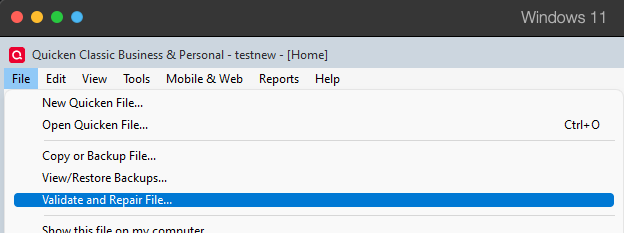
- Validate File
- Click OK
- Close the Data Log
- Close Quicken (leave it closed for at least 5 secs)
- Reopen Quicken and see if the issue persists.
Please let me know how it goes!
Quicken Kristina
Make sure to sign up for the email digest to see a round up of your top posts.
0 -
Quicken Kristina,
I validated my data file, with minimal errors noted/corrected.
To answer your questions: I have reminders set for 3 days prior. I enter the payments about 2 weeks ahead of the due date to allow for payments to get to the Fed/State in time. I have edited the estimated payments at the early part of the year to reflect the expected Estimated payments for each quarter for Fed and State, after I have completed my taxes, and determined the Estimated payments needed for the new year. I can't tell when the reminders have disappeared, as I only noticed them gone when I was looking for my 4th 1/4 estimates (paid in January 2026 for this past year) and they and others were missing or misplaced by date.
I have again entered my April 15th reminders for both Fed and State 1st 1/4 Estimates as well as for Fed and State tax payments. I will see if they remain after closing out the program, and restarting in the next day or so. The reminders I re-entered for 4th 1/4 Estimates for 2025 (January 15) are holding in place for now.
1 -
Thank you for your reply,
Please let me know if those reminders remain or if they vanish/get skipped again.
Thank you!
Quicken Kristina
Make sure to sign up for the email digest to see a round up of your top posts.
0 -
Quicken Kristina,
Thank you. I will monitor the reminders I have placed, and let you know if I have further problems.
I do have another unanswered problem that I put in the discussion back on June 28, 2025. It relates to what shows up in my Budget Reports page as I look at my budgeted and actual expenditures. Quicken inserts a category that I have not placed in my budget, and which assigns values to this category that makes using my budget for planning really impractical. Another Quicken user tried to help me with this, but our interventions, including creating a totally new budget did not help. I would appreciate it if you would review those notes and suggestions, and let me know how I can get rid of this problem category and values that mess up my budget report! Here is the date and title of the string:
From June 28, 2025:
Budget Category: <b>Everything Else<b> showing up in Budget, unselectedThanks in advance for your help!
Richard Roberts
0 -
Thank you for your reply,
There is a known issue with Everything Else showing up in Budget reports, unselected, and there's no option to remove it. If that's the problem you're encountering, then I recommend that you bookmark the Community Alert linked below to track the status of the issue and know when it is resolved:
If you're encountering a different issue, I'd recommend starting a new discussion with more details, so we can better help troubleshoot the issue.
Thank you!
Quicken Kristina
Make sure to sign up for the email digest to see a round up of your top posts.
0 -
Quicken Kristina,
It is good to know that I am not the only one having this problem. I looked at the post by Quicken Anja, but the last entry for that was March 13, 2025 which is now 9 months ago, and I am still having problems with this issue. It makes it difficult, if not impossible, to use the Budget Report document to monitor the status of the budget, or of actually planning for the year ahead and actual expenses/income. Quicken Anja indicates that attention was being paid to resolving the issue, but after 9 months, I would expect a resolution/clarification. Can you give me the resolution status, and how I can get around this very frustrating issue?
Thanks,
Richard Roberts
0 -
Thank you for your reply,
The issue is still open and ongoing. Here is a work around from an earlier discussion about this issue:
I hope this helps!
Quicken Kristina
Make sure to sign up for the email digest to see a round up of your top posts.
0
