fidelity woes - no downloaded transactions for one of my Fidelity accounts

Like many here, I've been following the many threads of Fidelity issues. I seem to have an issue that's not covered by the updates and tracker threads and was wondering if anybody else was seeing this. I have 5-6 separate accounts in Fidelity (IRAs, brokerage, money market, etc.) and they all got cut over early on in the process (early August?) and that's when my problems began. After deleting and re-adding, everything seems ok, with the exception of my primary brokerage account, which refuses to download transactions. All my other Fidelity accounts seem to be downloading transactions just fine, but the brokerage account is not. It hasn't downloaded anything since the connection method changed back in August. One clue (perhaps?) is that whenever I delete and re-add the brokerage account, it reverts to simple mode and I have to manually change it to track all the transactions. Is it possible that this is the source of the problem? How does Quicken decide to default the account to simple mode, and is there a way to set this prior to re-connection?
Comments
-
Hello @kyoung2112,
Thank you for reaching out! The brokerage account defaulting to Simple Investing may be a symptom of another problem if you already have your Quicken Preferences set to not default to Simple Investing. To check this, navigate to Edit>Preferences>Investments. If Default to Simple Investing for new accounts is unselected, then it's already set up not to default to Simple.
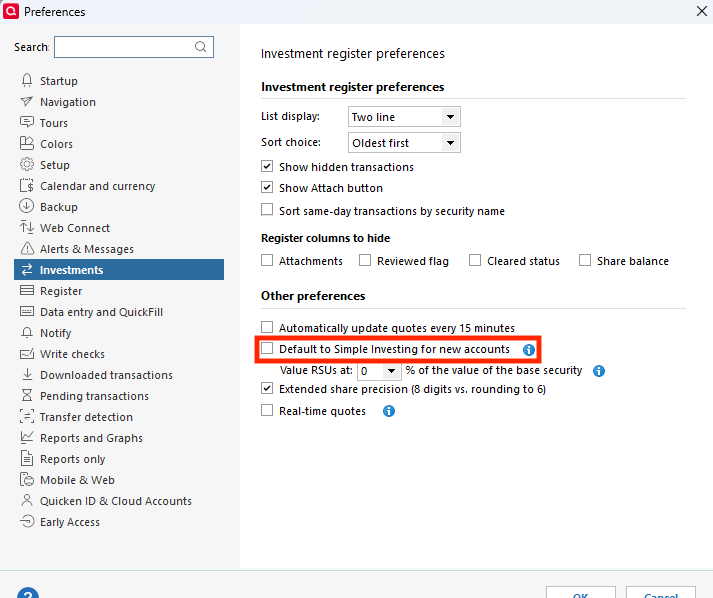
If it is selected, then unselect that box, click OK, and test to see if that stops the account from defaulting to Simple Investing.
To troubleshoot the issue with the account not downloading transactions, please start by following these steps from our article on missing transactions/transactions not downloading:
Be sure to follow these steps in order:
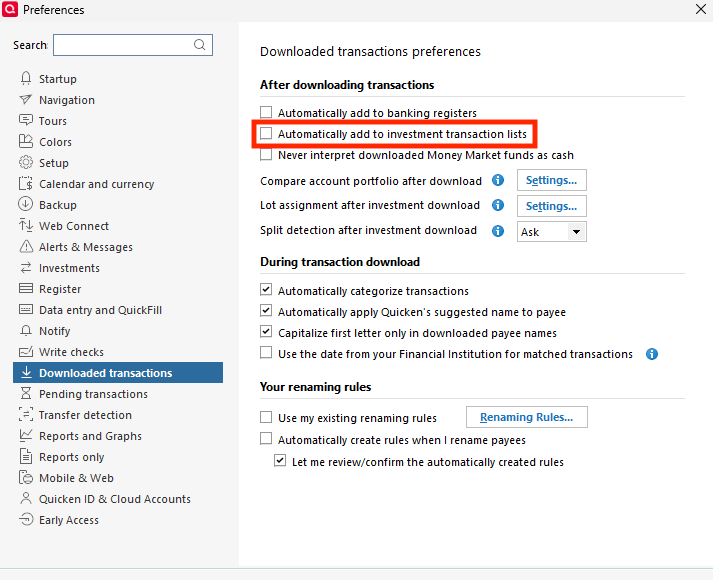
1. Go to Edit > Preferences > Downloaded Transactions. The option Automatically add to investment transaction lists needs to be unchecked.
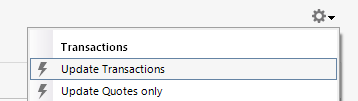
2. Refresh your online account information by clicking the Actions Gear Icon on the upper right of the register, and select Update Transactions. Follow the on-screen instructions to complete the update.
3. Confirm that the Sort Order in your account is by Date; just click the top of the Date column in your account register. It's possible the transactions are in your register, but not where you thought they'd be.

4. Try refreshing your login session: To do this, go to Help > Refresh Sign in. After completing the log-in process, trying running a One Step Update again.
5. Go to Tools > Account List and check Show Hidden Accounts at the bottom left. Confirm the missing transactions haven't been added to a hidden account by clicking on the name of any account that appears with a check mark in the Hidden column.

Please let me know how it goes!
Quicken Kristina
Make sure to sign up for the email digest to see a round up of your top posts.
0 -
My Fidelity brokerages and credit cards are suddenly not downloading either.
The connection does not recognize "Fidelity Investments." This is hardly the first time this has happened.
No, I do not intend to spend more hours of my own time trying to trouble shoot [Removed - Disruptive]
-1 -
As an update, I did have "Edit>Preferences>Investments" set to "Default to Simple Investing for new accounts". I never set this - somehow it got set and I'm not sure how. But anyways, I unchecked this box, de-activated and re-activated my brokerage account (not my other Fidelity accounts) and now the transaction downloads seem to be working for this account. Fingers crossed this continues to be stable.
2 -
Same! Been two weeks…
0 -
Thank you for the follow up @kyoung2112,
I'm glad to hear that transactions are downloading into the account.
If you need further assistance, please feel free to reach out!
Quicken Kristina
Make sure to sign up for the email digest to see a round up of your top posts.
0 -
None of the steps from Quicken Kristina work. I have not been able to download Fidelity transactions since 10/1. I have deactivated and reactived account along with all the other steps she recommends. Other sites allow to download a file and then directly import it. Why is that not possible?
1 -
What is the update?
How soon can we expect this to resolved?
0 -
I just got into this issue - trying to update my acccounts (deactivate - reauthorize). Got through the login… currently "updating your accounts" spinning circle. Took quite awhile, downloaded, but it seems like it didn't get all the history. Stopped with August transactions in HSA account even after another download attempt.
My 401k account updated to the most recent transactions showing on the website.
Correction - All transactions were downloaded as "unidentified security" since 9/15/2025 except for 1 vanguard fund and the money market. Prior to that all details were downloaded and entered.
0 -
Thank you for your replies,
If you are missing transactions, or transactions are not downloading, and the troubleshooting I posted earlier does not correct the issue, then please contact Quicken Support directly for further assistance, as they have access to tools that we can't access on the Community and they're able to escalate the issue as needed. The Quicken Support phone number can be found through this link here. Phone support is available from 5:00 am PT to 5:00 pm PT, Monday through Friday.
Hello @sprinres,
The issue with no transactions for Fidelity HSA accounts is a known issue. For more information, please see this announcement:
The issue with Fidelity 401k transactions coming in as "unidentified security" is also a known issue. Per our Community Alert, please follow these steps to correct the issue:
- Edit each affected transaction
- Open the register for the 401(k) account.
- For every transaction tied to Unidentified Security, edit the Security field to the actual security name shown on the bank website.
- Remove the placeholder
- After all affected transactions are corrected, delete the “Unidentified Security” from your Security List.
- Re-match holdings
- Go to Tools > Online Center and choose Fidelity Investments.
- Select the 401(k) account, then open the Holdings tab.
- Click Compare to Portfolio.
- When prompted, proceed with Compare to Portfolio and match to the correct security.
Ensure every transaction previously pointing to “Unidentified Security” is corrected before deleting it. If the correct security name isn’t obvious, then confirm it from your Fidelity website holdings page.
If the steps above do not resolve the issue, then we ask that you please contact Quicken Support directly for further assistance and escalation if needed.
Thank you!
Quicken Kristina
Make sure to sign up for the email digest to see a round up of your top posts.
0 - Edit each affected transaction
-
I am also having issues with my Fidelity HSA account activity & transactions not downloading to my HSA accounts in Quicken. I have read Kristina's post from 12/9/2025 as well as the 10/13/2025 communication re: this issue and ongoing efforts by Quicken to fix…just wanted to get this post out to refresh dialogue in hopes Quicken will address shortly.
0 -
I have the same issue as mblake5. My Fidelity HSA account transactions have not downloaded in several months.
0 -
Thank you for letting us know you're impacted by the issue with Fidelity HSA accounts not able to download transactions into Quicken. If you haven't already done so, I recommend that you bookmark the announcement about the issue (linked below), since any updates, once available, will be posted there.
Thank you!
Quicken Kristina
Make sure to sign up for the email digest to see a round up of your top posts.
0 -
[Removed - Disruptive]
0 -
I am also having issues with Fidelity. I'll wait patiently while all y'all figure this mess out. The root issue I'm guessing is the transition from the older Direct Connection (less secure but more reliable) to newer Express Web Connect+ (more secure but ah, less reliable.)
For all customers like me, sure, try deactivating all your Fidelity accounts and reactivating them (once) which might start recent downloads but not backfill.
I'll manually backfill my transactions by download trusty QIF files in order to close my 2025 books and hope/expect that future downloads work as expected. For my HSA, which doesn't support QIF I manually backfilled transactions using Quickens copy/paste transaction feature as my contributions where a fixed amount each paycheck.0 -
I had to call Quicken support and deactivate and reset all of my Fidelity accounts. Now one account (HSA) still has not updated since 10/31/25. Reset it several times now, I cannot spend hours troubleshooting a Quicken problem. You need to escalate this until resolved!
0 -
I have no Fidelity HSA accounts but do have various investment accounts. They are all accurate through the date of the forced migration. About 3 months ago. I also have a few new accounts setup in the interim that have never been downloaded the old way.
Now I just have to take the plunge. After backing up do I:
- Not deactivate my old accounts, try to download and let it setup my new accounts. And then for existing accounts choose how to handle default MM fund and hopefully it omly downloads the last 3 months.
- Deactivate my existing Fidelity accounts and re-setup existing and and new accounts never previously downloaded with old method.
- Something else?
Thanks!
BJB
0 -
Hello @GlennK,
Thank you for reaching out. The issue with HSA accounts is a known issue. If you haven't already done so, I recommend reviewing and bookmarking this announcement:
Hello @BJB,
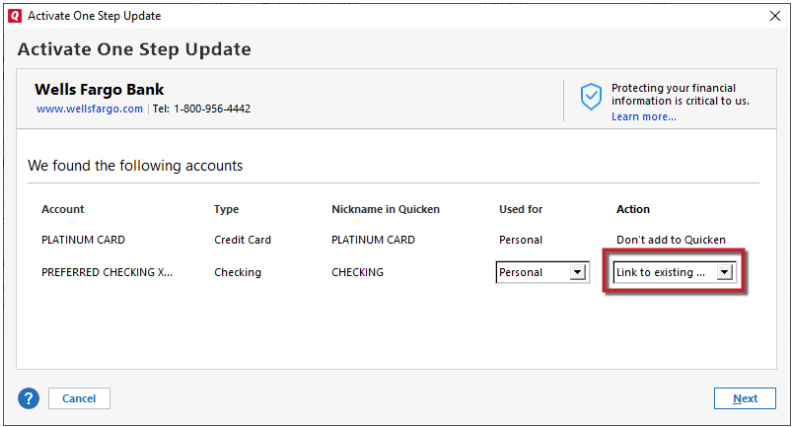
Thank you for reaching out with this question! To clarify, are your old accounts still showing connected via Direct Connect, or have you already moved them to Express Web Connect+? If they are connected via Direct Connect, then you would likely want to go with option 2: deactivate and connect/reconnect the original accounts plus the new ones which were never connected via the old connection. Make sure to carefully link the existing accounts to the correct nickname in Quicken.
I hope this helps!
Quicken Kristina
Make sure to sign up for the email digest to see a round up of your top posts.
0
