OnePay accounts

I can log into my OnePay accounts from this link: https://web.onepay.com/
There is no option to download transactions, this is a OnePay problem. However, the Quicken problem is you can't add the accounts into Quicken to download transactions automatically. When will a fix happen so that I can use OnePay in Quicken
Comments
-
Hello @Rick @ Kansas,
Thank you for sharing your experience.
You are not alone in what you are seeing. Many others have reported this issue as well, and it has been escalated internally.
If you would like to contribute to the investigation, you can do so by going to Help>Report a problem>Send to Quicken. This will allow you to send over your log files.
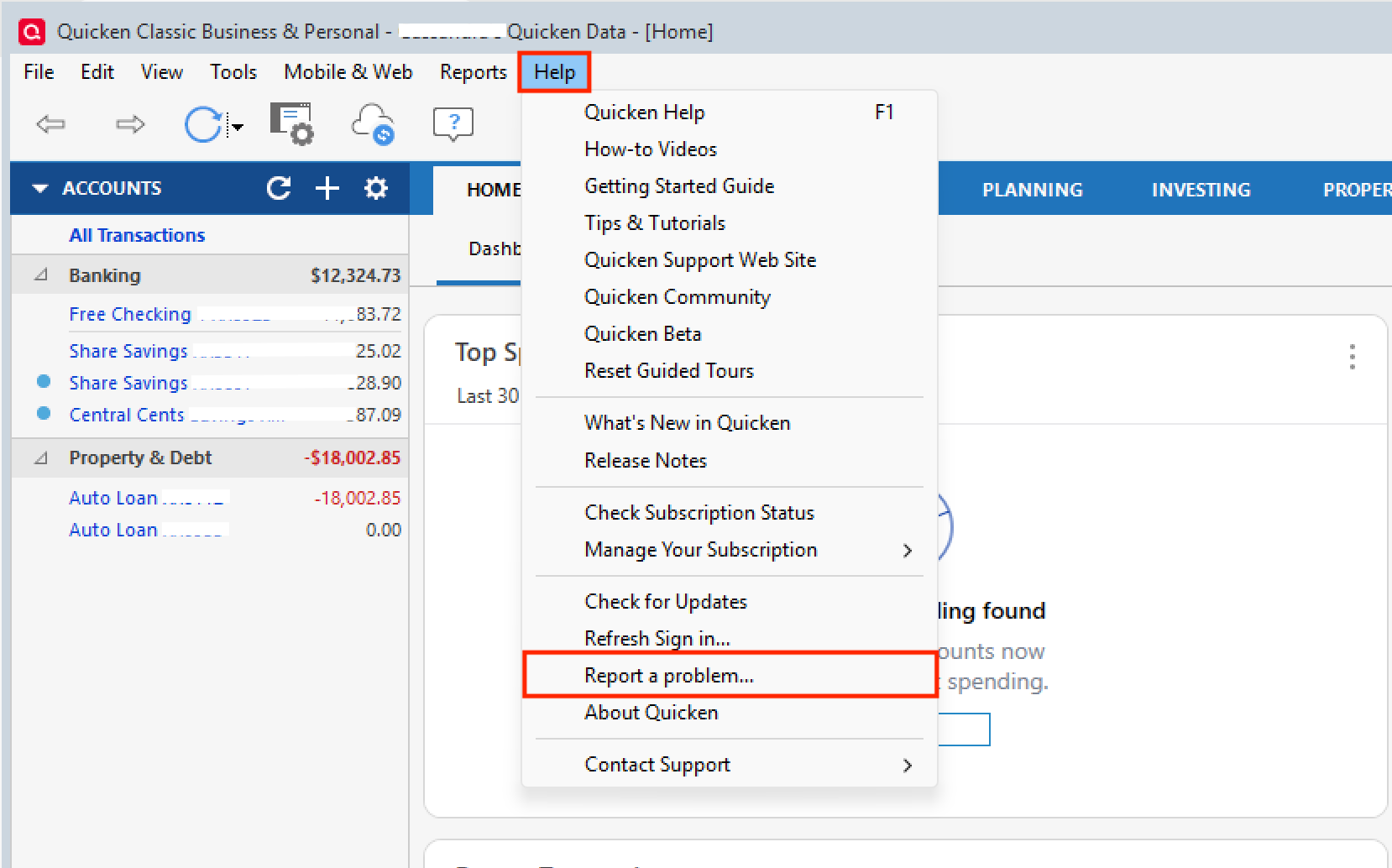
If you do send them over, let me know so I can add them to the ticket.
Thank you.
[CTP-15053]
Quicken Alyssa
Make sure to sign up for the email digest to see a round up of your top posts.
1 -
I have the same problem
1 -
I just did a scan of FIDIR.TXT, which is the Quicken file that records all of the Financial Institutions that have signed the contract with Q/Intuit to enable Q users to download transactions.
OnePay wasn't found … meaning they haven't signed the contract.
Q can't fix this, because there's nothing to fix. Downloads from OnePay simply won't be available until OnePay signs the contract and makes the necessary system changes on their end.
SO, those complaining about this need to bug OnePay to sign the contract.
Q user since February, 1990. DOS Version 4
Now running Quicken Windows Subscription, Business & Personal
Retired "Certified Information Systems Auditor" & Bank Audit VP0 -
Hello All,
Thank you for adding to this discussion.
While @NotACPA is correct that there is not a OnePay instance in the financial institution list, there is currently an open escalation ticket for this issue.
If you would like to contribute to the investigation, you can submit log files, as described above. If you do send them, let us know so we can add you to the ticket.
Thanks again!
Quicken Alyssa
Make sure to sign up for the email digest to see a round up of your top posts.
1 -
Watching this thread and about to contact OnePay to add my vote for them to get onboard!
1 -
Please add me to the list of users who can't install it in Quicken
1 -
As large as Walmart is, I'm sure this will get fixed soon. I submitted a problem report to quicken as requested by support above.
Interestingly, I ended up getting two onepay cards and one syncs and the other does not. I added my wife's card to an existing synchrony account that already supported quicken downloads for the card that was linked to the account. Once I linked the onepay card to that synchrony account I was able to add it to quicken.
For my card, on the other hand, I didn't have any cards issued by synchrony already and the onepay card is the sole card linked to the account. It wont sync after trying to create a new account with several of the synchrony based credit card types in quicken. I'll probably just cancel my card if this doesn't get resolved.
0 -
Hello All,
Thank you for continuing to update the discussion.
Can I have any of you who have not been able to connect your OnePay cards try again? Do let us know your results.
Thank you!
Quicken Alyssa
Make sure to sign up for the email digest to see a round up of your top posts.
0 -
Add me to the list
1 -
Hello @Herkguy,
Thank you for adding to this discussion!
I see you sent over your log files as well, so I went ahead and added those to the ticket.
Thanks again!
Quicken Alyssa
Make sure to sign up for the email digest to see a round up of your top posts.
0 -
Add me to the list of unables.
0 -
Thank you for adding to this discussion!
If you would like to contribute to the investigation, you can do so by going to Help>Report a problem>Send to Quicken. This will allow you to send over your log files.
If you do send them over, let me know so I can add them to the ticket.
Thank you.
[CTP-15053]
Quicken Alyssa
Make sure to sign up for the email digest to see a round up of your top posts.
0 -
Any update for OnePay imports yet?
0 -
Thank you for following up.
Our team has determined that the problem is on the provider's end and is collaborating with the provider to resolve it. However, they do not have an ETA for when it will be resolved. In the meantime, you can try adding your account(s) periodically.
We apologize for the inconvenience.
Quicken Alyssa
Make sure to sign up for the email digest to see a round up of your top posts.
0