How to find corrupted split transactions?

I have MANY times encountered a register that suddenly has the wrong balance… because split transactions in the register have magically been changed, with an additional line of an uncategorized amount, that changes the transaction total. These transactions are old reconciled transactions, yet a Quicken leprechaun is somehow able to change them.
The uncategorized amount cannot be found by doing a transaction search for uncategorized transactions. They do not show up in reports! So, I have to sort the register by category, then painstakingly look at every split transaction's details to find the bad apples and remove those added lines. I try to avoid split entries because of this, but the old transactions are there to stay… and get corrupted again… I don't know what triggers the corruptions, and I don't know how to easily find them. I've asked Customer Service… no help.
Answers
-
Hello @berryhill,
Thank you for reaching out! There are a couple earlier posts in the Community which may help:
Since not all of these transactions are recent, if the dashboard widget can't help you identify the problem transactions, try going to the affected register, clicking the gear icon near the upper right, then select More reports>Register report, as recommended in this discussion:

Once you run the report, you can customize it to show only not categorized entries.
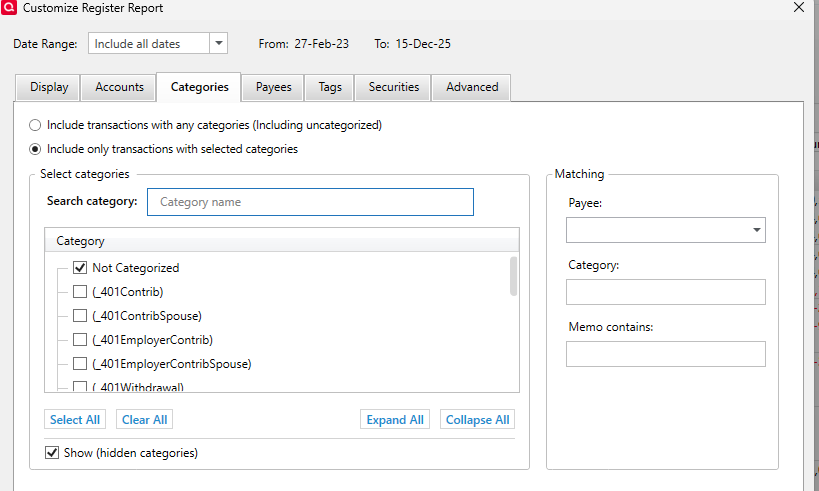
Once that is done, you will have a report which shows the transaction detail, including split transaction information.

I hope this helps!
Quicken Kristina
Make sure to sign up for the email digest to see a round up of your top posts.
0
