MidFirst Bank cannot download, cannot reconnect
Comments
-
Was this in Quicken or MidFirst Web Portal. Mac or PC. On my mac in Quicken there is no "new advanced way to connect" message.
1 -
And why can I no longer import downloaded information from the bank. Uo to a week ago I was downloading and importing manually and last week this access stopped working.
1 -
Hello All,
Thank you to everyone who continues to share updates and experiences in this thread.
We understand how frustrating this ongoing MidFirst Bank connectivity issue has been—especially when accounts fail to update day after day. I want to confirm that our escalation ticket is still open, and our teams are actively working with both our service provider and MidFirst Bank to resolve the issue. At this time, we do not have an ETA to share.
Thank you as well to those who have reported recent success reconnecting,—and @bumgarb for sharing what worked for you:
For all who are still experiencing this issue and are unable to resolve it at this time, please continue to refer to the Community Alert for the most up-to-date information and any official updates as they become available.
We truly appreciate your patience and apologize for the continued inconvenience.
-Quicken Anja
Make sure to sign up for the email digest to see a round up of your top posts.0 -
Sorry for the confusion, I will try to help you if I can, but I am on Windows 11, not Mac.
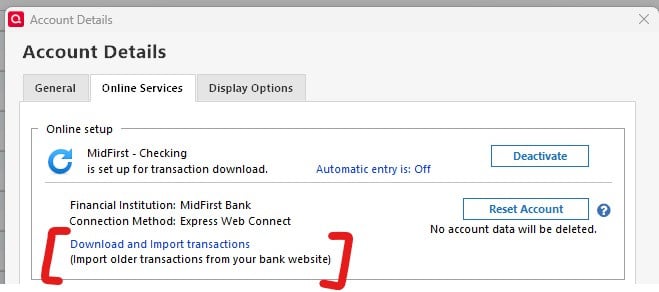
The "advanced connection" message I mentioned appeared in Quicken when I selected my MidFirst account, edited account details, and then clicked the Online Services Tab.
The message appeared approximately where it now says "Download and Import transactions." To be clear, it did not say "Download…" before being able to reconnect; it instead said something about a new "advanced connection."
Here is an image of the area I saw "advanced connection" (again, it did not say "Download…" there until I was reconnected). (more below)
I do not know if that is different on Mac. As a speculation, it could also be that MidFirst is rolling it out slowly to make sure it doesn't cause issues as it did back in June/July.
I hope something there is helpful.
0 -
Wanted to leave a note here also. I started experiencing this issue months ago and stopped downloading transactions. Today I tried again after having been converted over in Midfirst's systems some time ago. Today it found all my accounts and downloaded transactions. I also had spoken to MidFirst and was informed similar stories to above. Perhaps they are nearing the end. Today I had success.
1 -
Hello @MrJamesT,
We appreciate you taking the time to share this update. Glad to hear that your accounts were able to connect and download successfully again.
Thank you!
-Quicken Anja
Make sure to sign up for the email digest to see a round up of your top posts.0 -
Question for QUicken support, Is there a cache in the Quicken Classic Deluxe 8.3.3 on a Mac Mini running 15.6.1. The issue is supposed to be resolved for everyone, this is not a rollout issue anymore. I am confident it is a MidFirst ineptitude issue, but I have solved many problems clearing the cache.
0 -
Hi guys - just wanted to leave a note here to say that my issue with my Windows 11 Quicken Classic download has been resolved - after almost 4 months. When the transactions did finally come through some of them didn't match successfully to the ones I'd entered manually - so it took me some time to untangle all of that - but the download now seems to be working for me as it used to. I hope that everyone else's issues also get resolved shortly. Thanks and good luck.
0 -
@keelyh Thanks for the update! Glad to hear it is resolved for you now.
-Quicken Anja
Make sure to sign up for the email digest to see a round up of your top posts.0

