MidFirst Bank cannot download, cannot reconnect

bumgarb
bumgarb Quicken Windows Subscription Member ✭✭

This issue seemed to start with MidFirst updating their website / webapp. Trying to subsequently download transactions from MidFirst, Quicken started reporting error CC-507 - that there was an error with an account type mismatch or something similar. I have two existing accounts at MidFirst that have been in Quicken for years. I was just trying to download transactions. So I deactivated the online link and then attempted to reactivate the account. Now, get an error message that Quicken cannot communicate with MidFirst's servers.

Again, this seems like MidFirst's new app or security feature changes are the cause but I'd imagine the fix is on the Quicken side.

Any help is appreciated

«1

Comments

  • Quicken Anja
    Quicken Anja Moderator mod

    Hello @bumgarb,

    Thanks for reaching out and telling us about this issue!

    I checked your account, and it looks like you're receiving an internal FDP-107 (INCORRECT_FI) error, which appears in Quicken as a CC-507 error.

    We recommend reviewing the steps in this support article for CC-507 errors.

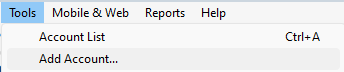
    As noted at the bottom of the article, you’ll need to start the Add Account process again and make sure to select the correct instance of your bank (if you're unsure, try the same one you previously used). Please follow these steps:

    1. Deactivate all accounts set up with this financial institution following the deactivation instructions found in this support article.
    2. Navigate to Tools > Add Account image.png
    3. Search and select MidFirst Bank, and click Continue
    4. Follow the prompts to sign in using your MidFirst credentials
    5. If the connection is successful, be sure to link to your existing accounts in Quicken rather than creating new ones

    Thank you!

    -Quicken Anja
    Make sure to sign up for the email digest to see a round up of your top posts.

  • sultar7
    sultar7 Member ✭✭

    I followed the above and still it will not connect for me.

  • Quicken Anja
    Quicken Anja Moderator mod

    Thanks for giving that a try and following the steps.

    At this point, the next best step is to contact Quicken Support directly so an agent can collect your log files and escalate the issue if needed.

    Be sure to let them know you’ve already followed the CC-507 troubleshooting steps. They'll be able to dig deeper and get this moving forward.

    Thank you!

    -Quicken Anja
    Make sure to sign up for the email digest to see a round up of your top posts.

  • davidm69
    davidm69 Quicken Windows Subscription Member ✭✭

    I am experiencing a similar issue with Midfirst Bank connection.

    Quicken states: "Sorry we encountered an error (it's not your fault)".

  • Quicken Anja
    Quicken Anja Moderator mod

    Hello @davidm69,

    Thanks for taking the time to add to this discussion and tell us about your issue.

    I've checked internally and it appears you are encountering the same FDP-107(CC-507) error.

    Please refer to the support article I provided in my earlier response to bumgarb for troubleshooting steps.

    If following those steps does not resolve the issue, you will also need to contact Quicken Support directly so they can investigate further and collect your log files.

    Thank you!

    -Quicken Anja
    Make sure to sign up for the email digest to see a round up of your top posts.

  • bumgarb
    bumgarb Quicken Windows Subscription Member ✭✭

    Hi Anja,

    Someone else replied to my original post. However, I too have tried your suggestion to try a complete redo of the Add Account process, and that attempt also failed.

    MidFirst recently updated their web app, mobile app, and added more security, so I am surprised more people are not here complaining about the issues.

    I will try the Help > Report a problem process and then call Quicken Support.

    Thank you for your response,

    Brad

  • mjrrobins
    mjrrobins Quicken Windows Subscription Member

    I am experiencing a similar issue with Midfirst Bank connection.

    Quicken states: "Sorry we encountered an error (it's not your fault)".

    Ever since Midfirst updated their online banking. And not long after Quicken updated thie online processing.

  • dcmmngs
    dcmmngs Quicken Windows Other Member

    Same issue here. Called Midfirst and they had no clue. Definitely related to the switch over to the new app. Would love to get an update.

  • Quicken Anja
    Quicken Anja Moderator mod
    edited June 16

    Hello All,

    Thank you for taking the time to report this issue!

    We will be forwarding this issue to the proper channels to have this further investigated. However, we request that you please navigate to Help > Report a problem within your Quicken program and submit a problem report with log files and screenshots attached in order to contribute to the investigation.

    image.png

    It would also aid the investigation to include a sanitized file when submitting the problem report. A sanitized file is a data file that removes personally identifiable information so you can comfortably share this file with the Quicken team.

    While you will not receive a response through this submission, these reports will help our teams in further investigating the issue. The more problem reports we receive, the better.

    We apologize for any inconvenience in the meantime! Thank you.

    (CTP-13495)

    -Quicken Anja
    Make sure to sign up for the email digest to see a round up of your top posts.

  • sultar7
    sultar7 Member ✭✭

    Anyone have any luck connecting.? I still can and haven't heard anything from quicken after sending them my info ect……

  • Quicken Anja
    Quicken Anja Moderator mod

    @sultar7 Thanks for checking in!

    The ticket is still open and actively being worked on, tnough we do not have an ETA on resolution at this time. As noted in the problem report submission window, submissions are used for diagnostics and investigation purposes, so you won’t receive a direct response. That said, I personally opened your problem report and attached your log files to the ticket, so rest assured, it’s been received and included in the investigation.

    Thank you!

    -Quicken Anja
    Make sure to sign up for the email digest to see a round up of your top posts.

  • sjohnson4812
    sjohnson4812 Quicken Windows Subscription Member

    Anja - I am still not connecting to MidFirst bank. I receive a CC-501 Error. This was caused by an the introduction, and user migration to a new MidFirst Bank app.

    When will Quicken have a solution?

  • Dave Hutchison
    Dave Hutchison Member ✭✭✭

    Oh what a mess I have with Midfirst. I have submitted the report with log but posting in case anyone else has this mess. I also have the Barclay won't connect 501 error that have had for months…

    But on Midfirst:

    Get CC-507 error. But somehow shows two entries for same account in Quicken. I think this is when I did from back up a few months ago or when Midfirst changed something. When I manually download, it goes to both "Account names" but Qucken shows it's the same account number. So I don't know if disconnecting one it will also disconnect the new (the prior named MidFirst goes back to 2015 but has an incorrect balance since the balance is wrong. The one that is now correct only by manual download is titled "LIVEFREE CHECKING XX8176. Oddly, there were 2 deposits shown that were actually withdrawls but corrected them manually and now the balance is correct. But when I try and update get the CC-507 code. Confused but will contact support.

  • doodlebailey
    doodlebailey Quicken Windows Subscription Member

    FYI I've had the same issue. I sent an email to MFB and got a response mid June.

    This is their message back to me:

    "Currently at this time, the third party application verification function within the new mobile application is disabled.  Our development team is working to resolve the known issues of that function to re-enable it. In the meantime, you will need to manually download your transactions and then upload them into Quicken." I was just checking this post to see if anyone had any updates. My guess is this is still the current issue. It's not Quicken, Midfirst disabled the function and haven't fixed it.

  • Quicken Anja
    Quicken Anja Moderator mod

    Hello All,

    The ticket for this issue is still open and actively being worked on in coordination with the bank. While we are continuing to collaborate with MidFirst to help bring this to resolution, the root cause lies on the bank's end, and further action on their part is required to move things forward. We do not have an ETA on resolution at this time.

    We apologize for any inconvenience in the meantime! Thank you.

    -Quicken Anja
    Make sure to sign up for the email digest to see a round up of your top posts.

  • Quizzle54
    Quizzle54 I do not have Quicken yet Member
    edited July 26

    Every other online budgeting app [Removed - 3rd party app] has updated it so….is it really the bank’s fault at this point? I like Simplifi but if you continue to be the only app that can’t connect, I’ll have to find a different one.

  • Quicken Kristina
    Quicken Kristina Quicken Windows Subscription Moderator mod

    Hello @Quizzle54,

    Thank you for letting us know you're also seeing this issue. To clarify, this is the Quicken Classic Community. If you are using Quicken Simplifi, I recommend contacting Quicken Simplifi Support for assistance. Please see this article for their contact options:

    I hope this helps!

    Quicken Kristina

    Make sure to sign up for the email digest to see a round up of your top posts.

  • This content has been removed.
  • MJHowell
    MJHowell Quicken Windows Subscription Member

    I am experiencing the same issues. I have tried the fix and reported the error. Does Quicken have an ETA for this fix yet?

  • fireniceaz
    fireniceaz Quicken Windows Other Member

    I have been having this problem as well. For Midfirst being such a great bank this is for sure frustrating. I need this fixed already. Been since April,

  • margarettorossia
    margarettorossia Member ✭✭

    on the first day i saw the new website on my pc (windows 11), the downloads for 3 Midfirst accounts duplicated back for months and years. some charges were put in as credits, and even the CSV download is messed up. for the last 3 weeks I have had to try to reconcile manually; was given advice to manually enter until this problem is fixed. because money moves back and forth amongst 3 accounts, one fix on one account messes up the other account. I have spent HOURS and DAYS trying to manually fix the problems.

    I have many accounts on my quicken software and never have anything remotely happen like this. I've been using Quicken FOR DECADES.

    I'm very disappointed in the new Midfirst website. The staff have been very accomodating with printing me paper statements etc. I suggest they get some high level banking tech support, such as Bank of America has to work toward fixing their website.

    In addition I'm scared that if the problem with downloading is fixed, what will it do to my 3 accounts and the Quicken reconcillation issue….

    Phone support at Quicken is useless. The person I talked to didn't seem to understand the importance of Quicken when using for tax purposes and one can't just reconcile willy nilly to make the online and quicken balances match.

    Thankfully I have backups but I'm at my wits end as to what to do at this point.

  • margarettorossia
    margarettorossia Member ✭✭

    The Midfirst download mixes up the performance savings with the M+Account and to reconcile quicken brings phone transfers from performance savings to the M+ Account going back to 2021. please expedite the fix!!!

  • margarettorossia
    margarettorossia Member ✭✭

    I can connect just fine and have no error messages.

  • Quicken Jasmine
    Quicken Jasmine Quicken Mac Subscription Alumni ✭✭✭✭

    Fantastic! Thank you for coming back to update us.

    Please let us know if the issue returns again!

    -Quicken Jasmine

    Make sure to sign up for the email digest to see a round-up of your top posts.

  • bumgarb
    bumgarb Quicken Windows Subscription Member ✭✭

    @Quicken Jasmine

    I am still NOT able to connect to or download transactions from MidFirst to Quicken. I just spoke to MidFirst, and they have NOT turned the download feature back on. They are still trying to work out the situation. MidFirst support did say that they have ceased migrating accounts over to the new website until the issue is resolved, and that is the only way someone can still download transactions.

    I am not sure what the previous poster was referring to when they didn't have an issue after posting about having issues… but according to MidFirst, no one who migrated to the new website can connect or download.

    Please keep this ticket open so that we have a central place for communication that might keep multiple people informed.

    Thanks!

  • BobInPhoenix
    BobInPhoenix Quicken Windows Other Member

    I have been having the same problem since MidFirst changed its web interface a few months ago. I can download my data directly, but not through Quicken. I called MidFirst today and the service rep was polite but clueless. When I tried to Deactivate my MidFirst account, following the instructions linked above, "Deactivate" was not an option — just "Delete." I have many years of data for this account, I don't want to delete it.

  • Dave Hutchison
    Dave Hutchison Member ✭✭✭

    How do you download data directly? I have hunted and hunted on my account and can not find how to directly download although I think I was able a few months ago. I have no transaction in Quicken since June.

    Also none of my Barclays accounts have worked for a long time and if do manual download makes duplicates and a mess

  • Quicken Kristina
    Quicken Kristina Quicken Windows Subscription Moderator mod

    Hello @BobInPhoenix,

    Thank you for letting us know you're also impacted by this. Unfortunately, the CC-507 error is a known issue. To be notified of any updates, once available, and know when the issue is resolved, I recommend that you bookmark this Community Alert:

    Hello @Dave Hutchison,

    If the financial institution supports it, then you may be able to download a file in the QFX format and import it into your Quicken. You may want to contact MidFirst Bank to find out if it's supported and where to find it.

    If you're looking for help with your Barclays connection also, I'd recommend either posting to a relevant Barclays discussion or starting a new discussion.

    Thank you!

    Quicken Kristina

    Make sure to sign up for the email digest to see a round up of your top posts.

  • SJPusateri
    SJPusateri Quicken Mac Subscription Member ✭✭
    edited September 11

    All Midfirst customers. My connectivity issues with Quicken started in July when Midfirst updated my online access. I have spoken with numerous people, including one involved with the update. The connectivity issue was supposed to be addressed after all clients were moved to the new system at the end of July or beginning of August, obviously the issue is not resolved. All interactions up to September 3rd indicated the issue was being addressed. On September 3rd the support person I spoke with said the Quicken problem was a back burner issue. Now I do not know if this phone support person was correct, but the best way to get Midfirst to take the issue seriously is for everyone who has an issue to keep calling and emailing the bank. Personally I would change banks but I currently have a loan that is discounted due to having multiple accounts with the bank. This problem must be addressed!!!! Just spoke with a Midfirst rep who says the new timeline is the end of September. I still say call and make your displeasure known.

  • bumgarb
    bumgarb Quicken Windows Subscription Member ✭✭

    I spoke to MidFirst support on September 9th. That support person said the phone support personnel were given an ETA of September 30th. I've called 3 times since the issue started in June - this was the first time I got a date for it to be fixed. I agree with the above post. If you have not called, please call and express your disappointment that this is not being handled faster.