Unvested RSUs don't match Grant Lots

I'm having an issue with my employer Stock Option/RSU account where my employer RSUs in the Holdings/Account Overview window do not match the correct remaining unvested quantities by grant date/lot. The combined number of unvested RSU shares (across all grants) is correct, but when I click the plus sign to view by Grant/Lot, the remaining shares for the individual grants are off. This is a manual account with no transaction download.
Quicken appears to be removing RSU shares First In / First Out, rather than tracking them by grant. I am using the RSU Grant / RSU Vest functions, and when I go into the RSU Vesting → Record Vest option, the top right corner drop-down does reference the specific (correct) grant and RSU share amount for that transaction. My Stock Options for the same security are correctly tracking shares by grant.
I receive annual RSU grants in March, which vest 25% annually over a 4-year period. Quicken is reducing the unvested shares entirely from the oldest grant until it reaches zero, and then moves on to removing unvested shares from the 2nd oldest grant. In 2024, when 25% of shares from both 2022 and 2023 grants vested, Quicken removed unvested shares for both 2022 and 2023 from the 2022 grant. This under-states the remaining number of unvested 2022 shares, and over-states the remaining number of 2023 shares. Same thing happened in March 2025.
I've tried specifying lots after Quicken generates the "Removed" transaction, but get an error about the currency not matching the account (my RSUs/security are tracked in Swiss Francs). Quicken created the RSU security and I cannot change the currency for it, so I cannot test trying to specify lots by editing the Remove transaction after the fact.
Thank you Quicken Community.
Comments
-
Hello @CDG01,
Thank you for sharing your experience. You are correct; Quicken does default to first in/first out (FIFO). For more information, see this article: .
That said, you should be able to manually correct it by assigning lots. It sounds like, in this instance, the fact that it's in a foreign currency is blocking your ability to correct the transactions by assigning lots.
I'm not able to replicate the issue in my own Quicken. To check for a possible file issue, I suggest that you try validating your data file. Please save a backup file prior to performing these steps.
Validate:
- File
- Validate and Repair File...
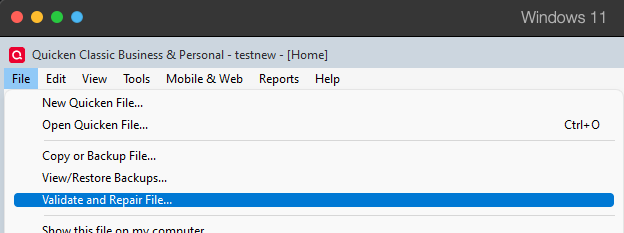
- Validate File
- Click OK
- Close the Data Log
- Close Quicken (leave it closed for at least 5 secs)
- Reopen Quicken and see if the issue persists.
Please let me know how it goes!
Quicken Kristina
Make sure to sign up for the email digest to see a round up of your top posts.
0 -
I validated the file and repaired investing lots. No change in behavior.
My concern is that for a RSU Vesting event, FIFO is never the correct methodology to apply. Vesting should always apply to the individual Grants/lots.
Quicken applies the correct methodology when dealing with Stock Options, as vest/exercise/expire events are specific to the original grant. This same methodology should also apply to RSUs, but Quicken is not treating my RSU vesting the same way it is Stock Options.
The currency bug I'm dealing with, where Quicken has generated a RSU security in a different currency from the underlying stock, might be compounding my specific situation - since I am unable to Specify Lots for the Shares Removed event. (When I do try to specify lots, the error I get from Quicken is "Please select a security whose currency matches the currency of your account"). But nonetheless, the default vesting (and "Shares Removed" event that Quicken creates) should be lot-specific and not FIFO.
0 -
Thank you for your reply,
Since validating did not correct the issue, please try restoring a backup from before the issue started and test to see if the issue is resolved in the newly restored backup.
If you'd like to see the behavior changed for vesting RSU events, I recommend creating an Idea post to request the change. Ideas that get enough votes may be implemented in the future! For information on creating an idea, please see the post linked below:
Thank you!
Quicken Kristina
Make sure to sign up for the email digest to see a round up of your top posts.
0
