"Update financial institution" will not allow me to link to existing accounts

Quicken on Windows 10 has been insisting that I update my Bank of America / Merrill Lynch accounts. So I agree, go through the bank login page and Q shows me all of my accounts at the bank - checking, brokerage, credit card, etc.
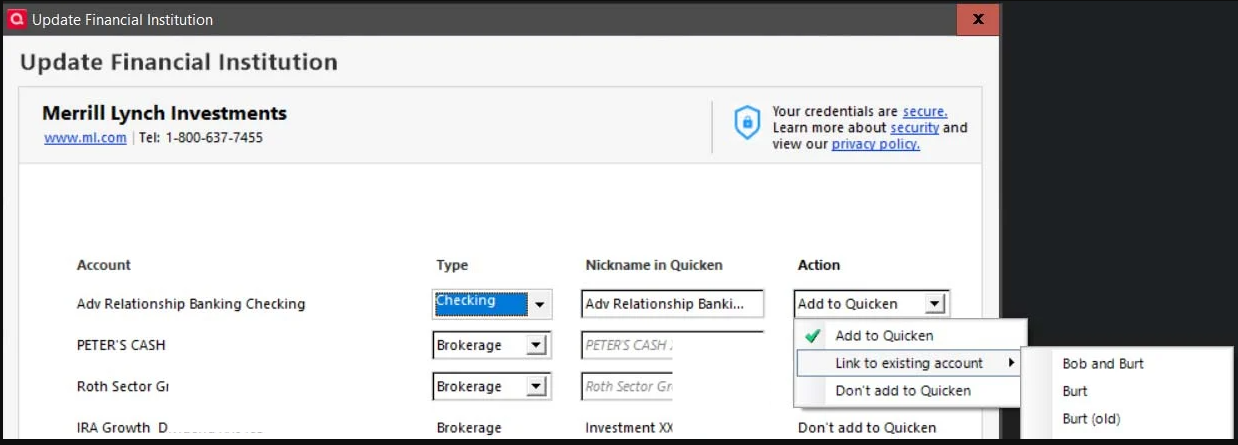
All but one have the dropdown where I can choose add / link / don't add. The one exception being my trad IRA account (the dropdown is disabled and the only option is don't add). All of these accounts have been in Q - and downloading more or less happily - for a very long time, but in this update dialog, whenever I select "link to existing account", the list that is shown (i.e. the accounts that I can link to), the list never contains the account I need to link to and often only shows accounts that have been closed for years.
IOW, the list is always some strange subset of the existing (both active and closed) Q accounts, but the account that should be linked is never in the list. I think I saw this before a long time ago (I've been using Q for decades and have worked through / around an insane number of glitches and bugs over the years), and I think I resolved it by telling Q to add the bank accounts as new and then copy/pasting all of the transactions from the existing / correct accounts inside Q, but now it's happening with every single account, and I just don't have the patience to deal with it the hard way.
In the attached screen shot I'd like to link the main checking account (which has been in Q for years), but the only options for linking are a bunch of old / closed accounts (it shows half a dozen of them, all of them closed, but I cropped out most of them). You can also see that the trad IRA (the one account that cannot be added at all for some unknown reason) ends in [Removed - Partial Account Number] but Quicken shows a nickname of "Investment XX[Removed - Partial Account Number]" for it, which is also an ancient account closed years ago.
Any suggestions? TIA!
[Edit - Readability/Removed partial account numbers]
Best Answer
-
Hello @prcek63,
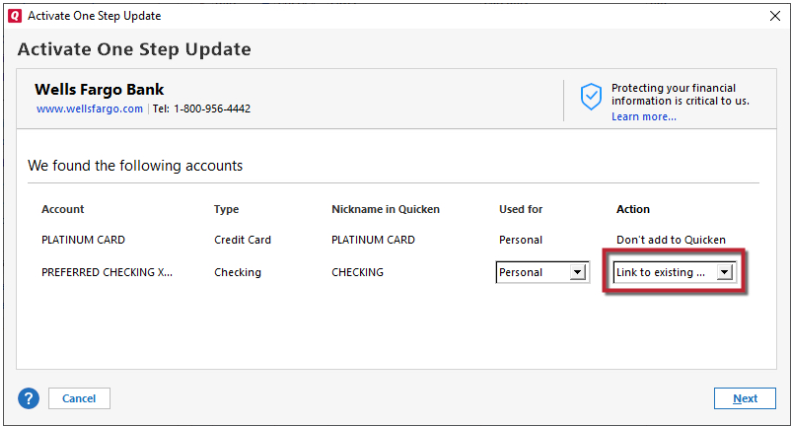
Thank you for reaching out! One of the most common cause of the account you want to link to not showing as an option in the dropdown is if Quicken sees the account as connected. To troubleshoot, please backup your Quicken file, deactivate the problem accounts, then navigate to Tools>Add Account, and follow the prompts. Once you get to the Add/Link screen in Quicken, please make sure to carefully link the accounts to the correct nickname in Quicken.
Please let me know how it goes!
Quicken Kristina
Make sure to sign up for the email digest to see a round up of your top posts.
0

Answers
-
TLDR and no white space to improve readability.
Q user since February, 1990. DOS Version 4
Now running Quicken Windows Subscription, Business & Personal
Retired "Certified Information Systems Auditor" & Bank Audit VP0 -
Hello @prcek63,
Thank you for reaching out! One of the most common cause of the account you want to link to not showing as an option in the dropdown is if Quicken sees the account as connected. To troubleshoot, please backup your Quicken file, deactivate the problem accounts, then navigate to Tools>Add Account, and follow the prompts. Once you get to the Add/Link screen in Quicken, please make sure to carefully link the accounts to the correct nickname in Quicken.
Please let me know how it goes!
Quicken Kristina
Make sure to sign up for the email digest to see a round up of your top posts.
0 -
Thanks for the tip and apologies for taking so long (I dread using Quicken TBH, as almost every time I download transactions things go awry - bizarre transactions appear, automatic credit card payments are duplicated, etc). Anyway, the trick worked! The one added problem was that I could not deactivate one of the investment accounts (to re-add/re-link it), because it supposedly had unresolved transactions - which it didn't, so I used the "disable automatic transaction entry" trick and that allowed me to deactivate the account. Quicken did crash once when I looked up Merrill Lynch in "Add account" and double-clicked it to proceed, but that's pretty normal (Quicken crashes for me quite regularly), and a second attempt to add/link the account went fine. Thanks again!
0 -
Thank you for the follow-up,
I'm glad to hear that the issue is resolved.
It sounds like you encounter quite a few issues with your Quicken. About how long have these problems been happening? It is likely that the frequent crashes may be causing some of these other problems, since crashes can cause file issues. Is there anything in particular that seems to trigger these crashes?
Thank you!
Quicken Kristina
Make sure to sign up for the email digest to see a round up of your top posts.
0
