Bank reconciliation issue - balance is off and reconciled transactions no longer reconciled [Edited]

Comments
-
Hello @Pakchap,
Thank you for reaching out. Data changing or going missing, such as items which were previously reconciled suddenly not being reconciled, makes me suspect you may have a file-specific issue. Do you keep your file directly on your local hard drive? Is the file synced with OneDrive, iCloud, or Dropbox? Was there anything that happened just before this problem started, such as a program/computer update or an unexpected program/computer shutdown?
To check for file problems, I suggest that you try validating your data file. Please save a backup file prior to performing these steps.
Validate:
- File
- Validate and Repair File...
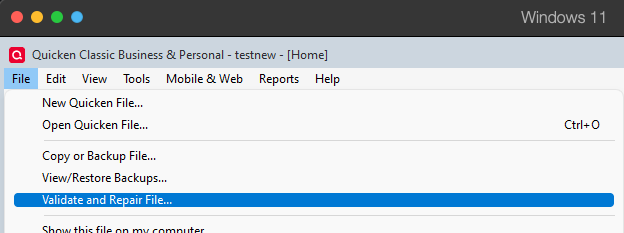
- Validate File
- Click OK
- Close the Data Log
- Close Quicken (leave it closed for at least 5 secs)
- Reopen Quicken and see if the issue persists.
File issues could also explain the beginning balance discrepancy, but you may also want to check for any duplicate or missing transactions, since that could also cause it. Is this issue happening in an account that is connected to download into Quicken when you run One Step Update, or is this an account you update manually?
I look forward to your response!
Quicken Kristina
Make sure to sign up for the email digest to see a round up of your top posts.
0 -
Hello Kristina,
Thanks for your response. I tried the steps you suggested. Nothing changed. This is a bank account, I am trying to reconcile. It is not connected to bank download. I either make the manual entries or they come from my entries through "reminders". Have been doing this rec for years. Did not have this problem in past. Any more ideas ? Or should i try Quicken support, with screen share ?
Let me know.
Thanks
0 -
- Are you Syncing to Mobile/Web? Is the Sync option in Edit / Preferences / Mobile & Web turned on?
AND - do you actually use the Mobile app on your smartphone or the Quicken on the Web browser-based app?
The Sync process has been suspected of a number of weird things happening with Quicken. Could your problem be caused by Sync?
• If you answer "yes" to the 1st question and "no" to the 2nd question, turn Sync off completely. You don't need it. The Sync process should only be used in conjunction with the Quicken app for Smartphones or the Quicken on the Web browser app. It cannot be used as a replacement for backing up and restoring your Quicken data file.
• If you answer "yes" to both questions, try to Reset Sync so that the current cloud sync file is replaced with a fresh complete copy
Do note that a full Sync process may take many minutes to complete.Also note that this will not repair erroneous changes made to your data file. You may have to restore your Quicken data file from a backup taken before this problem occurred.
How to reset Sync to Cloud
• Log out of your mobile app, then do this on your desktop / laptop:
• Go to Edit / Preferences / Mobile and Web
• Click the "Reset your cloud data" link and follow the instructions until it is complete.
• Sync your desktop file to the cloud
• Now log back into your mobile appHow to turn off Sync to Cloud for the current data file
• Go to Edit / Preferences / Mobile and Web
• Change the Sync radio button and set it to OFF0 - Are you Syncing to Mobile/Web? Is the Sync option in Edit / Preferences / Mobile & Web turned on?
-
Never used Mobile app. It is OFF in Synch Pref.
0


Categories
- All Categories
- 6 Product Ideas
- 34 Announcements
- 249 Alerts, Online Banking & Known Product Issues
- 19 Product Alerts
- 266 Welcome to the Community!
- 301 Before you Buy
- 1.5K Product Ideas
- 55.8K Quicken Classic for Windows
- 16.9K Quicken Classic for Mac
- 1K Quicken Mobile
- 834 Quicken on the Web
- 129 Quicken LifeHub