I have a credit card that is adding charges and balance owed is decreasing

I have a credit card that is adding charges, and the balance owed is decreasing, and payments are increasing CC balance. No filters running, blue date arrow pointing up. This started after my last statement, which is the 6th of the month. I tried validating the file and an online reset. Same thing. How may I fix this?
[Edited-Readability]
Comments
-
Is the balance shown in the register red or black? If black, you are in a credit balance condition and have past transactions that have overpaid the amount owed. They could be duplicates of correct transactions or it could be due to correct charges that have been deleted.
How about showing a screenshot of just the right hand columns so that we can see what is happening?
-splasher using Q continuously since 1996
- Subscription Quicken - Win11 and QW2013 - Win11
-Questions? Check out the Quicken Windows FAQ list0 -
Also, take a look at the Opening Balance transaction (the very first one in the account). Is it correct? If not, correct it.
An easy way to confirm whether or not the Opening Balance transaction dollar amount is correct: Restore a back up file dated from before when you started seeing this issue. Make note of the Opening Balance transaction dollar amount there and compare it to what is shown in your primary data file. If the two show different amounts, replace the amount in your primary data file with the one in your restored backup file.
Quicken Classic Premier (US) Subscription: R66.23 on Windows 11 Home
0 -
The running balance is in red.
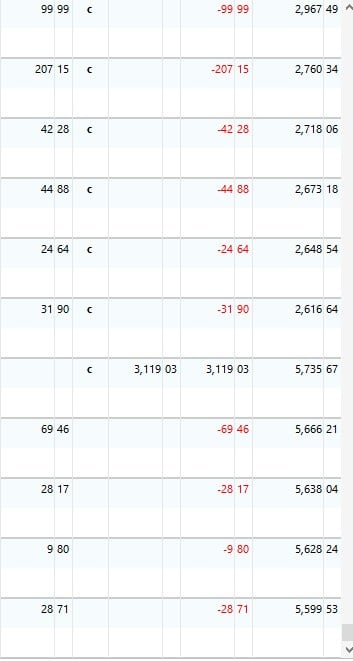 0
0 -
Sorry, the running balance is in the black. the payments are showing in the red
0 -
Hey! Sorry, you are correct. The issue was to a double payment posted because of a bank payment error. Log story, but it is working now. I just didn't go back further. Thanks!!!!!
1 -
Hey! The issue was to a double payment posted because of a bank payment error. Log story, but it is working now. I just didn't go back further. Thanks!!!!!
0 -
Thank you for following up and letting us know that you were able to resolve the issue. This issue may be helpful to others experiencing the same or similar issues in the future.
If you need more help, don't hesitate to reach back out!
Thanks again!
Quicken Alyssa
Make sure to sign up for the email digest to see a round up of your top posts.
0 -
@Boatnmaniac did bring up an issue which could have caused your issue, in that Q has a bad tendency to change the Opening Balance of a register if your ever need to re-establish One Step Update for the account.
The regulars here suggest putting the correct OB amount in the memo field of that transaction for future reference to see if Q has incorrectly changed it. It saves having to restore a backup to see what it should be.
I went so far as to change mine so that every OB is $0 with the next transaction setting the correct OB with either a deposit or debit depending on the type of the account. Mine are now instantly identifiable as correct or screwed up by Q.
-splasher using Q continuously since 1996
- Subscription Quicken - Win11 and QW2013 - Win11
-Questions? Check out the Quicken Windows FAQ list2


