An investment transaction appears on the Web app that is not (nor has ever been) on Desktop

When I sync my Desktop (Windows Classic) to the cloud, the web app shows a stock that I don't own and in a large quantity. The stock does not appear anywhere on the desktop. For example, when I access Quicken on my browser, it shows I own 85000 shares of some stock: NEE. On my desktop, Quicken Classic Deluxe for Windows, there is not such stock in my holdings and no transaction for NEE anywhere in the account. How do I override the Web browser and mobile app to match what I have on the desktop? BTW, I have tried resetting the cloud data.
Answers
-
Hello @JeffPend,
Thank you for sharing your experience. To help troubleshoot, please provide more information. When did you first notice this issue? Which financial institution is this happening with, or is the impacted account one that you update manually?
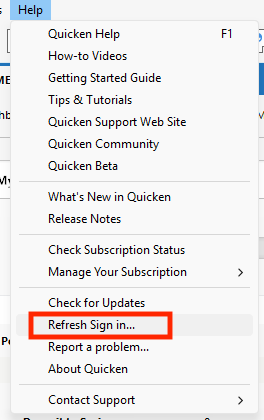
Since resetting the cloud didn't correct the issue, in your desktop app, please navigate to Help>Refresh Sign in….
After the refresh completes, please close the Quicken program, re-open it, and sync with the cloud. You can initiate the cloud sync from the Mobile tab or select it in One Step Update Settings, then run One Step Update.
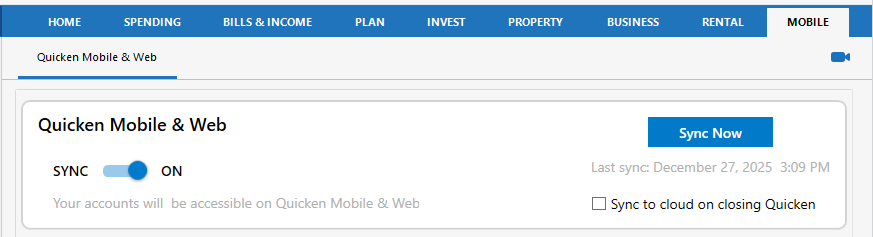
Once the sync completes, login to Quicken on the Web and check to see if the issue is resolved.
I look forward to your reply!
Quicken Kristina
Make sure to sign up for the email digest to see a round up of your top posts.
0 -
I have a similar problem and that fix did not work for me.
0 -
Hello @nathanau,
Have you already tried resetting the Quicken Cloud? If you have, and that didn't correct the issue either, then the next step is to try a manual cloud reset. First, please proceed to save a backup (just in case). From there, create a new data file (click here to view instructions, and review the section titled: "Creating a new file"). Once the new file opens, follow the steps below to remove your main data file's cloud account.
- Go to Edit
- Preferences
- Quicken ID & Cloud Accounts
- Click Cloud accounts associated with this Quicken ID (#) (this is not a button, it is written in blue underneath the "Edit dataset name" button)
- Select the Cloud Account Name used for your main data file and click Delete
- Type Yes and click Delete
After that, switch back to your main data file (click here to view instructions, scroll down and review the section titled: "How to alternate between multiple files").
Once your main file opens, resync your data by navigating to the Mobile & Web tab and clicking on the blue Get Started button, and then the blue Sync Now button and see whether or not the errors you were receiving persist. You can then also delete the new file you previously created as well as its cloud account.
I hope this helps!Quicken Kristina
Make sure to sign up for the email digest to see a round up of your top posts.
0 -
I tried resetting the Quicken cloud and resync with no change.
I tried your instructions to setup a new file and deleting the main file from the cloud account but it seems to work a little differently than you describe. After creating a new file and opening Preferences>Quicken ID & Cloud Accounts, there is no link for the "cloud accounts associated with this quicken ID". I can see the link when I do that in my main account but not on the new file. On the new file, there is nothing below the links for update profile and Sign in as a different user.
0 -
Thank you for your reply,
If you're not seeing that link, it means that you do not have cloud sync turned on in the new file. To turn it on, navigate to Edit>Preferences>Mobile & Web.
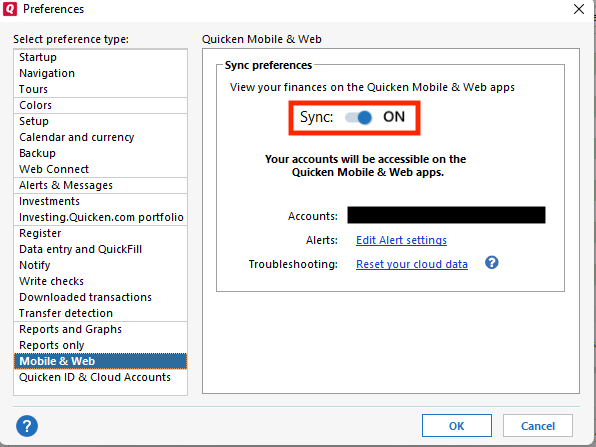
Once Sync is turned on, click the OK button. Then, navigate to Edit>Preferences>Quicken ID & Cloud Accounts. You should now see the link.
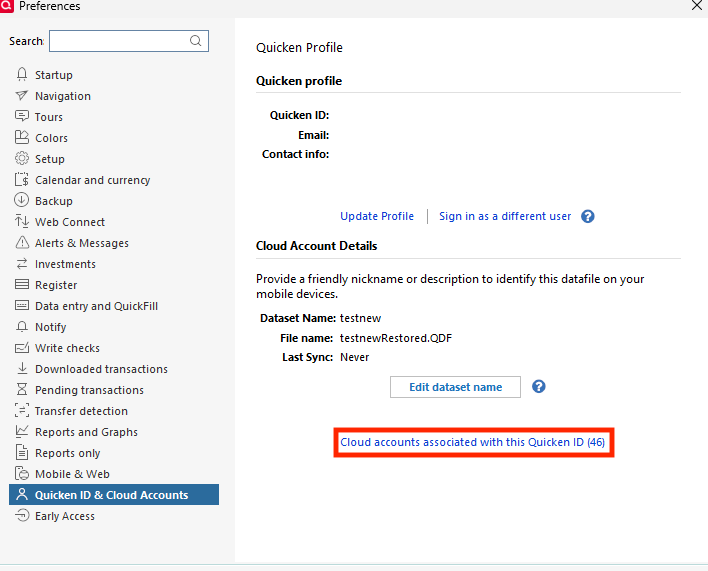
Please let me know how it goes!
Quicken Kristina
Make sure to sign up for the email digest to see a round up of your top posts.
0
