Quicken 2007/Windows 11-Quicken keeps asking for file when starts after replaced drive

Hi,
I have been using this Quicken 2007 on Windows 10 and now Windows 11 for a while. The Quicken is installed on the C: drive, but I have the data files on a separate E: drive.
Yesterday, I wanted to change the E: drive to a new NVME, so I copied all files from the original E: hard drive to a new NVME and then added the new NVME to my system, and removed the original E: drive, and then, I changed the drive letter of the new NVME to E:.
However this morning, when I started Quicken, it is asking for the data file, so I pointed it to the folder on the new E: drive, and everything looked ok, then I exited Quicken.
HOWEVER, when I tried to start Quicken again after that, it keeps asking for the data files, every time.
How can I get Quicken to persist the the data files on the new NVME drive?
Thanks, and also Happy New Year to everyone!
Jim
Comments
-
At first glance, is it possible that the Quicken data file in your new location now has a trailing blank at the end of the file name?
For example,QDATA .QDF
would be incorrect. Quicken cannot find such a file.
If so, with Quicken closed, locate the file and rename it, removing the trailing blankQDATA.QDF
When working with Windows File Explorer, be sure to enable the option to show file name extensions as part of the Name. Otherwise it's next to impossible to find trailing blanks.
There also is the possibility that Quicken can't remember a data file name, if the file name is too long (more than 40 characters or so … I'm not quite sure about the exact limit for your old version of Quicken). If that's the problem, rename your data file to use a standard file name in the old style "8.3" naming format, name not longer than 8 characters plus file extension.
1 -
I've been trying to get this working with some help from an AI (ChatGPT), and it seems to think that the Quicken 2007 is somehow locked to the original drive (e.g., some invisible volume number or something similar), where I cannot get to it.
Is that possible?
I've been working on this for a few hours now and we've tried all kinds of things but it keeps either asking for the data files or Quicken won't even open.
Thanks,
Jim0 -
Can you show us the bottom portion of the Quicken File Menu, where the (up to 4) most recently used QDF file names are stored?
How do I post a screenshot in the community from a mac
How do I post a screenshot in the community from windows
Please save images to files of file type PNG or JPG only. They're easier to work with than PDF files.
Maybe that'll give us an idea.
Is the external(?) drive correctly mounted in Windows as your E: - drive?
Can you mount it as a different drive letter?0 -
Do you have ALL the files in the data set? The main data file ends in .QDF. All Quicken versions prior to QW2010 store your data in a series of files all sharing the same filename but with different extensions like - .QDF .IDX, .QEL, .QPH and all 4 of those files were rolled into a single-file .QDF starting in 2010.
I would try moving or copying the data files to the actual C: drive and see if you can open it from there. And if you have One Drive turned on that can mess things up.
You should at least try to convert to the 2013 version since you don’t use any online services or download transactions now. Then it should run on newer versions of Windows. Starting in 2014 they instituted an ID password to get into your own data. I’m staying on 2013.2013 should run on Newer Windows. I’m running 2013 on Windows 11. You can download 2013 Deluxe for free using this how to convert article. It’s under Converting from Quicken 2004-2009. Click on the Blue words....Quicken 2013 for Windows in step 3.
I'm staying on Quicken 2013 Premier for Windows.
1 -
volvogirl,
Yes I have 4 files with the same name but different extensions, including the .QDF.
Thanks re. Quicken 2013. For some reason I thought that they started the subscription pricing in 2008.0 -
UKR
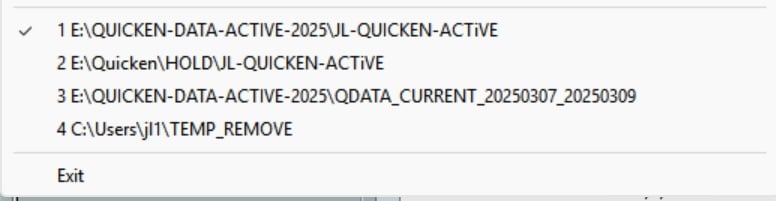
So, to clarify:
Originally the E: drive was an external in a USB enclosure. (this worked, and also STILL works - I JUST tested by putting the original external back on the system as the E: drive and Quicken works fine.
What I am trying to do is use an internal NVME as the E: drive instead of the external USB enclosure, mainly for speed). So what I did was add the new NVME, then I changed the drive letter of the external to R:, then set the drive letter for the NVME to E:. I want to keep the new NVME as E: because I have a ton of data on the E: drive.
Thanks, Jim0 -
Also, FYI just installed Quicken 2007 on another machine with the same data files and it installed no problem.
Also FYI, the AI is kind of reticent about just uninstalling Quicken 2007 and then installing 2007 - it thinks that something even worse will happen and prevent me from using Quicken 2007, but doesn't what I just did (install Quicken on a clean machine) basically the same as an uninstall and then an install?
Should I try that ?
Thanks,Jim
0 -
Well - I tried to uninstall, then reboot, then reinstall quicken 2007 on the machine that is having this problem and it still has the same problem.
Everytime I start Quicken, it asks me if I want to select a file, etc. :(!!
This all really doesn't make much sense (to me :(!!).0 -
Hi All (and thank YOU Volvogirl!),
So after struggling with this all day, and getting nowhere with it, I decided to try Quicken 2013. It installed super easily and worked out-of-box!!
So again, thanks everyone and Happy New Year!
Jim1


Categories
- All Categories
- 18 Product Ideas
- 34 Announcements
- 246 Alerts, Online Banking & Known Product Issues
- 19 Product Alerts
- 517 Welcome to the Community!
- 682 Before you Buy
- 1.5K Product Ideas
- 55.7K Quicken Classic for Windows
- 16.8K Quicken Classic for Mac
- 1K Quicken Mobile
- 834 Quicken on the Web
- 127 Quicken LifeHub