Memorized Investment Transaction not supported in open account - IRA distribution

I am attempting to automate a Regular Monthly Distribution from my IRA to my checking account. After much searching and testing, I have found the Memorized Investment Transaction List. What I have found is that I can successfully use a Sold Transaction of MMF shares. I can also successfully use a WithdrawX and Record Proceeds To: my checking account.
But when I try to use a SoldX: Sell shares in MMF and Record Proceeds to: my checking account,
I get the error:
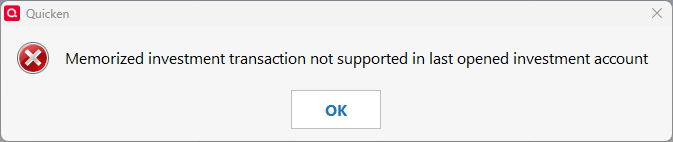
Why doesn't that work? Am I missing something?
Answers
-
I don't use Memorized Investment Transactions but if you are having income tax withheld from the distribution there is are two issues you should be aware of when setting up distribution transfers in IRA accounts and transferring them from there to checking/savings accounts.
- If you are setting up reminders for the tax to be paid by the IRA account, the Tax Reports and Tax Planner will not capture them. (Expenses in tax exempt and tax deferred accounts are considered to be non-taxable events.)
- This, then causes the Tax Reports and Tax Planner to under-report the total taxable distribution because the tax withheld and paid by the investment company is part of the taxable income but it is not being captured as such.
There is a planned improvement regarding IRA distributions. But until that is implemented you might want to review the process that I many others view as the best practice for recording IRA distributions:
IN THE RECEIVING ACCOUNT:
1) Enter a deposit transaction for the net amount of the RMD...a positive number.
2) Split the category:
- Line 1 of the split: Category = transfer from the IRA account for the gross amount...a positive number.
- Line 2 of the split: Category = the Fed taxes category that you use...a negative number.
- Line 3 of the split: Category = the State taxes category that you use...a negative number.
- Total of the split: Must equal the net amount of the deposit.
IN THE IRA ACCOUNT: Have any securities Sell transactions deposit the proceeds to the IRA account Cash Balance…do not transfer it to another account nor expense it. Then delete the brokerage transactions for
- The net distribution
- The Fed taxes withheld
- The State taxes withheld
I then set up a recurring Income (not Transfer) Reminder for my monthly IRA distributions to be automatically entered into my checking account. All I need to remember is to 1X per month delete the brokerage downloaded transactions for the net distribution and withheld taxes.
Also, one other thing you might want to confirm is the Tax Schedule for the IRA account (regardless of which path you take). Quicken often defaults to the wrong one. To do this go to Account Register > upper right Gear icon > Edit Account Details > Tax Schedule button:
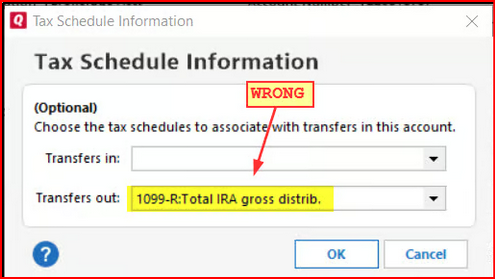
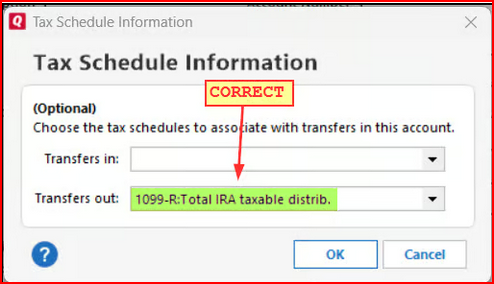
Now, if you want to also set up Memorized Investment Transactions for the security sells you can certainly do that. But instead of setting them up to transfer the proceeds to your checking account, set them up to deposit the proceeds to the IRA account's Cash Balance. Then you might be able to avoid having to manually delete Sell transactions as mentioned above.
Quicken Classic Premier (US) Subscription: R66.23 on Windows 11 Home
0 -
Thank you for the quick response. And the detailed process for handling IRA distributions.
Up until late last year I was using exactly the process you described. But then I got creative and found I could accomplish (what looked like) the same result by entering a SoldX of the MMF transferring funds to the checking account, eliminating the WithdrawalX transactions. The end result of a Sold/WithdrawalX is the same as SoldX as seen by the checking and Investment accounts.
Now I've discovered the pitfalls of that. I then started looking at the Memorized Investment Transactions, hoping I could create an equivalent Memorized transaction to replace the Bill and Income reminder for the WithdrawalX. That's when I discovered the discrepancy between the way Q handles the Sold, SoldX and WithdrawalX transactions in the Memorized Investment Transactions List function. I can Use the Sold, and WithdrawalX transactions, why can't I Use the SoldX transaction?
That is the answer I'm seeking in this thread.
0 -
The way you described the process to use for RMD is 100% correct. To answer my question, I just completed a Chat with Quicken support. Here is what they said:
Why SoldX is excluded
- SoldX is a special transaction type used when you sell shares in one account and transfer the proceeds (cash) to another account.
- It involves two linked accounts (the investment account and the receiving account), which makes it more complex than a standard Buy, Sell, or Dividend transaction.
- Memorized transactions in Quicken are designed for single-account templates. They don’t support cross-account logic because memorization doesn’t store transfer details reliably.
So much for getting creative…..😏
3 -
Thanks for the update. I've been scratching my head over this one and haven't come up with anything that makes any sense.
While the explanation you received does seem possible I am a bit confused by it because I would think the logic for splitting the transaction in a way that includes a transfer to another account does exist in Quicken. After all, we can do this with split categories in Reminders for any other type of account. And we can enter Sell transactions in investment accounts where the proceeds are directly transferred to other accounts. So, I'm not convinced yet that this is the reason.
Still, Help does draw some distinctions between Memorized Investment Transactions and Bill & Income Reminders so maybe there is some restriction with it that I just don't understand.
Quicken Classic Premier (US) Subscription: R66.23 on Windows 11 Home
0 -
I agree, it doesn't make sense. I see no reason not to literally treat it as two operation as described: Sell the Security, and send the proceeds to a transfer transaction. Simple.
It's probably just a case of "we don't want to deal with the discrepancy, so make up an excuse".
Re: MIT, I see no reason the couldn't just add a scheduling function to it. Or add a MIT to B&IR. Problem solved.
I do understand Investing accounts are more complex than Banking accounts as are Property & Debt. And they are separated in Quicken.
0 -
See my post in your other thread regarding SoldX. I'm guessing the two issues are related and am now leaning toward this as being a bug.
Quicken Classic Premier (US) Subscription: R66.23 on Windows 11 Home
0 -
Hello All,
Thank you for taking the time to visit the Community to report this issue, though we apologize that you are experiencing this.
We have forwarded this issue to the proper channels to have this further investigated. I can see that you already sent a problem report due to the other bug you reported.
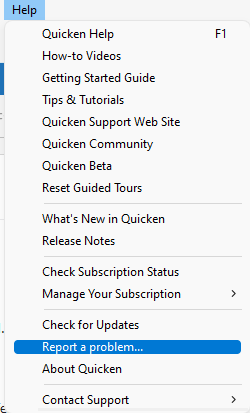
If anyone else is encountering this, we request that you please navigate to Help > Report a problem and submit a problem report with log files attached and (if you are willing) a sanitized copy of your data file in order to contribute to the investigation.
While you will not receive a response through this submission, these reports will help our teams in further investigating the issue. The more problem reports we receive, the better.
We apologize for any inconvenience!
Thank you.
(CTP-15884)
Quicken Kristina
Make sure to sign up for the email digest to see a round up of your top posts.
0 -
A report has been submitted. I didn't submit a file because this is a hard reproducible failure.
2 -
Thank you for your reply @DoctorBrown,
Thank you for sending the problem report! It will help our teams investigate the issue.
You are correct, this issue is easy to replicate. I was able to replicate it in both Traditional and Roth IRA accounts.
Thank you!
Quicken Kristina
Make sure to sign up for the email digest to see a round up of your top posts.
1


Categories
- All Categories
- 3 Product Ideas
- 34 Announcements
- 249 Alerts, Online Banking & Known Product Issues
- 19 Product Alerts
- 266 Welcome to the Community!
- 42 Before you Buy
- 1.4K Product Ideas
- 55.8K Quicken Classic for Windows
- 16.9K Quicken Classic for Mac
- 1K Quicken Mobile
- 834 Quicken on the Web
- 84 Quicken LifeHub