About the Categories DivIncTaxFree and IntIncTaxFree?

I hold various amounts of Canadian stocks some that are held in Tax Free accounts and others in Taxable accounts. Quicken has two Categories DivIncTaxFree and IntIncTaxFree. I cannot seem to access those Tax Free categories in the Investment accounts when adding a dividend.
Answers
-
In QUS, and I suspect the same in QCA, those 2 "taxfree" categories are used for securities that themselves taxfree and are held in an otherwise taxable account. They aren't needed/used if the entire account is taxfree.
Q user since February, 1990. DOS Version 4
Now running Quicken Windows Subscription, Business & Personal
Retired "Certified Information Systems Auditor" & Bank Audit VP0 -
@Johnny132 HOW was my response "off-topic". OR, was it not you that marked it as such?
Q user since February, 1990. DOS Version 4
Now running Quicken Windows Subscription, Business & Personal
Retired "Certified Information Systems Auditor" & Bank Audit VP0 -
Further to my original post:
When Div is selected in the Action column in a Investment account it automatically shows as a _DivInc in the Description column. I would like to be able to choose or have it show up as DivIncTaxFree category.
0 -
Then Edit the Security to mark it as Tax Free
Q user since February, 1990. DOS Version 4
Now running Quicken Windows Subscription, Business & Personal
Retired "Certified Information Systems Auditor" & Bank Audit VP0 -
Thank you for your help. Unfortunately, even if the Tax Free is checked off any new Dividend added shows up as _DivInc.
0 -
Commonly (US versions), in reports that are not tax-oriented, the transactions get reported under the simpler _DivInc category. Tax-oriented reports make the distinction between the two. So what reports are you referring to?
0 -
Unfortunately, when using the Quicken Classic Deluxe version does not let you choose DivIncTaxFree and IntIncTaxFree in the Investment accounts when adding a dividend.
0 -
In Quicken US, you do not specify tax free when entering the dividends and interest. Everything is entered as _DivInc or _IntInc and Quicken automatically changes them to the TaxFree versions if the security is set to tax free. To make a security tax free, go to the Security Details, click on Edit details, and check the Tax Free box. This is for tax free securities like state government bonds and tax exempt bond funds.
There is also a "Tax deferred" setting for retirement accounts. With this setting, the interest and dividends are still recorded as plain _DivInc and _IntInc but the accounts are excluded from the tax reports, so the dividends and interest in those accounts is not included in those reports.
I assume the Canada version works the same way.
QWin Premier subscription2 -
I just tested this in Quicken Canada. You are correct that the category does show up as you indicated in the actual transaction line; coversely, it is classified as TaxFree when you run a report:
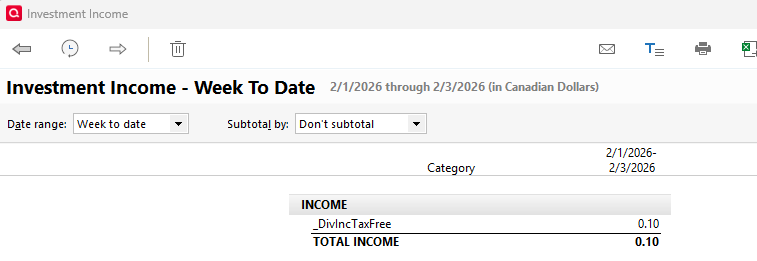
It appears that the Canadian version works just like the USA version in this regard.
3


