Categories With Pre-filled Amounts and CLR Checks

I'm currently using Quicken Classic for Mac Version 8.3.3. I recently went on an extended trip and used the web app to keep my records updated. While this has limited use (unable to manually update investments or assets isn't available) it helped to keep my bank and credit card accounts updated. When I returned home and began using my desktop again, I noticed that when making entries for any of the Payee/Categories that I used via the web app, the amount was pre-filled with one of the entries I made online. Also, some of these are automatically checking the CLR box in my registers. Why is this happening and how do I rectify this problem? It's made transaction entry more difficult as it now requires two additional steps - one to change the pre-filled amount and one to reset the CLR flag.
Answers
-
Update: It appears that the web app is changing the Quick Fill Rules. I can manually parse through the rules and update them. Question remains why the web app is changing my quick fill rules.
0 -
Hello @Chrisg727,
Thank you for sharing your experience. To help troubleshoot, please check your settings in your desktop file. To do that, navigate to Quicken>Settings… and select Register.
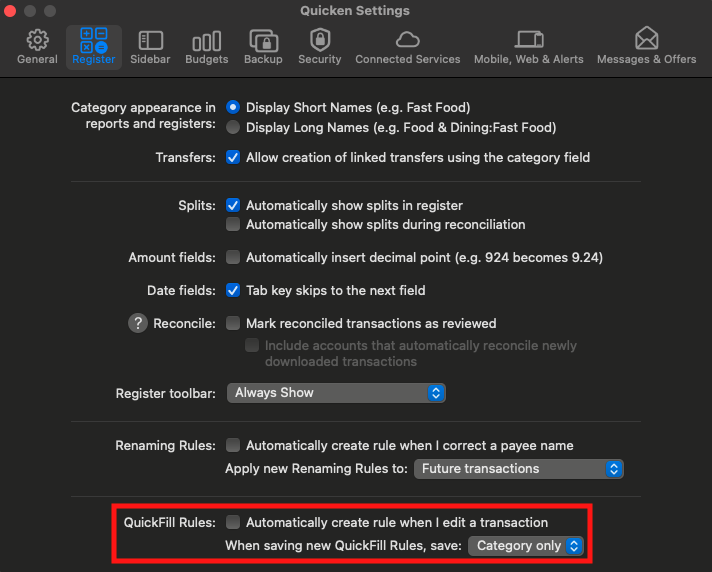
Is "Automatically create rule when I edit a transaction" selected? If it is, try unselecting it and see if the behavior persists.
Please let me know how it goes!
Quicken Kristina
Make sure to sign up for the email digest to see a round up of your top posts.
0 -
Thank you for the followup on this. No, this setting is not checked on my desktop. I've retried again after resetting all the prefill rules that were altered while using the web. It appears to be changing (or setting) prefill rules when I access via the web. I have yet to search further but is there a setting on the web side I should check?
0 -
I've confirmed that when entering a transaction via the web, if there's a memorized payee/category it is updating the default amount whereas in the app (and what I use daily) if there's a memorized payee/category it leaves the amount according to my prefill rules (usually $0.00). I often enter the same payee and category with varying amounts depending on the specific transaction (for example multiple purchases from Amazon that go to the "Household" category). When entering via the web, the first transaction resets the default amount from $0.00 to whatever is entered for all succeeding transactions. Using the example above, if I enter a transaction for Amazon and select the "Household" category (which is memorized) the first time it shows $0.00. I enter the transaction amount, say $49.99, and save. From thereon when I enter an Amazon transaction in the "Household" category the defaullt is $49.99 not $0.00. When I return to my desktop app and check the prefill rules it shows that Amazon/Household transactions are set to default to $49.99. Hope this helps.
0 -
One final note today, in reviewing the "Preferences" on the web I don't see anything that would indicate a preference for modifying prefill rules. The "lightning bolt" icon reads "Automatically categorize uncategorized transactions when a suggestion is available." It would seem that this would be OK as long as it's not setting the memorized payee/category default amount with the first non-zero entry. Thanks!
0 -
Thank you for your replies,
I recommend that you contact Quicken Support directly for further assistance, as they have access to tools we can't access on the Community and they're able to escalate the issue as needed. The Quicken Support phone number can be found through this link here. Phone support is available from 5:00 am PT to 5:00 pm PT, Monday through Friday.
I apologize that I could not be of more assistance!
Quicken Kristina
Make sure to sign up for the email digest to see a round up of your top posts.
0
