One of my IRA distributions doesn't show on my Tax Summary report (and on other reports also).

Running Quicken Classic Business & Personal using Parallels and Windows 11 on a Mac Mini… latest O/S. I have three IRAs that I get distributions from every month. One of them doesn't show the income on the Tax Summary report. Comparing the account setups, the only difference I see on the missing account is the "Simple Mutual Fund Act" Box on the Tax schedule setup will not accept the checkmark. It appears, then disappears when I hit OK. Category selection is identical to the two accounts that work properly. Any suggetions? Thanks… Dave in KY
Answers
-
Click on the gear at the top right of the problem account and select Edit account details. Click on the Tax Schedule button. The transfers from this account section should look like this
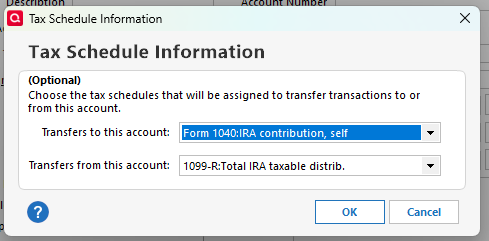
If fixing that setting does not solve your problem, please post back for further instructions.
QWin Premier subscription0 -
Hello @k4to@arrl,
We haven't heard back from you in a while. Do you still need assistance?
Were you able to give @Jim_Harman's suggestion a try?Check back and let us know! Thank you.
-Quicken Anja
Make sure to sign up for the email digest to see a round up of your top posts.0 -
Hello again,
Checking in once more before this thread is closed.
Let us know if you still need assistance.Thank you!
-Quicken Anja
Make sure to sign up for the email digest to see a round up of your top posts.0 -
Hello again,
Due to the lack of response, I went ahead and closed this post.
If you still require assistance, please feel free to start a new post.
Thank you!
-Quicken Anja
Make sure to sign up for the email digest to see a round up of your top posts.0

