I don't even know the proper terminology in which to present my question.

I need to talk to a real intelligence, not an artificial one. My question is very simple, but I don't have the terminology in which to present it. It involves creating a new (insert terminology here) to create a new income/expenditure record for 2026
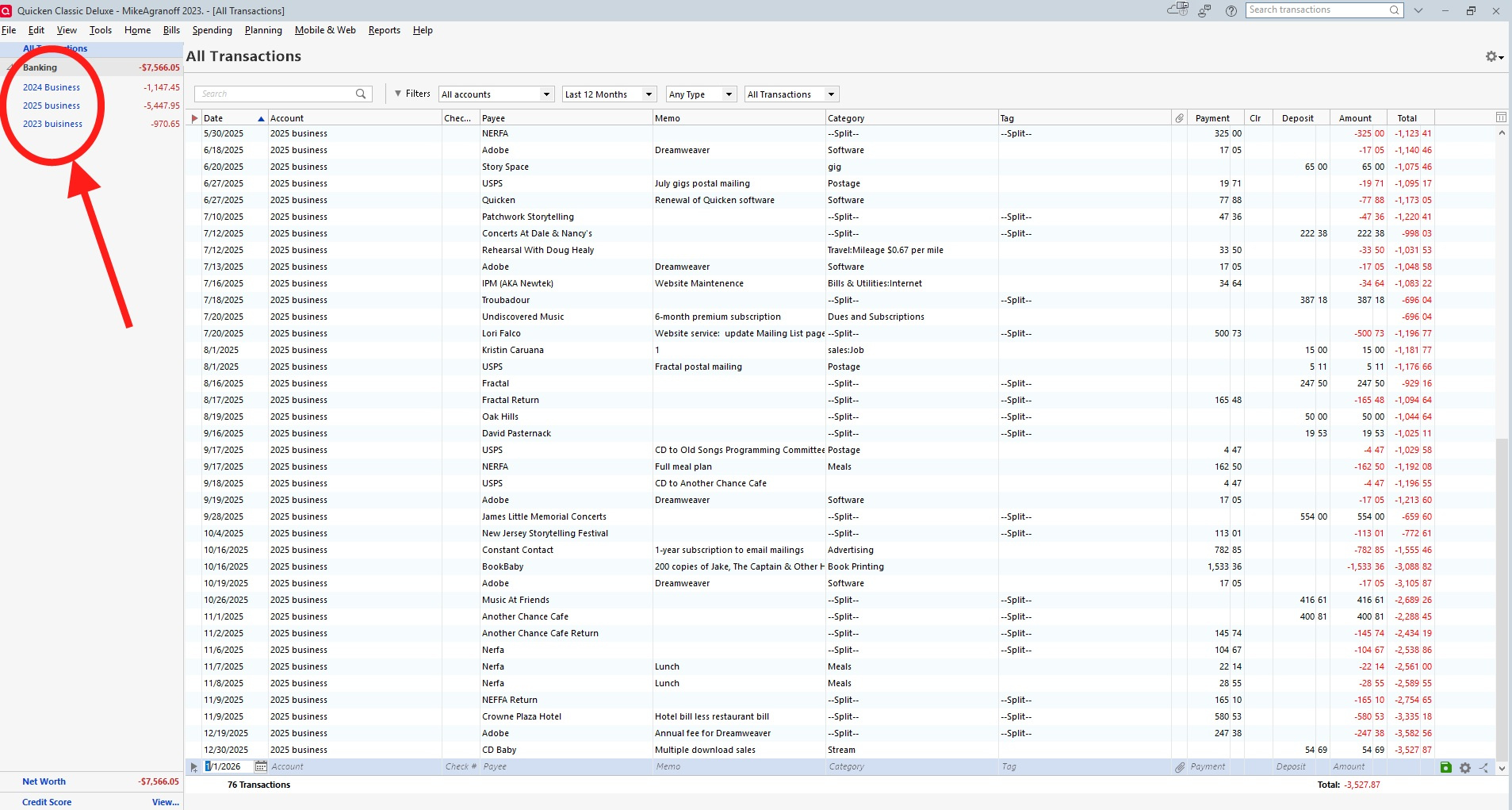
I am a musician, and I use Quicken to record my income and expenditures to fill out a schedule C for income tax purposes. I have a separate (file? account? record? I don't know what to call it) for each year. The above screenshot shows my working screen. The encircled list at the upper left shows years 2023, 2024, and 2025, and the overall picture for year 2025. I need to create another one for 2026, and I've forgotten how to do that. Can someone please advise me?
Answers
-
It appears you are treating accounts as "business years". So to create 2026, you would need to create a new "bank account" named appropriately.
Of course, backup the file first if you don't like the result so you can restore.
 0
0 -
How do I do that?
0 -
Click on the Tools menu and select Add account.
Assuming you are not downloading transactions, select Offline account. Under Banking, select Checking.
If you are just tracking income and expenses for the year and not the balance of a real account, name the account "2026 Business" and set the Opening balance to zero.
You are free to set up Quicken however you want, but be aware that this is an unusual way to use Quicken.
QWin Premier subscription1 -
Hello @Mike Agranoff,
We haven't heard back from you in a while. Do you still need assistance?
Were you able to give the suggestions from our SuperUsers above a try?Check back and let us know! Thank you.
-Quicken Anja
Make sure to sign up for the email digest to see a round up of your top posts.0 -
Reviewing the image you provided once again, I noticed that your Quicken window is missing a few elements, namely the Quicken Toolbar and the Main tabs.

To show these Quicken window elements, click the "v" icon in the upper right hand of the Quicken window and turn it into a "^"
Are you using Register Column Amount together with Charge and Payment Columns?
Does your account register show the Amount column together with Charge and Payment (or Payment and Deposit) columns? Is your register looking a little crowded with all these columns?
Depending on your personal preference you should use
• either the traditional pair of Charge and Payment columns together
• or the newer Amount column alone (where you have to enter negative amounts with a Minus sign and positive amounts with a plus sign)
but you really don't need all three of them.
Please decide which columns to use and remove the other one(s) from the view.
Q Windows: To add / delete columns in your register click the Register Columns gear icon located next to the Balance column header.
Q Mac: there's a Columns button at the bottom right of the register view0 -
Hello again @Mike Agranoff,
Checking in once more before this thread is closed.
Let us know if you still need assistance.Thank you!
-Quicken Anja
Make sure to sign up for the email digest to see a round up of your top posts.0 -
Hello again,
Due to the lack of response, I went ahead and closed this post.
If you still require assistance, please feel free to start a new post.
Thank you!
-Quicken Anja
Make sure to sign up for the email digest to see a round up of your top posts.0




Categories
- All Categories
- 6 Product Ideas
- 34 Announcements
- 249 Alerts, Online Banking & Known Product Issues
- 19 Product Alerts
- 266 Welcome to the Community!
- 301 Before you Buy
- 1.5K Product Ideas
- 55.8K Quicken Classic for Windows
- 16.9K Quicken Classic for Mac
- 1K Quicken Mobile
- 834 Quicken on the Web
- 129 Quicken LifeHub