Duplicate Downloaded Bank and Credit Card Transactions
Answers
-
Thank you for your replies,
Thank you for letting us know you're also impacted by this issue. I added you to the ticket so that our teams will know you're impacted by this also.
Thank you!
Quicken Kristina
Make sure to sign up for the email digest to see a round up of your top posts.
0 -
Any update on a fix for this issue?
1 -
Thank you for the follow-up,
The ticket is still open and ongoing. No new updates are available yet.
Thank you!
(CTP-15396)
Quicken Kristina
Make sure to sign up for the email digest to see a round up of your top posts.
0 -
I have also verified, that AFTER accepting the duplicate transactions, the transaction ID fields are totally blank in both accounts for CHARGES. Ironically for PAYMENTS, the fields have values. Very weird. Also very annoying.
0 -
Thank you for your reply @mjonis,
Is that happening only with Discover, or are you seeing that same behavior with multiple financial institutions?
Thank you!
Quicken Kristina
Make sure to sign up for the email digest to see a round up of your top posts.
0 -
So far only happens with Discover.
1 -
Thank you for confirming,
I forwarded that information to our teams!
Quicken Kristina
Make sure to sign up for the email digest to see a round up of your top posts.
0 -
Just had it happen again.
It seems the downloaded ID doesn't show up until AFTER you accept the transactions (and even then you need to switch to another account and back again for the Quicken Register to update/refresh).
Anyway, the DOWNLOADED ID numbers are NOT the same. They do NOT match. Not sure if that helps.
0 -
Thank you for the update,
I forwarded that information to our teams.
Thank you!
Quicken Kristina
Make sure to sign up for the email digest to see a round up of your top posts.
0 -
I'm going to add my 2¢ - I've had this problem for several months - transactions often duplicate and go to the wrong place. I just updated today and saw one of the credit card payments to one card show up multiple times, including to a secondary credit card account. What's really bogus is that it says that it was manually entered (no Downloaded ID) into the wrong card even though that didn't happen (and I almost never manually enter entries.) After reading the above posts, it does seem to always include my Discover Card but can't say for certain that it's every time.
Additionally, although it might be a separate issue, Quicken often removes old transactions - sometimes recent and sometimes a long time ago - even though the transaction is reconciled. This then sometimes takes hours to go find and manually add the missing transaction in order to balance the account. (Yes, this also happened to me today. 😡) It seems to move around from account to account - Savings, Checking and Credit Cards. I was watching a video of someone that recently moved to another product and this is one of the complaints he made - constant transaction problems.)
0 -
Hello @mjonis,
I sent you a DM. To view it, please click the envelope icon near the upper right.

Hello @David36,
Thank you for sharing your experience! Since you're also seeing duplicate transactions from Discover, please navigate to Help>Report a Problem and send a problem report with log files attached.
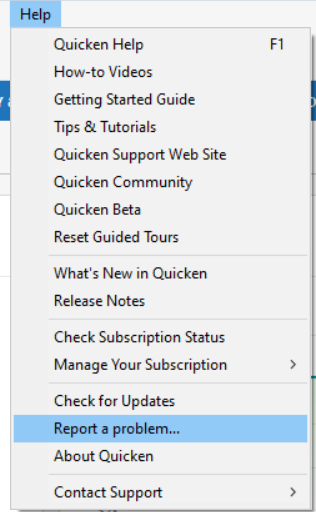
Please post to this discussion once you've sent the problem report.
Please create a new discussion to discuss the issue you're encountering with older transactions disappearing, so that we can troubleshoot with you without this discussion getting off topic.
Thank you!
(CTP-15997)
Quicken Kristina
Make sure to sign up for the email digest to see a round up of your top posts.
0

