What is the correct procedure to link to Xcel Energy for eBills? Enrollment fails every time for me.

I'd like to link to my Xcel Energy account and receive eBills.
Here is what I've done so far:
- I created a biller named named Xcel Energy.
- I clicked on "Link eBill", located Xcel Energy, and entered the account information on the form, making sure it matched the information on my most recent statement.
- I clicked "continue" and entered payment and schedule information.
- I submitted the request
I've done this twice. Each time, it will say "Enrollment pending" next to the biller until enrollment fails.
Then I'll click on the 3 dots and select "fix biller" and repeat entering account and schedule information.
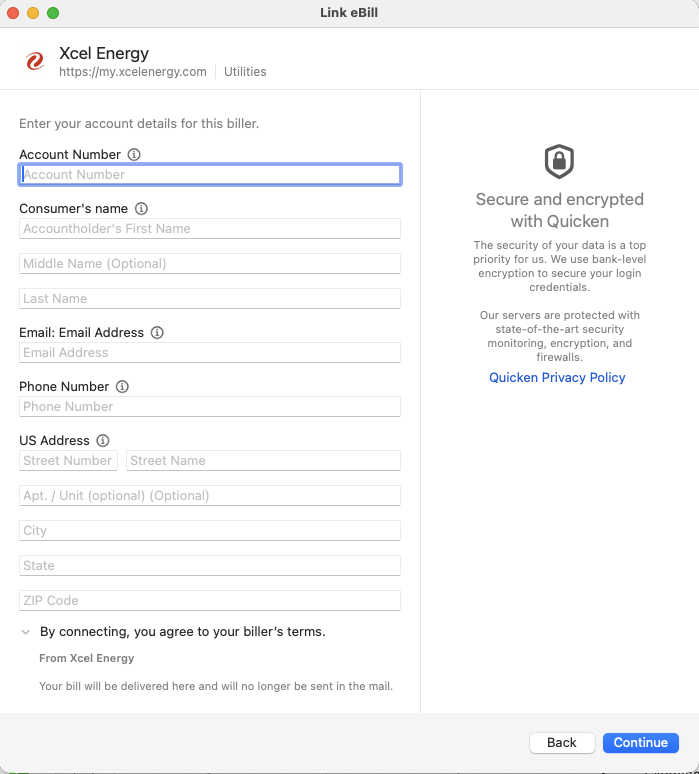
Enrollment information form screenshot ( no person information for privacy reasons )
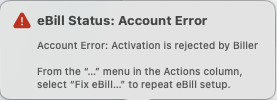
Error message screenshot
What I've noticed:
- It never asked me to log into my account.
How can it enroll me for eBills without authenticating me? That missing piece might be why enrollment is failing.
I'm on macOS 26.2 and Quicken Classic 8.4.1. I have 7 other eBill enrollments that are working, only Xcel Energy is failing to enroll.
Help!
Answers
-
Hello @majorgear,
Thank you for letting us know you're encountering this issue. For further assistance with this issue, I recommend that you contact Quicken Support directly, as they have access to tools we can't access on the Community and they're able to escalate the issue as needed. The Quicken Support phone number can be found through this link here. Phone support is available from 5:00 am PT to 5:00 pm PT, Monday through Friday.
I apologize that I could not be of more assistance!
Quicken Kristina
Make sure to sign up for the email digest to see a round up of your top posts.
1 -
Quicken Phone support was unhelpful. After several minutes of convincing them I wasn't talking about Bill Pay, they still asked me to call Xcel Energy. I'll look for a support number on Xcel's website.
Quicken chat support was better. Though they had me repeat the unlink/link process that I've done 3-4 times already. Now I'm waiting 24h for the response from the biller. They opened ticket 12204395 for my case in case I need to get back to them.
[Edited - Readability]
0 -
Thank you for the follow-up,
I'm glad to hear that chat support was more helpful. If the issue persists, please make sure to reach back out to them with that ticket number, so they can further investigate the issue.
Thank you!
Quicken Kristina
Make sure to sign up for the email digest to see a round up of your top posts.
0 -
I am have had the exact same issue since Quicken changed its method to connect sometime last year. I think only about 1/4 of my previous accounts are able to connect successfully.
If you find a fix with Xcel please post here.
Thank you.
0
