Able to authorize account on financial institution website, but it doesn't download in Quicken

This discussion was created from comments split from:
Has the problem with Chase Adding accounts been fixed - MAC Quicken
.
Comments
-
I am having the same issue. When I connect to bank to authorize connection, it lists this account with all the others and Quicken lists it with all the others, but it fails to set up download for just this account.
Parallels, Windows
0 -
Hello @pjane21,
Thank you for letting us know you're encountering this issue. To help troubleshoot, please provide more information. Is the problem account with Chase? If not, which financial institution is the account with? How is it failing to set up the download in Quicken? Is the account not showing up in the Add/Link window at all? Is it showing up, but with Don't add to Quicken, and no option to change it?
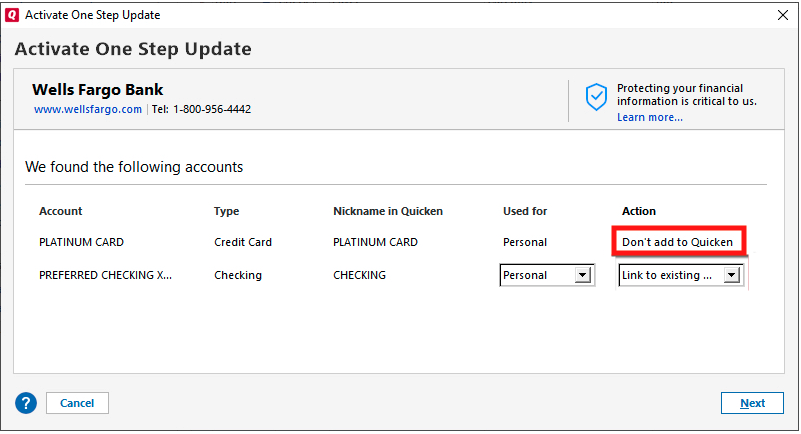
Is something else happening? If so, what exactly are you seeing? Please include a screenshot. If needed, please refer to this Community FAQ for instructions on how to attach a screenshot. Alternatively, you can also drag and drop screenshots to your response if you are not given the option to add attachments.
I look forward to your response!
Quicken Kristina
Make sure to sign up for the email digest to see a round up of your top posts.
0 -
Quicken Kristina
Make sure to sign up for the email digest to see a round up of your top posts.
0 -
Hello again,
Checking in once more before this thread is closed.
Let us know if you still need assistance.Thank you!
Quicken Kristina
Make sure to sign up for the email digest to see a round up of your top posts.
0 -
Hello again,
Due to the lack of response, I went ahead and closed this post.
If you still require assistance, please feel free to start a new post.
Thank you!
Quicken Kristina
Make sure to sign up for the email digest to see a round up of your top posts.
0


Categories
- All Categories
- 20 Product Ideas
- 34 Announcements
- 247 Alerts, Online Banking & Known Product Issues
- 19 Product Alerts
- 518 Welcome to the Community!
- 682 Before you Buy
- 1.5K Product Ideas
- 55.7K Quicken Classic for Windows
- 16.8K Quicken Classic for Mac
- 1K Quicken Mobile
- 834 Quicken on the Web
- 128 Quicken LifeHub