Duplicate Bills in Bills and Income Reminders

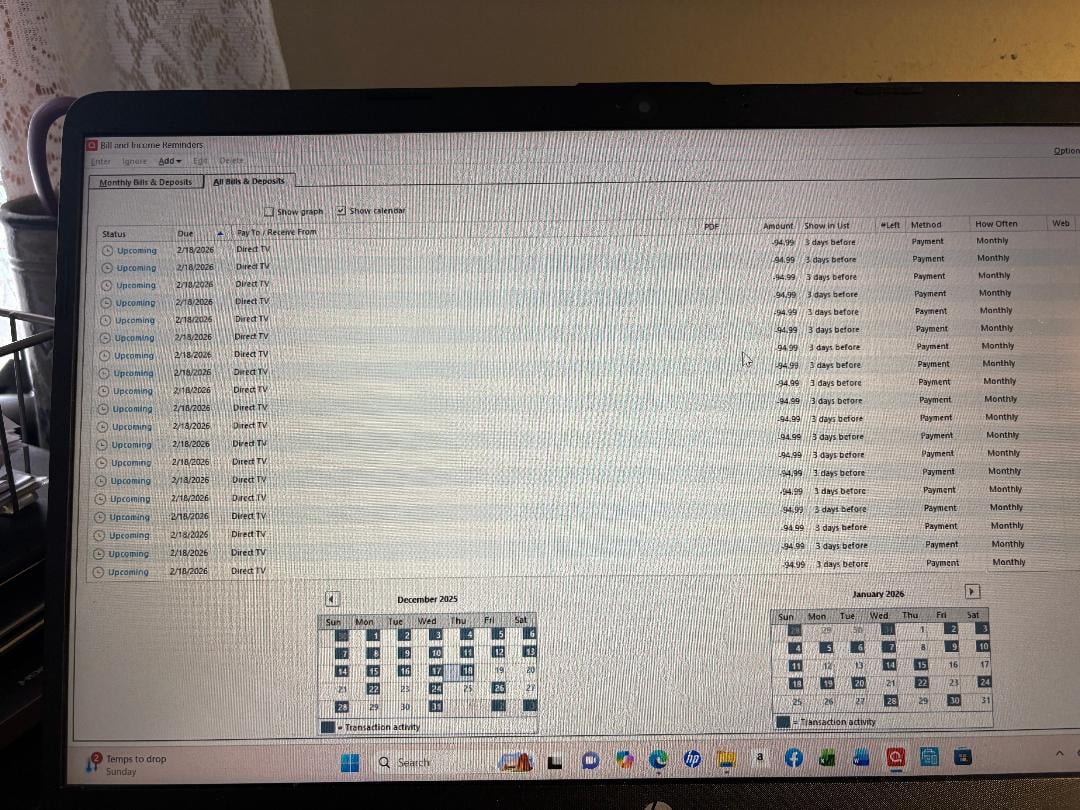
On one particular bill reminder has duplicated itself at least 100-fold. Appears to have started about a month ago. I am running Quicken Windows subscription and I have not had a problem like this before.
Comments
-
Hello @lslagle,
Thanks for sharing the details about your duplicate bill reminders—that sounds very frustrating! To help narrow down the cause, could you clarify a few things for us:
- Where is your Quicken data file stored? Is it on your local hard drive (C: Drive) or on a cloud-based/external drive (e.g., OneDrive, DropBox, USB, etc.)?
- Have you attempted any troubleshooting steps so far? If so, what have you tried?
- When did this issue first start occurring?
- Were there any significant changes to your system or Quicken software just before the issue began (updates, new installations, etc.)?
- Is this happening with only the one bill reminder shown in your screenshot, or are multiple different reminders affected?
Check back and let us know! Thank you.
-Quicken Anja
Make sure to sign up for the email digest to see a round up of your top posts.0 -
Hello again,
We haven't heard back from you in a while. Do you still need assistance?
Thank you!
-Quicken Anja
Make sure to sign up for the email digest to see a round up of your top posts.0 -
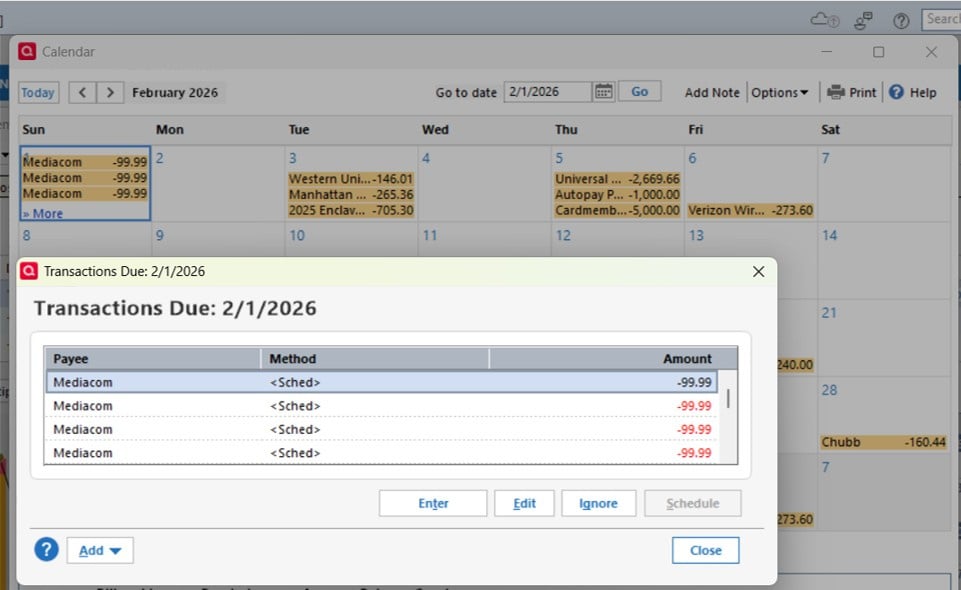
I am having the same problem. See screen shot. It has happened on multiple reminders. To fix it I have to delete the reminder and recreate it. After I fix one another comes up (different reminder). I thought it have something to do with Sync function so I disabled Sync but it is still happening. I am using Quicken Classic Deluxe Version R65.29 Build 27.1.65.29. I am running on a PC with Windows 11.
 0
0 -
Hello @ciduncan,
Thanks for chiming in and sharing those details—sorry to hear you’re running into the same duplicate reminder issue. Since this appears similar to what the original poster experienced, it would be helpful if you could also answer the questions I previously asked the OP, so we can better understand what might be contributing to this behavior in your case:
- Where is your Quicken data file stored? Is it on your local hard drive (C: Drive) or on a cloud-based/external drive (such as OneDrive, Dropbox, or a USB)?
- About when did you first notice the duplicate reminders starting?
- Were there any recent changes to your system or software before this began (Windows updates, Quicken updates, new installations, etc.)?
- Are the duplicates occurring with just one reminder at a time, or with multiple different reminders over time?
Once we have that information, we’ll be in a better position to determine next steps.
Thank you!
-Quicken Anja
Make sure to sign up for the email digest to see a round up of your top posts.0 -
My Quicken file is stored on my local drive.
It seems like this started sometime in the last couple of months.
No special updates, just the normal Quicken updates. I don't recall any Windows updates but there may have been one.
I currently have three showing up in my calendar at the moment in June, November, and December. They are all for annual bill reminders although there have been monthly reminders duplicated in the past.
0 -
@ciduncan Thank you for getting back to us with those details—that’s very helpful.
After deleting and recreating the affected reminders, have you also tried validating or super validating your Quicken data file? Sometimes, reminder-related corruption can persist unless the file is checked and repaired.
Here are the steps, just in case you haven’t tried them yet:
First, save a backup file prior to performing these steps.
Validate:
- File
- Validate and Repair File...

- Validate File
- Click OK
- Close the Data Log
- Close Quicken (leave it closed for at least 30 secs)
- Reopen Quicken and see if the issue persists.
If the issue persists, proceed to Super Validate. If the issue is resolved after performing validation, then please disregard the instructions to Super Validate.
Super Validate:- File
- Hold CTRL + Shift and click Validate and Repair File...
- Super Validate File

- Click OK
- Close the Data Log
- Close Quicken (leave it closed for at least 30 secs)
- Reopen Quicken and see if the issue persists.
I hope this helps!
-Quicken Anja
Make sure to sign up for the email digest to see a round up of your top posts.0 -
I can try this but every time I delete one that is duplicated and reenter it, I find another reminder that is duplicated that wasn't before. I can't get to a place where there are no duplicated reminders. Fixing one just creates others.
0 -
@ciduncan Thank you for clarifying that.
In this case, please do not continue deleting and recreating the reminders, since that is clearly not stopping the duplication cycle.
At this point, I recommend going straight to validation (and Super Validate if needed) without attempting to clean up the reminders first. Once that’s done, please let me know whether the duplicates stop appearing.
Thank you!
-Quicken Anja
Make sure to sign up for the email digest to see a round up of your top posts.0 -
The validation cleaned up the duplicates. I will watch to see if any reoccur.
2 -
@ciduncan Good to hear! If anything changes, please don't hesitate to reach back out.
Thank you!
-Quicken Anja
Make sure to sign up for the email digest to see a round up of your top posts.0 -
I had the same issue with certain reminders being duplicated in the calendar view. I'm running Quicken Classic Deluxe with data stored locally, but I do sync with the cloud. Performing the Validate that Anja recommended fixed the issue. The text file that was generated by Quicken Validate confirmed the fixed items and also prompted me to fix a few old items in the register, which was pretty easy. I did not need to do a Super Validate nor stop and restart the cloud sync like I have seen as a possible fix elsewhere. Overall it was a pretty simple fix. Thank you Anja!
1 -
Hello @DanaRW,
Appreciate you sharing your experience and outcome! I’m really glad to hear that the Validate process resolved the duplicate reminders for you and that the Data Log helped clean up some older items as well.
Thank you!
-Quicken Anja
Make sure to sign up for the email digest to see a round up of your top posts.0
