How To Record RMD (Required Minimum Distribution)

Using Quicken Classic Premier for Mac v.8.3.3 | Each year the IRS requires that I withdraw a certain amount from my IRA. I normally do this in Dec. The funds are transferred from my IRA to my bank checking account. The amount transferred is a taxable event which increases my taxable income by the amount of the RMD. QuickenMac does not have a way to capture this event as taxable. QuickenMac only records it as a transfer of assets from one account to another. What is a work around?
Answers
-
From Q's perspective, there's nothing special about an RMD (I'm taking them also). It's just another w/d from your IRA(s).
Is there a way, in QMac, to set the Tax Schedule (or, Attributes) on deposits or withdrawals from aRETIREMENT account … as there is in QWin. In QWin, one would EDIT the account and then click on the Tax Attributes button and then set transfers out as "1099-R: Total IRA Gross Distribution".
Then, in the banking account, you'd split the transaction with the transfer showing in the split for the full amount w/d, and any taxes w/h on the next line as a negative number resulting in the Net amount actually deposited to checking.
Q user since February, 1990. DOS Version 4
Now running Quicken Windows Subscription, Business & Personal
Retired "Certified Information Systems Auditor" & Bank Audit VP0 -
There's no "Tax Attributes" button in Quicken Mac, any tax side effects accruing to an account are handled automatically based on the account type. You can associate categories to individual lines in a tax form to get transactions in that category to show up in tax reports, but there's no way to do that with transfers.
0 -
I think the workaround is to not to try to use a linked transfer. Instead put one transaction in the IRA account showing a Payment of the amount using a category not associated with a tax item. Then in the checking account, put a corresponding second separate Deposit transaction of the same amount with a category associated with 1099-R income. You can make up these categories to suit your taste. You can note that it was a transfer in the memo. Or you could put the work "Transfer" in the Action column, which has no functional affect other than to notate that it was a transfer.
Quicken Mac Subscription; Quicken Mac user since the early 90s0 -
I use a linked transfer for IRA withdrawals, but if you want the tax reporting to be correct, you need to use a hack.
The transfer from the retirement account to the non-retirement account is merely a transfer of funds between accounts, so Quicken doesn't treat a transfer as income or expense. So then you need to recognize the taxable income. My hack is to do a separate transaction, or to add split lines to the transfer transaction, to create the income. I do this by having one split line have a category of the taxable income — mine is "Taxable IRA Withdrawal", which is assigned to Form 1099-R — followed by another split line with the negative of the amount which uses the special category "Adjustment". This is basically a way of creating income out of thin air, as the split with the income category creates the income for tax reporting purposes, and the split with the Adjustment offsets the income amount so the transaction amount nets to zero.
Note that these splits to create the taxable income must be in a transaction in a non-retirement account. So if you're taking money from a traditional IRA and transferring the proceeds to a brokerage account, make sure you enter the transfer transaction along with the two extra split lines in the taxable (brokerage) account.
If you're doing a Roth conversion, pulling money from a traditional IRA or 401k and moving it to a Roth IRA account, after the transfer transaction, you need to do a separate zero dollar transaction in any taxable account to create the income. Here's an example if I was doing a $50,000 Roth conversion:
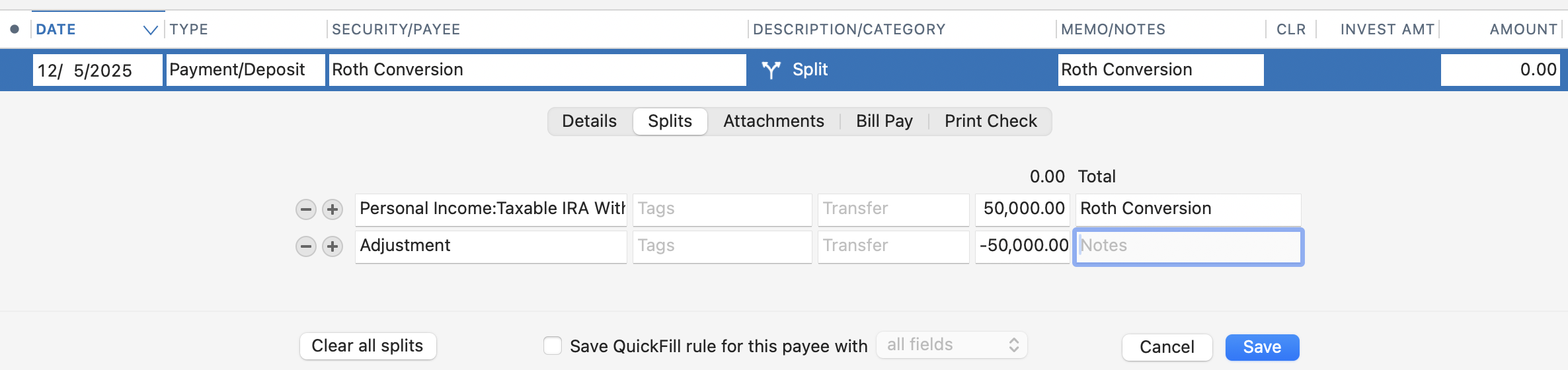
Hopefully, someday the developers will provide a tool for doing RMDs and Roth conversions correctly in a single step. You can add your vote for such a feature here:
Quicken Mac Subscription • Quicken user since 19930 -
You can do the same with a split that looks like this:
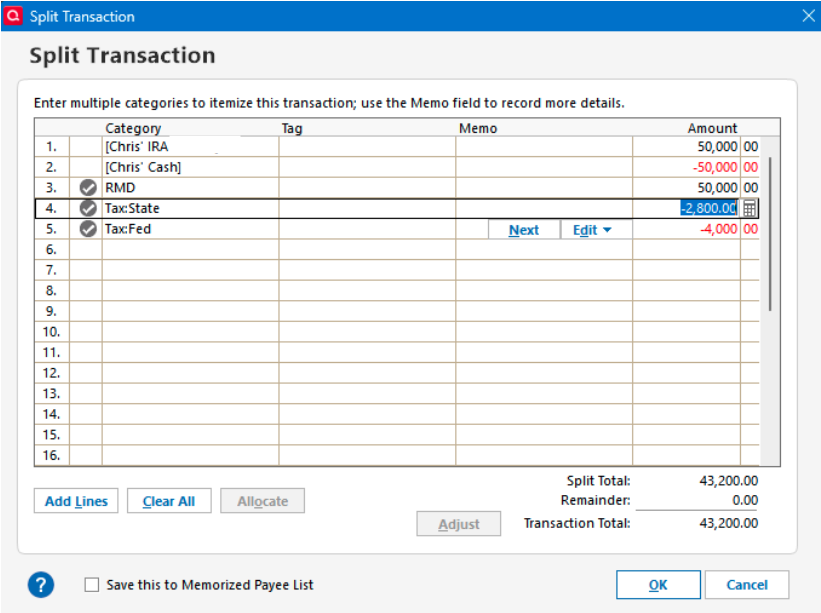
There is the transfer in, then a "balance adjustment" to make the amount "go away" ([Chris' Cash] is the account the split is in, and the syntax {at least in Quicken Windows) of a "transfer to the same account" is a balance adjustment) and then RMD would be a category with the right tax line for a taxable distribution.
And the report would look like this:
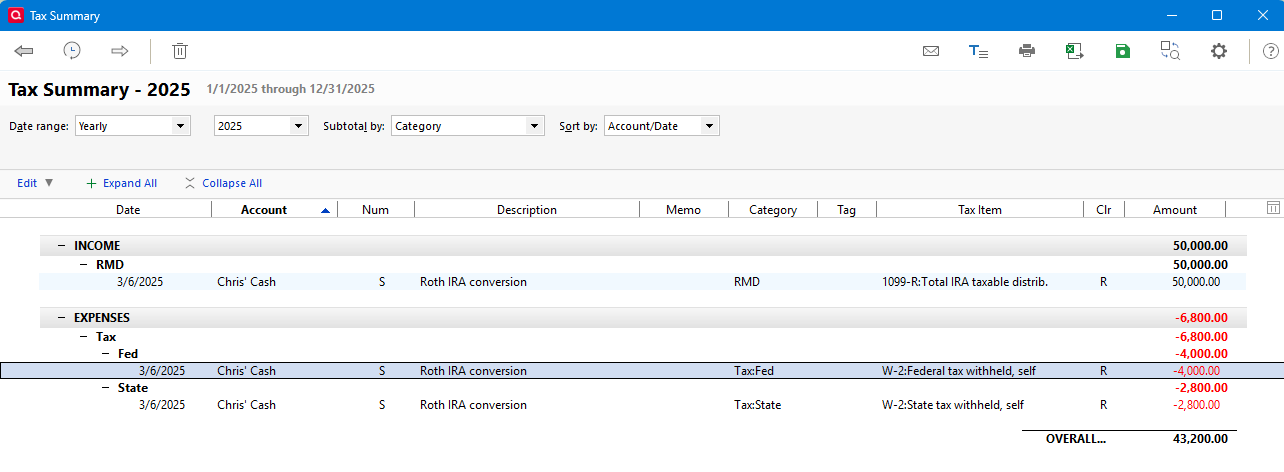
RMD in the category list:

[Edited - Removed partial account number]
1 -
@Chris_QPW Your reply about Quicken Windows isn't really applicable to Quicken Mac for this issue. (1) In Quicken Mac, you can't have a transaction which is a transfer to the same account. (2) I said both the transfer and adjustment could be done in one transaction for an RMD, but it really can't for a Roth conversion. In Quicken Mac, transactions in retirement accounts are excluded from tax reports, which is fine except for this use case. Since a Roth conversion is a transfer between two retirement accounts, there's no way to make it show up as a taxable event; that's why I illustrated the adjustment transaction as a separate, standalone transaction in a non-retirement account.
Quicken Mac Subscription • Quicken user since 19930 -
I think I must have been editing my response while you were posting, or I just missed yours for some reason.
Your approach is exactly what I was showing. As in using a balance adjustment so that you can record the total.
Normally Quicken Windows doesn't allow reporting on tax lines in taxable accounts either. (In reality for reports what it does is just exclude the tax deferred accounts by default, but this can be overridden. But the tax planner doesn't allow that.). Bottom line is that all of this has to be done in a taxable account. Chris's Cash above is my example of a taxable account entry for this.
Quicken Windows does have the quirk of allowing a tax line to be assigned to a transfer in or out of a tax deferred account, which is what @NotACPA referred to, but it definitely has "weaknesses". This is what it looks like in Quicken Windows:
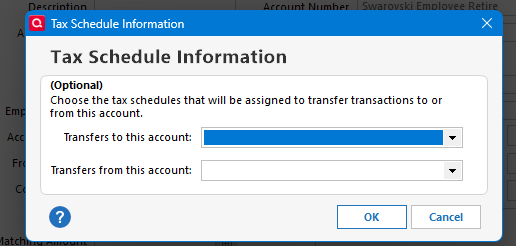
There is a couple of flaws to this (one more my opinion than anything else).
The first problem is what if you want to do different things for transfers? For instance, RMD, Roth Conversions, or just transferring off cash/security between accounts. This approach locks you into one.
The "opinion" one is this. The truth is that this isn't done as a transfer. The financial institution is actually going to be moving the money to an internal account(s) and then sending/reporting any taxes from those accounts. The main reason all of this seem "strange" is because of the fact that some of it is hidden.
Quicken Mac users are asking for the "Wizards" and things like this that Quicken Windows have, but I can tell you that these have their own share of problems. Because a lot of they do is hidden it is hard to fix problems when they come up. It was real fun time when the ESO wizard would mess up for me. Because what it did was record somethings in a hidden location and then do the rest with "normal security action transactions". If you needed to fix something, you ended up having to delete the whole ESO and recreate it, which could be years of history.
Even the Paycheck wizard has shown such problems especially if the user uses Sync to Web/Mobile. Many of times there have been reports of people past Paycheck entries being messed up. And there is a hidden tax account for all this.
0


