AMEX - one account won't reconcile

Quicken Classic Premier for Windows 11, Desktop subscription
Version R65.29, Build 27.1.65.29
I have two AMEX accounts that are both connected to Amex using DirectWebConnect+.
Only one of these accounts is experiencing this issue, which started about 3 weeks ago (Dec 25).
Both accounts download transactions. With one account, reconciles correctly (meaning I go through the list of downloaded transactions, check each on that matches and click "Done". The correct software behavior during the software reconcile is to change the "c" to and "R" update the "Difference" line to "0".
However, with the problematic AMEX account, I check all the matching transactions, but the software shows an increasing out of balance the more matches I check. The statement balance remains at "0". I cannot reconcile. FYI, the account has been used with Amex since 1999.
I've attached a couple of screenshots so you can see what I mean. All of these transactions have been posted to Quicken, so they all match. The statement ending balance should not be 0.
I've performed validate, supervalidate, disconnected and reconnected the DirectWebConnect+, and has not resolved the problem.
Thanks in advance for your help!
Comments
-
Hello @gigaboy,
Thank you for letting us know you're seeing this problem. To help troubleshoot, please provide more information:
- When was the problem account last successfully reconciled?
- Are you reconciling against the Online Balance?
- If you are, then the statement ending balance Quicken is filling is would be the Online Balance from American Express.
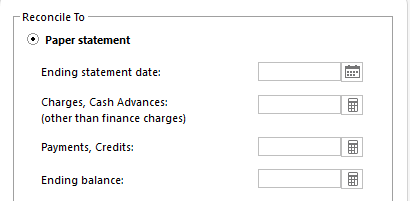
If you are reconciling against the Online Balance, then switching to the Paper statement option may be a viable work around, since that will allow you to manually fill in the correct information.
I look forward to your response!
Quicken Kristina
Make sure to sign up for the email digest to see a round up of your top posts.
0 -
Started on 12-25-2025, a day after AMEX's monthly closing date for that account.
I've always reconciled against online balance, and do so every day that I'm here.
Would switching to paper statement be a temporary fix, just to bring into current online balance, and then revert back?
0 -
OK, so I've disconnected the online connection to Amex. Ran a validate. Got this message:
"Quicken repaired American Express - Hilton account. No action required."Reconnected the account. Tried a reconcile again. Same problem.
0 -
I've closed and reopened Quicken. Went to my working AMEX account (a different one) that I haven't had any problems with, tried a reconcile. Now its broken!
0 -
Here is my latest attempt at fixing the problem.
I logged in to my Amex account online, and revoked all access to Quicken. There were four instances of Quicken authorized, even though I only use Quicken on one desktop. Then I went to Quicken and removed online access to the account. I then ran a validation, closed the program, waited a few moments, and restarted Quicken. I then went through the steps of re-initiating online access to the Amex account from Quicken to Amex. I attempted to run another online update. The same problem exists.
I've attached screenshot 4, which shows the correct display where another account is to be reconciled to its online balance.
Notice that the statement ending balance should be a positive number. Review screenshot 2 which I posted earlier in that the statement ending balance is 0, which is not the case.
I have never balanced any of my accounts using a paper statement. It has always been reconciled to the online balance, and for this problem AMEX account, since 1999.
0 -
Thank you for your reply,
I recommend that you contact Quicken Support directly for further assistance as they have access to tools we can't access on the Community and they're able to escalate the issue as required. The Quicken Support phone number can be found through this link here. Phone support is available from 5:00 am PT to 5:00 pm PT, Monday through Friday.
I apologize that I could not be of more assistance!
Quicken Kristina
Make sure to sign up for the email digest to see a round up of your top posts.
0



