Problem downloading data from Vanguard

January 1, 2026, I downloaded my Vanguard accounts (4 of them) and had many problems. The first problem that I encountered was the change in the Quicken screen as to how I viewed the account and I could not figure out how to fix the split screens with different graphs and information, back to the plain old listing of account data with downloads at the bottom that you had to approve and accept. Eventually, I got the downloads to work.
Today, Jan. 15, 2026, I tried to figure out what the problem was and attempted to download one of the accounts. First, I attempted to download a file directly in Quicken from Vanguard using direct connect. It failed. I went to the account and uninstalled it from downloading. Then I changed the method of data collection from "simple" to the other choice of complete. Then I attempted to install the online update process again. It required me to enter my Vanguard user name and password. Then another screen popped up in which there was a filled in circle next to the comment that I had a user name and password. Above that was another box telling me to contact Vanguard to setup the account and provide the user name and password. I checked all 4 of the Vanguard accounts and ended the online update information for two of them but the other 2 were correct so I left them in place. I attempted to setup one of them for online download and had an endless loop of failure as described above.
Gave up and went to Vanguard account as I would normally and attempted to download one of the current accounts. Vanguard created the file to download but when I clicked it to download into Quicken it quickly popped up two messages. Here are the error messages (couldn't figure out how to do a screen shot.) Quicken: "Please wait while Windows configures Quicken [cancel] followed quickly by the next message: Quicken: There are Quicken components currently open and cannot be uninstalled. Please close Quicken and try uninstalling again. [ok]. (If you click ok, it stops the execution of the download.)
Help! I am now unable to download Vanguard either way at this point. It is year end and I must be able to accurately book all of the necessary information.
Thanks for your help.
Best Answer
-
Today, January 16, 2026, transactions from Vanguard did not download to Quicken. I did not receive and error message. The account transaction register had the message "last download January 16, 2026 - 9:26AM (Direct Connect)". To update my Quicken file I used the download function in Vangard.com. Anyone else have this issue?
2
Answers
-
I am having the same problem. [Removed - Speculation] I have wasted many hours trying to get a fix as Quicken wants to access the msi file to seemingly install components that never work. It is an endless cycle of frustration. [Removed - Rant]
1 -
Thanks for your input. I have 4 accounts at Vanguard. Two of them were "fixed" by Quicken to be "simple investing" and two were left as before. I only download once a month to capture the entire month's data for reconciliation.
On January 1, after lots of trouble, I was able to download all four accounts but the "simple investing" didn't download transactions so the stock that I had sold in December simply didn't show up.
Today, Jan. 15, I disconnected the two accounts from Online transactions and changed them back from "simple investing" to "Web Direct. . " I am now unable to get them connected back to Vanguard. Worse, I attempted to download data for one of the other two that I had not changed directly from Vanguard, as I usually do. Vanguard created the file to download bu when I click on it, it pops up the two messages that I indicated originally and when you click ok on the second one it wipes out the download execution.
Now, I cannot do anything with Vanguard and Quicken. Yes, I am very frustrated.
0 -
Today, January 16, 2026, transactions from Vanguard did not download to Quicken. I did not receive and error message. The account transaction register had the message "last download January 16, 2026 - 9:26AM (Direct Connect)". To update my Quicken file I used the download function in Vangard.com. Anyone else have this issue?
2 -
I am having the same problem that transactions from Vanguard using their download function is not working. Also, no error message.
Additionally, I believe that a Quicken update caused the problem. I have 4 Vanguard accounts and magically 2 of them changed to "simple investing" while the other 2 stayed the same as always. I deactivated the 2 accounts that said "simple investing" and changed their type of investing back to what it was originally. Then I tried reactivating them. I'm now in an endless loop of entering the Vanguard user name and password, once I hit enter it sends me back to enter the user name and password. Totally need support to look at this and advise how to fix it.
0 -
Hello @HelenT,
Thank you for reaching out! Since you said you want Support to take a look at it, I recommend that you contact Quicken Support directly for assistance. The Quicken Support phone number can be found through this link here. Phone support is available from 5:00 am PT to 5:00 pm PT, Monday through Friday. Note - Support will be closed tomorrow, 19 Jan 26, to observe Martin Luther King Jr. day.
If you prefer to try troubleshooting here on the Community, then please provide more information. Do you see any additional information when Quicken prompts you for username and password again? Some financial institutions require that you authorize the connection through their website as well, which may be the cause of this loop you're running into. If you're willing, please provide a screenshot of what you are seeing. Please refer to this Community FAQ for instructions on how to attach a screenshot, if needed. Alternatively, you can also drag and drop screenshots to your response if you are not given the option to add attachments.
Hello @DJ3,
Thank you for letting us know you're seeing an issue. The issue you describe sounds different from the issue others are posting about. I can also see that you contacted Quicken Support about the problem earlier and they referred you to Microsoft. Was Microsoft support able to assist?
Hello @Robert Chiarulli,
Thank you for letting us know you're having a problem with transactions not downloading. If you haven't already done so, please start troubleshooting by following these steps from our article on missing transactions/transactions not downloading:
Be sure to follow these steps in order:
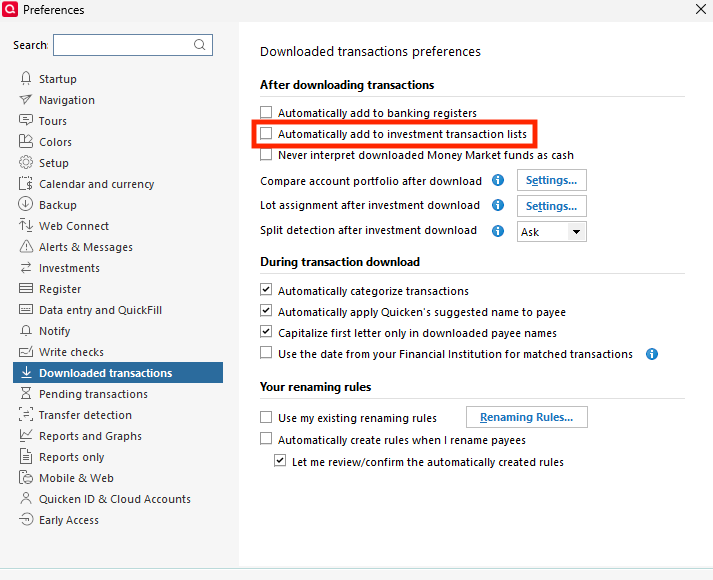
1. Go to Edit > Preferences > Downloaded Transactions. The option Automatically add to investment transaction lists needs to be unchecked.
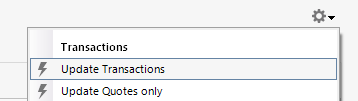
2. Refresh your online account information by clicking the Actions Gear Icon on the upper right of the register, and select Update Transactions. Follow the on-screen instructions to complete the update.
3. Confirm that the Sort Order in your account is by Date; just click the top of the Date column in your account register. It's possible the transactions are in your register, but not where you thought they'd be.

4. Try refreshing your login session: To do this, go to Help > Refresh Sign in. After completing the log-in process, trying running a One Step Update again.
5. Go to Tools > Account List and check Show Hidden Accounts at the bottom left. Confirm the missing transactions haven't been added to a hidden account by clicking on the name of any account that appears with a check mark in the Hidden column.

I hope this helps!
Quicken Kristina
Make sure to sign up for the email digest to see a round up of your top posts.
0 -
I have the same issue Vanguard transactions not updating in Quicken! The last update I received was 12/31/2025. I tried all the steps above, but it is still not updating with either one step update or transactions update.
[Edited - Readability]
0 -
Hello @MarcusW,
Thank you for letting us know you're also encountering this issue. Since the troubleshooting steps did not resolve the issue, please reach out to Quicken Support directly for further assistance. They have access to tools we can't access on the Community and they're able to escalate the issue as needed. The Quicken Support phone number can be found through this link here. Phone support is available from 5:00 am PT to 5:00 pm PT, Monday through Friday.
I apologize that I could not be of more assistance!
Quicken Kristina
Make sure to sign up for the email digest to see a round up of your top posts.
0 -
Doesn't work!!!!
Really getting irritated. I have had 12 Vanguard accounts with a lot of transactions from the past, downloading fine till ~ last Nov Dec. Have followed all the instructions for getting it work (The preferences is correct. Most current version etc.). Get it set up with some then every time it changes it to Simple, and I have to start over.
[Edited - Readability]
0 -
Hello @BEL,
Thank you for letting us know you're having issues with the tracking changing to Simple. To clarify, when is this happening? For example, is it as soon as you connect/reconnect the account, it's Simple instead of Complete? If not, at what point does it change, and is there anything that seems to trigger the change?
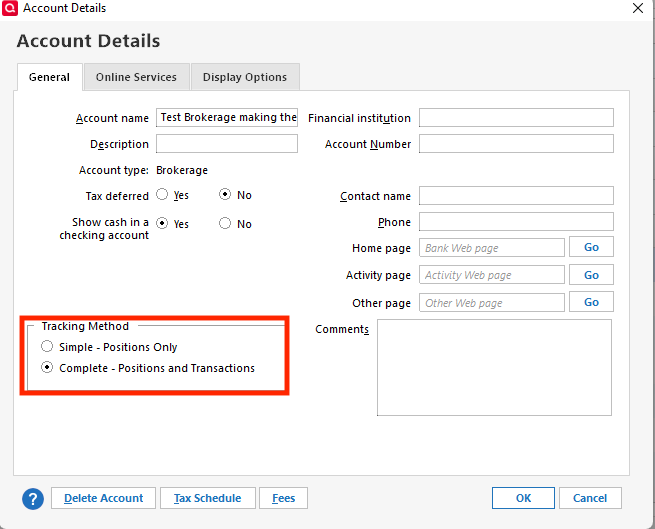
Are you able to switch it to Complete tracking by going to Tools>Account List, clicking the Edit button next to the problem account, and changing it on the General tab?
I look forward to your response!
Quicken Kristina
Make sure to sign up for the email digest to see a round up of your top posts.
0 -
Hello @BEL,
We haven't heard back from you in a while. Do you still need assistance?
Check back and let us know! Thank you.
Quicken Kristina
Make sure to sign up for the email digest to see a round up of your top posts.
0
