Is Quicken online down? Can't add new account

Answers
-
I started the "Add Account" just now (5:20pm CST) and it worked.
Q user since February, 1990. DOS Version 4
Now running Quicken Windows Subscription, Business & Personal
Retired "Certified Information Systems Auditor" & Bank Audit VP0 -
Hello @nhttip,
Thank you for letting us know you're seeing this issue. To troubleshoot this issue, I recommend you start by closing and reopening your Quicken program (if you haven't already done so).
If the issue persists after you've restarted Quicken, please provide more information. Was there anything that happened just before this issue started, such as a program/computer update or unexpected program/computer shut down? Do you keep your Quicken file directly on your local hard drive? Is it synced with any cloud service, such as OneDrive, iCloud, or Dropbox? Do you sync your file with the Quicken cloud?
I look forward to your response!
Quicken Kristina
Make sure to sign up for the email digest to see a round up of your top posts.
0 -
Yes, restarted Q. No major issues, file stored on my local hard drive, no syncing.
0 -
Thank you for your reply,
To check for file-specific issues which may be causing this, I suggest that you try validating your data file. Please save a backup file prior to performing these steps.
Validate:
- File
- Validate and Repair File...
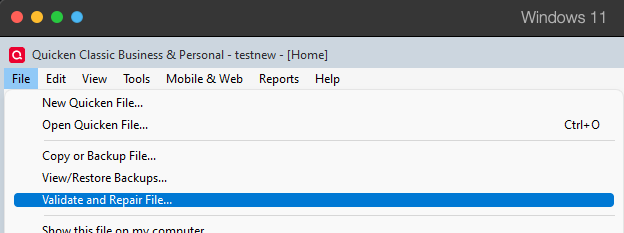
- Validate File
- Click OK
- Close the Data Log
- Close Quicken (leave it closed for at least 5 secs)
- Reopen Quicken and see if the issue persists.
Please let me know how it goes!
Quicken Kristina
Make sure to sign up for the email digest to see a round up of your top posts.
0


Categories
- All Categories
- 18 Product Ideas
- 34 Announcements
- 246 Alerts, Online Banking & Known Product Issues
- 19 Product Alerts
- 517 Welcome to the Community!
- 682 Before you Buy
- 1.5K Product Ideas
- 55.7K Quicken Classic for Windows
- 16.8K Quicken Classic for Mac
- 1K Quicken Mobile
- 834 Quicken on the Web
- 127 Quicken LifeHub