What is the problem with syncing a scheduled transaction

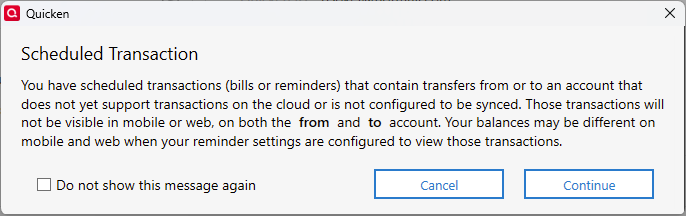
I have not been nor really intend to sync to the cloud but for the fun of it I turned on sync and got this. [Edited - Language] Can someone suggest what this means? Maybe there is somewhere in the bowels of quicken data files that would actually show me what scheduled transaction is causing Quicken to complain.
Answers
-
Hello @Snorkle,
That message typically means that you have one or more bill or income reminders which impact an account that either does not support transactions in Quicken on the Web (such as investment accounts) or an account that you did not select to sync with the Quicken Cloud. The message ensures you're aware that any reminders impacting such accounts will not show up in Quicken on the Web and the Mobile app.
I hope this helps!
Quicken Kristina
Make sure to sign up for the email digest to see a round up of your top posts.
0 -
It would be nice if the message specified the offending account(s) or transaction. Based on your comment regarding investment accounts it is probably the monthly transfer from a money market fund to my checking account.
0 -
Thank you for your reply,
That monthly transfer does sound like the most likely cause of that message.
I recommend creating an Idea post to request that the error message contain more specifics about which account/transactions are causing the message to appear. Ideas that get enough votes may be implemented in the future. For more information about creating an Idea post, please review the post linked below:
Thank you!
Quicken Kristina
Make sure to sign up for the email digest to see a round up of your top posts.
0
