Fidelity Updates Still Broken after Update
Comments
-
I got some December HSA transactions yesterday too. What Fidelity website reports as "SHORT-TERM CAP GAIN" is imported to Quicken as a Dividend. Not a huge error, but not quite correct. I reported it as a bug.
0 -
I finally did my conversion/ update. My last update was early September right before the deadline. I had some existing accounts and some new that had never seen a download.
It allowed me to link existing and setup new Quicken accounts for the new.
It had me re-authorize and then started downloading. For my old account, it said it downloaded 1000's of transactions, but it only downloaded like a month and a half! And put them in pending downloads. No placeholders added, which is strange.…but I just have to enter a few months of activity.
For the new accounts it also only downloaded a month and a half or so, and it did put in placeholders. I deleted those and entered the missing months, all good. I did try re-downloading because in the past, if I had more than 3 months to download, it would do it in 3 month chunks but this time it did not.
So, not too bad. The only question I have is I never saw a question whether to track the core MM account or not. And I don't see that in account options. For most accounts, I have a default core MM account and the FZDXX which has buys and sells. The dividends for this account it did not download as a buy.
I have been following all of these discussions, but not sure where things stand on the money market track or don't thing. I really don't care that much...just need to either continue tracking or not. I did expect if there is a core MM account and a non-core you use, it should probably show the buy and sell into that second one.
All in all not a bad conversion. Wish it would have downloaded all 3.5 months is all.
Thanks for any input.
[Edited - Readability]
0 -
Hello @BJB,
Thank you for sharing your experience! The reason less history downloads is because the conversion was causing months, and for some, years worth of duplicate transactions to download. Restricting the amount to just 1-2 months worth made the post conversion cleanup easier for customers.
The cash representation option should appear in brokerage accounts. What kind of accounts do you have (brokerage, IRA, 401k, etc.)?
I look forward to your response!
Quicken Kristina
Make sure to sign up for the email digest to see a round up of your top posts.
0 -
Thanks. They are all brokerage accounts. For Quicken Windows, exactly where is the option? Account specific or global? If I change it before the next download I assume they will come through with buys and sells. Still confused as the one that didn't was not a default MM option...
Thanks
[Edited - Readability]
0 -
Thank you for your reply @BJB,
It's an account-specific option. You should be able to access it a couple different ways. In your investment accounts, the Cash Balance near the lower right of your register should be a blue link.

Click on that link and it will bring up the Update Cash Balance window. Click the Cash Representation button.
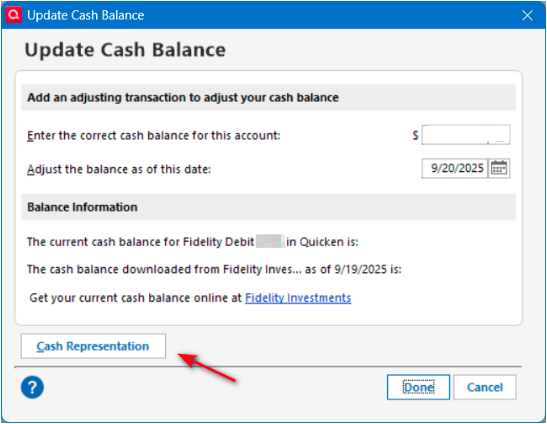
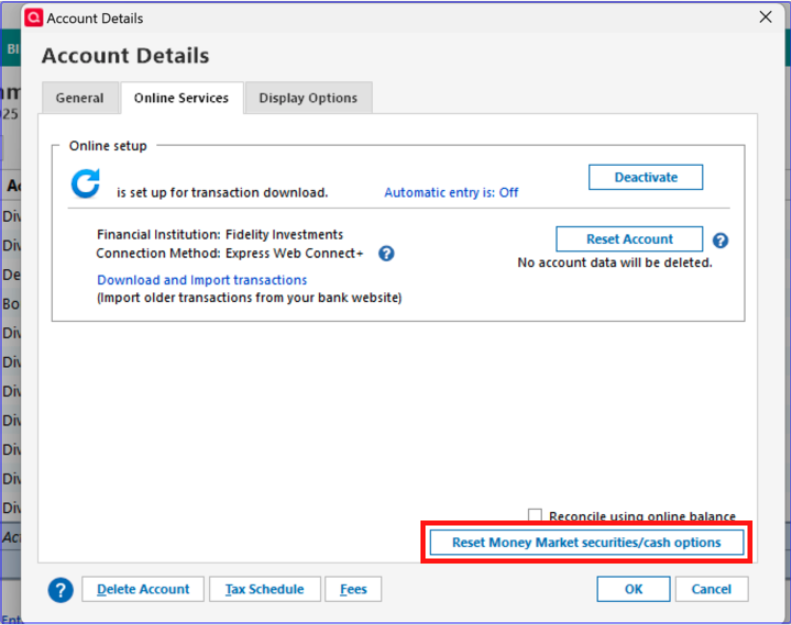
The other way to get to the cash representation option is by navigating to Tools>Account List, click the Edit button next to the investment account, then go to the Online Services tab. Click the Reset Money Market securities/cash options button.
I hope this helps!
Quicken Kristina
Make sure to sign up for the email digest to see a round up of your top posts.
0 -
Thanks, it does! Can you confirm this is just for future downloads and it will not impact prior or current balances? Still a little concerned because I don't care if SPAXX is treated as cash, but want FZDXX treated as buys and sells, as they are so. Sometimes it is treating both as cash.
[Edited - Readability]
0 -
Thank you for your reply,
It's a good idea to backup your file prior to making changes. Changing whether a security is represented as cash or as a security can impact current balances. See the screenshots below.
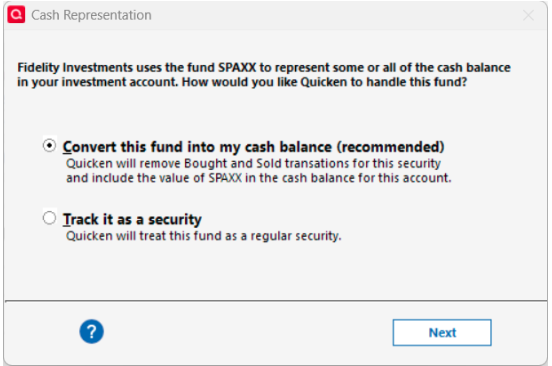
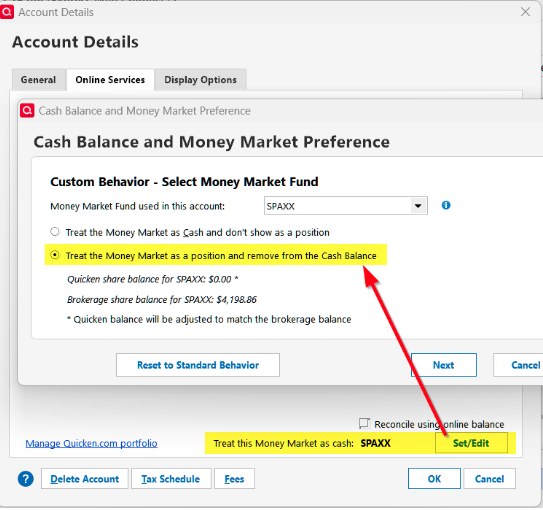
Thank you!
Quicken Kristina
Make sure to sign up for the email digest to see a round up of your top posts.
1 -
Kristina,
Recently, Fidelity reinvested some amount of cash in my brokerage account. While downloading the transaction I classified it as Reinvestment. Now, in the Account Holding window I see Cash and Cash Units. The later one comes from the Security List.Is there a way to transfer Cash into Cash Units, for consistency?
0 -
I would like to get this working as well - my retirement accounts generally use FDRXX for the core position, and Quicken is often informing me that the shares reported by Fidelity don't match Quicken's share balance. Generally I get Quicken to ignore this, but I have to remember to go into the details in order to tell Quicken to ignore the discrepancy. If I forget, I have to adjust my cash and share balances afterwards, to reset FDRXX to zero and adjust my cash balance.
I don't have all of the same screens I see above. What I do have, on the Online Services tab, is

The Set/Edit button opens:
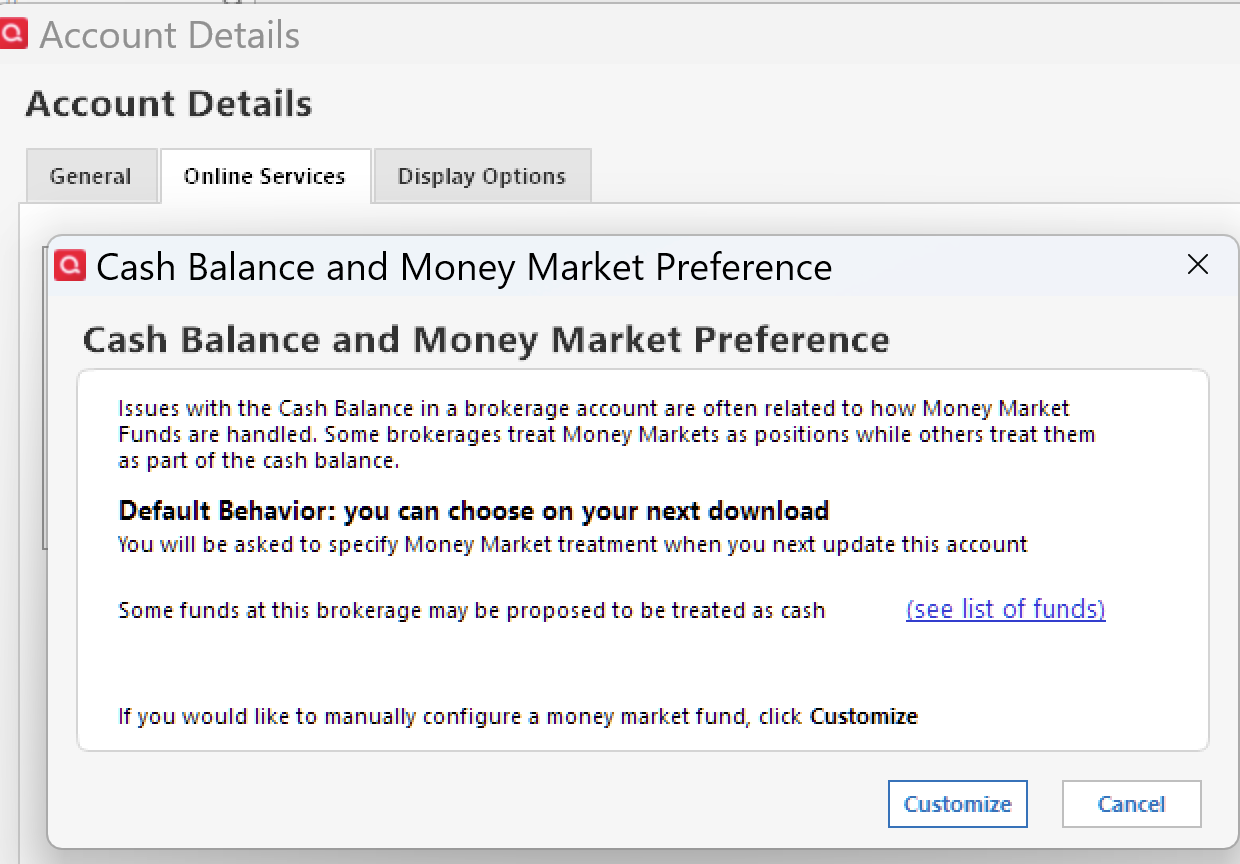
Perhaps I don't understand what the "Default Behavior" is supposed to look like, but I am never offered a choice when downloading. Quicken is either silent on the topic, or warns me about the FDRXX share balance discrepancy.
Is it possible that Quicken actually does not recognize FDRXX as a core account? It's not on the list of funds I see when I click the link:
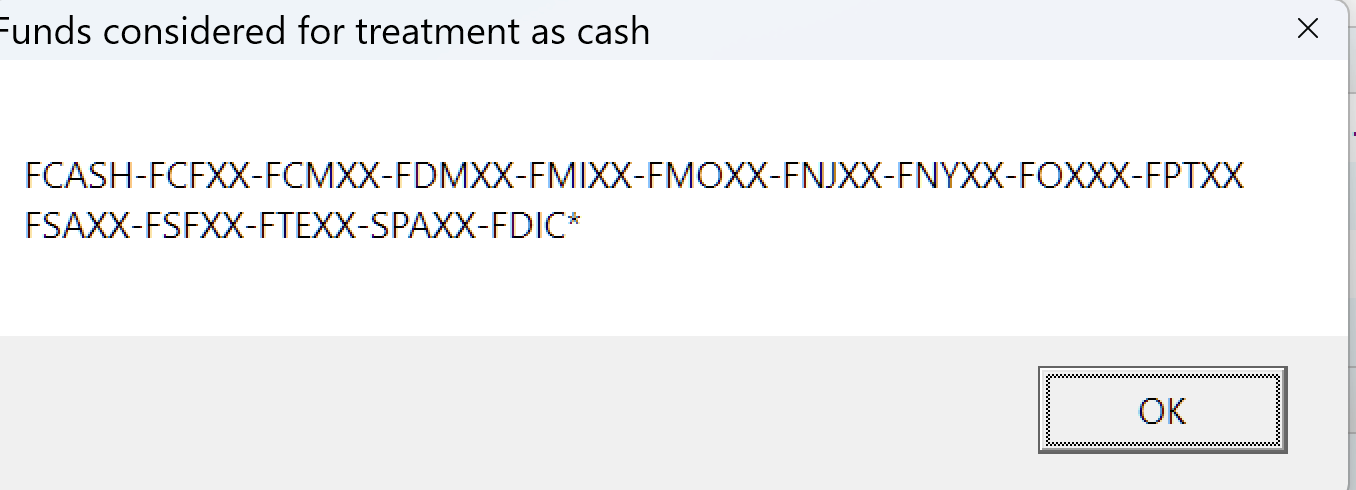
Is it merely cosmetic that FDRXX is not on the list? Or is that significant?
If I enter the Customize dialog, it does seem that I can designate any of my money market funds - I have 2, neither of which is on that "Funds considered" list. But it looks to me like the funds are simply be presented to me because they "look like" money market funds, as stated by the tooltip help:

The reason I am doubtful that this is working is because I can also select a fund that I know is definitely not used by Fidelity as a core account - it's on my list but it's not my core and cannot be my core.
I'm also doubtful, because I tried it on one account, and had disastrous results, leaving me with a cash balance of negative tens of thousands of dollars. When adjusting things, Quicken deleted up to decades of money market redemptions which had increased my cash balances in each case. And then it didn't even leave me with a sensible final balance.
Fortunately I am still running Quicken for Mac in parallel, so I was able to compare registers and make adjustments in QWin.
I have several other accounts to work on - and don't want Quicken deleting transactions in them. I can see in the Custom Behavior options that its plan will be to delete many Buy, Sell, Add and Remove transactions. Can this not be avoided?
My Quicken cash balances currently match my FDRXX share balance at Fidelity - that seems like I should be all set for the future.
I must be missing the step that will be the easy fix.
1 -
I am in a similar situation. Some many transactions ago I kind of ignored in Quicken to transfer systematically Cash into FDRXX. So, my Holdings lists Cash and FDRXX. As long as their total is equal to the value of FDRXX specified in a Fidelity's account monthly statement I ignore the FDRXX share discrepancy alert coming from Qckn.
I am thinking, nevertheless, eventually to transfer, but only inside of Qckn accounts, cash into FDRXX by "buying" those shares, to be in sync with Fidelity monthly statements.
I also noticed that Qcnk now lists Cash Units in the Securities List. Not sure how the program differentiate them. I am awaiting for response from "Quicken Kristina" about how to transfer Cash into Cash Units.
1 -
If you access the online center for your account, does it show FDRXX as the cash balance?
Deluxe R66.23, Windows 11 Pro
0 -
I just converted. In my first post-conversion download it treated both my core money market funds and another money market fund I also use both as cash. I think I am just going to leave things be as I don't really care that much. FWIW I never saw the choice box on how to treat MM funds either during the process. The cash balance is hyperlinked and I can click on that and it asks about the current online vs quicken cash balance. My online tab looks same as before. Maybe I missed how to open the MM choice box but since everything ties out now I might just leave things. Do a fake sale of my MM so it hits cash and move forward.
My fear is what is mentioned by @qudtp does something with my history.
0 -
@BJB From what I've read on the discussions, Fidelity conversion doesn't download all the history if it was several months since a transaction download. If you updated your history manually during that period, it should be okay. If not, there may be transactions missing, but I would think that would show up in the account balance. If there turns out to be a period of time with a large number of missing transactions, Quicken has the ability to import csv files from Fidelity and that may be a way to get missing transactions. Creating a backup before checking out the csv import is advised.
Deluxe R66.23, Windows 11 Pro
1 -
Thanks.
I was just at about 120 days. Pre-conversion I could download one chunk, then download again and Fidelity would pick it up. This time it picked up about 30 days and a second download did nothing. So I keyed in 3 months, deleted placeholders and all is good.
But then one chase CC downloaded and another one didn’t so have to figure that out now😀
0 -
@Quicken Kristina thanks for your help above in making my conversion go fairly well!
0 -
Thank you for the follow-up @BJB,
I'm glad to hear the conversion went fairly well!
Hello @ZQkn,
Your description makes it sound like Cash Units is being seen as a holding in that account. If that is the case and you want all cash to show as Cash Units, then you may be able to do so by setting your cash representation to see cash as Cash Units. To do that, click the blue number that represents your account's cash value, and in the Update Cash Balance screen, click the Cash Representation button and choose the appropriate options.
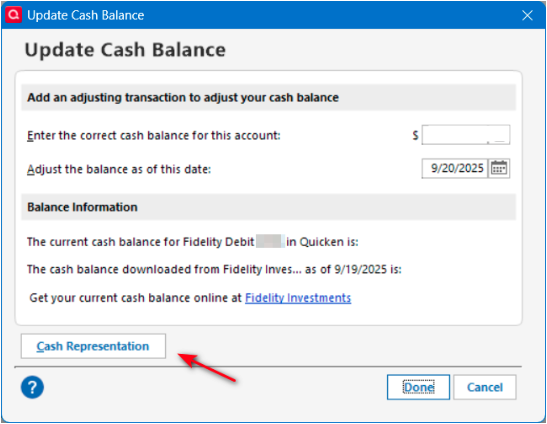
I hope this helps!
Quicken Kristina
Make sure to sign up for the email digest to see a round up of your top posts.
0 -
Kristina,
My Cash balance isn't represented in blue fonts but only word Cash is. When I click on it I don't see what you posted.
Please see the attached.
Thank you.

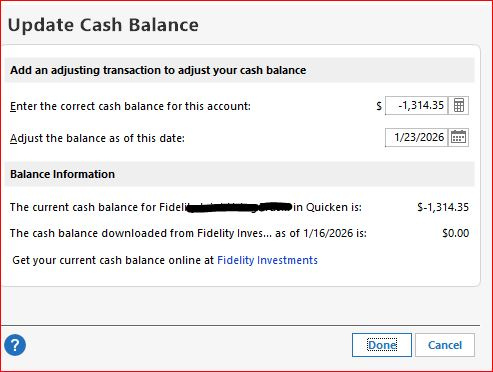 0
0 -
Thank you for your reply,
What kind of account is this (brokerage, 401k, IRA, etc.)?
Thank you!
Quicken Kristina
Make sure to sign up for the email digest to see a round up of your top posts.
0 -
It is a brokerage account.
0 -
Thank you for your reply,
You should be able to see the option in a brokerage account. Try going to Tools>Account List, click the Edit button next to the account, then choose the Online Services tab. There should be a Reset Money market securities/cash options button.
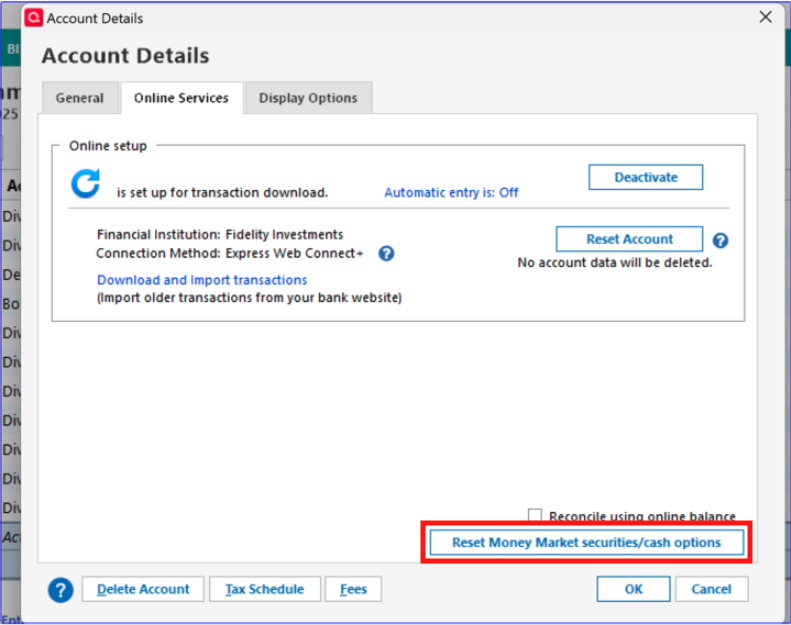
If you don't see the option there either, then please try manually reinstalling the most recent Quicken update patch. Please use the article linked below to download the patch and for the instructions on manually installing it:
Thank you!
Quicken Kristina
Make sure to sign up for the email digest to see a round up of your top posts.
0 -
Do you have any suggestions for me? I posted on 1/18 and don't think I've heard anything back. Thank you.
0 -
Thank you for your reply @qudtp,
To clarify, are you not getting the option to set FDRXX as cash at all, or is the problem that doing so throws off your balances?
There was a CTP for an issue with FDRXX not being handled correctly earlier (CTP-15746), but it was marked as fixed in version R65.29.
Thank you!
Quicken Kristina
Make sure to sign up for the email digest to see a round up of your top posts.
0 -
Kristina,
I don't see what you posted. See the attachment.
However, I think, we are drifting away from content of my original post. It was about Cash vs. Cash Units. Not how to treat/represent cash in a
brokerage account.
I wrote: "I also noticed that Qcnk now lists Cash Units in the Securities List. Not sure how the program differentiate them. I am awaiting for response from "Quicken Kristina" about how to transfer Cash into Cash Units."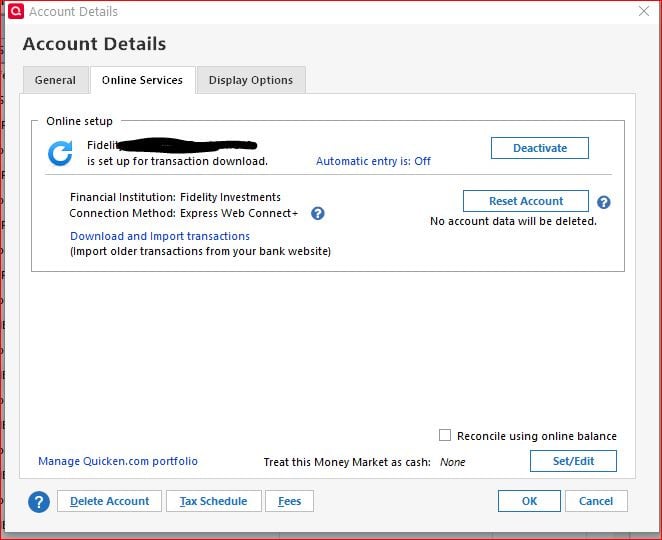 0
0 -
There are 2 aspects to this:
1) FDRXX is not listed as one of the potential money market funds that Quicken considers potential core funds. That's the list I pasted in my previous post: "Funds considered for treatment as cash." This may not have any practical impact, but might just be a bad list.
2) When I proceed, I can select FDRXX - Quicken displays a little drop-down menu that lists every money market fund I own in the account, including this one, but also including some funds that I know can never be used as core funds. That makes me suspicious of the list of funds. Neverthless, I pick FDRXX and can proceed.
3) Quicken then offers a number of options in terms of what will be the new cash balance, and one of the options is correct. BUT: in all cases, Quicken also indicates that it plans to delete older transactions involving FDRXX - transactions - some which occurred many years ago. These would be things like buy and sell transactions of that fund.
I already allowed Quicken to do this with one my accounts, and ended up with a balance of approximately -41,000, because Quicken deleted every instance in the past where I had ever redeemed shares of that fund. I had to find all of those deleted transactions and add to the cash balance through an Xin. (Alternatively, I could have just done a single large Xin on the current date, but that would have left my running balance in the account wildly wrong for basically the lifetime of the account.)
In fact my cash balance in Quicken is already correct, and my core fund is set to $0, because I have always forced them to be so. In the past, it meant doing a share adjustment and cash adjustment to fix the balances. More recently I simply block Quicken from making changes when it reports a fund and cash mismatch after downloading - I finally found that the way to do this is hidden behind the button to look at details, and if you do look at those details, the default when closing the window is to ignore the mismatch, which is the opposite of the default if you do not go into the details but simply close that mismatch window. And ignore is exactly the right behavior.
This is what I want:
- Going forward, the fund FDRXX should be treated as cash.
- Set my current cash balance as the current balance in FDRXX as reported by Fidelity.
- DO NOT DELETE anything from my history. Leave my history alone, and just adjust my cash balance. (My cash balance in Quicken is already correct, and my core shares are zero. Everything is perfect. I want Quicken to leave it alone, and just GOING FORWARD, treat core activities as cash.)
How can I accomplish this?
1 -
Thank you for your reply,
The tool tip indicates that any fund with a value equal to $1 per share and a positive balance can be selected.

That may be why you see some funds in the list which would never be used as core funds.
Since all of the options say that they'll delete the buy/sell transactions associated with that fund, it doesn't look like there are any which will do what you want without adding the transactions back in after they're removed.
If manually re-adding the transactions would be a lot of work, it may save time to backup your file, deactivate the account, navigate to Tools>Add Account and follow the steps to add the account as new in your Quicken. Set the new account to the cash representation preference you want, then use the move transactions function to move your transaction history from the old account to the new.
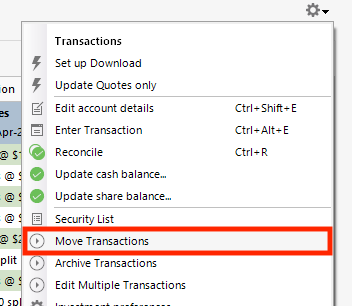
If it is showing Cash Units in the Security List, that indicates that the information is being sent to Quicken as a holding/security. That is why I recommended seeing if you're able to set your cash representation to cash units. If you are still not seeing an option to do that in your Quicken, did you try reinstalling the most recent update, as I recommended in my earlier post?
Thank you!
Quicken Kristina
Make sure to sign up for the email digest to see a round up of your top posts.
0 -
I went simpler way. I just revised the transaction that Quicken allocated to Cash Units by selecting Cash instead. Luckily, I had only one of those.
Also, in the Online Services tab, I selected "Reconcile using online balance", i.e., the balance in the Fidelity, and proceeded to select Set/Edit button. While going through the following steps/process I eventually converted all my Cash into FDRXX to match what Fidelity site/statement were showing. They don't list any simple cash balance.
So, I am set now and satisfied.
Thank you.
1 -
Thank you for your reply,
I'm glad to hear the issue is resolved, and thank you for sharing how you resolved it!
If you need further assistance, please feel free to reach out!
Quicken Kristina
Make sure to sign up for the email digest to see a round up of your top posts.
0 -
I am finally getting back to you about this - I hesitated to try out your suggestion because (1) I don't feel comfortable moving transactions and (2) restore from backup has never worked for me quite like it is documented, so I fear doing it.
So - I tried out what I thought you meant. After deactivating, I wasn't sure what kind of new account you wanted me to create - a new online account with Fidelity, or a new offline account, so I tried offline first, moved the transactions into it, but found that I could not link this to Fidelity nor set up cash representation at all.
So, pending more specific advice, I restored the backup. As always, it didn't work quite as expected. I picked the option to restore my own backup, selected the backup, and - as always - it did not "overwrite" my data file. Instead, the backup was copied to the Quicken data folder and retained the name of the backup. That always happens, and leaves me with a bizarre data file name.
So now I have a Quicken data file named:
Qdata-2026-02-12 Before fixing cash representation.QDF
and the associated file:
qdata-2026-02-12 before fixing cash representation_SyncLog.dat
Sitting alongside the originals that are documented to be overwritten but are not overwritten.
Qdata.QDF and qdata_SyncLog.dat
My questions going forward are -
With respect to data file name, is it safe to rename the 2 nicely name older files, and then rename the new QDF and dat files to their normal names (Qdata.QDF and qdata_Synclong.dat)? That is, no negative side-affects from doing that?
And then, to clarify exactly what you were suggesting - maybe your suggestion was
- Create a new online account at Fidelity
- I believe that will download up to a few months of the account data, and during or after that point I should set up the cash representation option
- THEN, move in the old account transaction history - being careful of overlap, since when I set up this new account, a few months of transaction data will have downloaded from Fidelity
Is that the idea?
BTW before doing this, just earlier upon a normal OSU, just clicking on one of the involved retirement accounts, I was prompted whether to treat a specific MMF as cash or shares - with no option to cancel. I had to pick one or the other, then click Next. If I picked cash, it said it was going to delete all buys and sells, same problem as before, except this automatic prompt didn't tell me how many buys and sells it was planning to delete, which you are shown if you set this up manually through the Custom feature. The only other option was to keep as shares. I elected to keep as shares for now, it inserted a single new buy transaction, which I simply deleted. Then it warned me, as always, of the share mismatch, which I instructed it to Ignore.
0 -
@qudtp : I've never tried using the internal restore from backup in Quicken. Or if I did, it was so many years ago that I've forgotten. I backup daily and restore frequently.
What I do is 1) make sure I've closed Quicken. 2) I rename whatever data file I don't want to something else, like Qdata.failure1.20260212.QDF. 3) I don't /rename/ the file I'm restoring from, but make a copy of it. 4) Then I rename the /copy/ to my desired primary data file name such as Bob2026.QDF. That step is the restore. 5) Finally I double-click on the newly renamed file (Bob2026.QDF) to open Quicken using the desired file.
Your 3-bullet plan seems like it would work, but another option would be:
- Make sure you're working on a copy of your best data file.
- Use the Edit/Delete Account function to make sure you have your fidelity account(s) named the way you want them. The original online accounts that used to download from Fidelity. I suggest adding the fidelity account number, or at least the last 4 digits, to the display name of the account to help you verify which is which.
- While there, if the Online Services tab offers a "Deactivate" option, do a full deactivation. It's not always needed, but especially when there's been such a long gap in downloads, I find it seems to avoid problems.
- Then check the General tab, and if there's anything in the Account Number or Financial Institution or Username field (you may not have all three), delete that data. You want to make sure there's no old data in those three fields to confuse the new attempt.
- OK to exit Account Details, and then go back into Edit/Delete to verify those fields are blanked out. OK to exit.
- Make Sure that your Preferences > Downloaded Transactions do NOT automatically add to investment transaction lists. You need this to be manual at least to start.
- Check your opening transactions and balances. If there's an Opening Balance transaction with a non-zero value, record that value (perhaps in the memo/description field). These sometimes get changed without notice during a reauthorization process.
- Use the "+" at the top of the account bar or Tools>AddAccount to start the process of connecting to Fidelity.
- After you've authorized, your account(s) will be listed. make sure you choose "link" to existing account, not create new account. If you have multiple accounts, make sure you link each one to the correct account (which is why I suggest having numbers there).
- The download may generate some duplicates, depending on how long you've been disconnected. These will be in the Downloaded Transactions. Start with the oldest, and delete any downloaded duplicates. You won't be changing the good historical transactions.
- When you're confident that all you have in Downloaded Transactions are new transactions, process any that happen to be transfers in/out first, manually, to make sure they get recorded the way you want them.
- You can then Accept All or do the remaining transactions one by one, your preference. I Accept All in my Fidelity accounts.
Good luck.
0 -
Kristina,
I take back what I wrote on 1/27:
"I went simpler way. I just revised the transaction that Quicken allocated to Cash Units by selecting Cash instead. Luckily, I had only one of those."I just was dealing with downloading last month, January, transactions and reconciling my balance with Fidelity monthly statement. Fidelity continues to download Cash Units and it messing up everything at the end, i.e., having Cash and Cash Units in the account.
I ended up using cash in the account and "buying", within Quicken, Cash Units and FDRXX share to match the monthly statement. Let's see how it goes next month.
0


