What is the difference between the Current Budget and Historical Budget reports?

Can somebody please explain what the intent is behind these two reports. They seem to be virtually the same on my system. I should explain that I have only one named budget, with annual changes in which categories are budgeted going back to 2014.
Secondary question: both of these reports have a Budget Year selection box at the top. If I click the down arrow on this I do not get a list of years as I would expect. But a dark black line does appear at the bottom of the selection box (see screenshot).
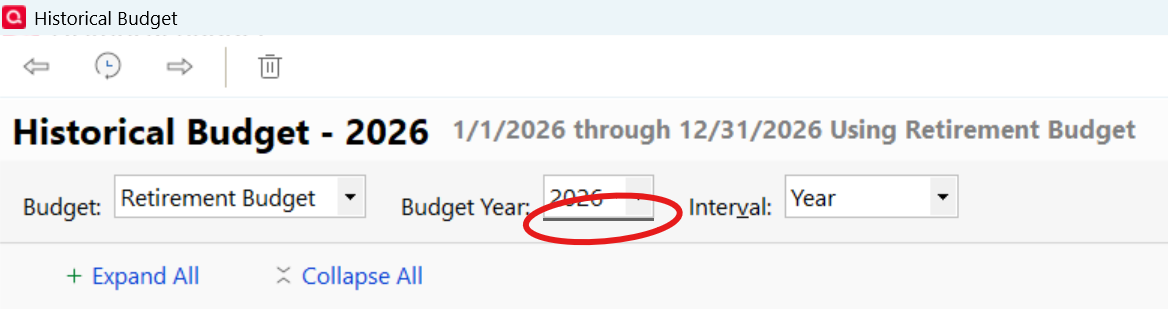
I cannot type a type a year into the box. BUT if I click in the box and press the '2' key, it switches the year displayed as if there was an invisible selection list.
Quicken Classic Premier for Windows, version 65.29
Answers
-
Hello @Jeff Bean,
Thank you for reaching out with this question! To answer your question:
- The Current Budget Report will report on any past date range.
- The Historical Budget Report will report only on the years that the selected budget existed.
For more information on budget reports, please review this help article:
I hope this helps!
Quicken Kristina
Make sure to sign up for the email digest to see a round up of your top posts.
0 -
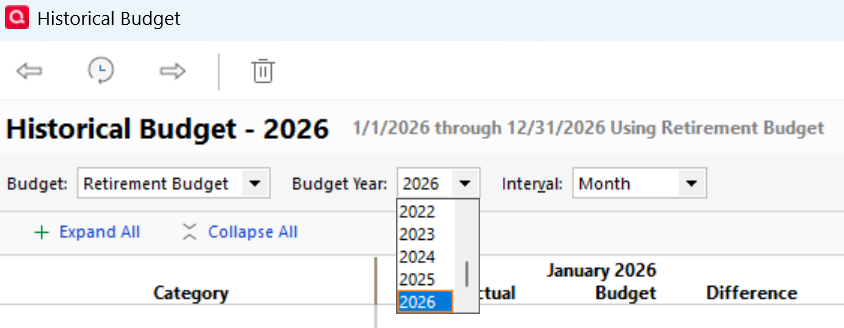
I figured out what is going on with the Budget Year selection box. The problem of not being able to see the selection list occurs if you have selected "Use Large Fonts" on the View menu. Here is a screenshot of how it works when you do NOT have Large Fonts selected:
 0
0 -
Thank you for the follow-up,
I'm glad to hear you found the cause of the issue and thank you for sharing the solution!
Quicken Kristina
Make sure to sign up for the email digest to see a round up of your top posts.
0
