Unable to link Fidelity account, shows "Don't add to Quicken"

Comments
-
I too have been having problems with fidelity account one step update issues. Go all the way thought the process, fidelity said "
Your accounts have been authorized successfully!".Then quicken "Update Financial Institution" comes back with Action, "Don't add to Quicken"
0 -
Hello @Ironmanron,
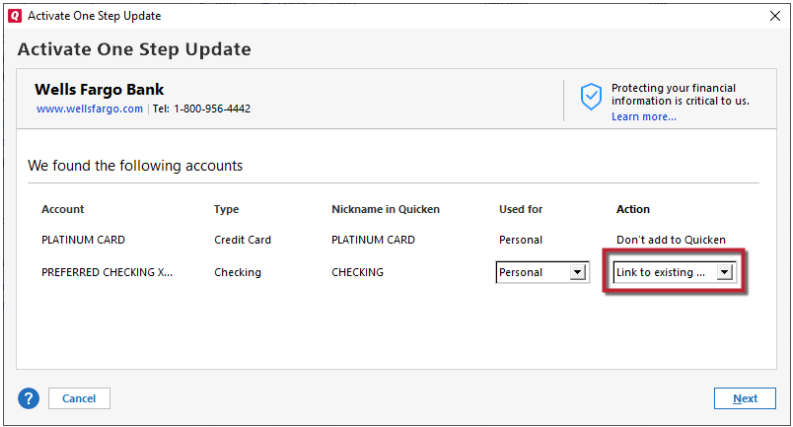
Thank you for letting us know you're seeing this issue. Typically, when you see "Don't add to Quicken" on the add/link screen, it's because Quicken thinks the account is already connected.
To resolve the issue, backup your Quicken file, deactivate the problem account(s), then navigate to Tools>Add Account and follow the prompts. When you get to the add/link screen, you should now be able to link the account(s) to the correct nickname in Quicken.
Please let me know how it goes!
Quicken Kristina
Make sure to sign up for the email digest to see a round up of your top posts.
0 -
Quicken Kristina
Make sure to sign up for the email digest to see a round up of your top posts.
0 -
Kristina, I ran into same performance gap as Ironmanron reported. For me, no transactions download from Fidelity Investments since 2/20/26 to today, 3/6/26. Mutual fund and share prices populate to current date.
I clicked 'reset' for ten Fidelity accounts that fail to load via OSU (One Step Update), closed Quicken, and shut down and restarted my laptop. I went through Quicken OSU prompts to activate those reset Fid accounts. Fidelity indicated “your accounts have been authorized successfully!” Then the same selection screen you attached above showed. Problematically, when I click 'Link to existing,' none of my active, corresponding Quicken accounts display as existing. The other choices are 'Add to Quicken' or 'Don't Add to Quicken.' I ran a test and clicked 'Add.' Then a new account showed with a same, duplicate name of existing acct.
So 'link to existing' fails to recognize active accounts. It seems like Quicken fails to accurately recognize or differentiate accounts which are and those that are not actively linked with Fidelity. Could that be the missing link as to why nothing downloads? I welcome suggestions and update to restore OSU and get Fidelity transactions again.
0 -
Hello @SeaStar,
Thank you for letting us know you're seeing the same problem. To clarify, do the problem accounts have a linked checking account?
If they do not, then you should be able to reconnect and link the accounts by following the process from my earlier post:
Instead of resetting your accounts, please backup your Quicken file, deactivate the problem account(s), then navigate to Tools>Add Account and follow the prompts. When you get to the add/link screen, you should now be able to link the account(s) to the correct nickname in Quicken.
If they do have a linked checking account, let me know, and I can provide the additional steps to turn off the linked checking account feature prior to deactivating and reconnecting the accounts.
I look forward to your reply!
Quicken Kristina
Make sure to sign up for the email digest to see a round up of your top posts.
0 -
'Reset' accounts resolved connectivity problems in past, so that was what I did first for all ten accounts. As mentioned earlier, 'Deactivate' was not an available choice after I reset accounts.
So I opened a back-up file, deactivated the ten Fidelity Investment accounts which earlier failed to OSU, and went through the authorization procedure to reactivate link between Fidelity and Quicken. Like after earlier 'reset,' Fidelity again indicated “your accounts have been authorized successfully!” But like with the earlier 'reset' and when I tried 'Link to existing,' the active accounts in Quicken that I need to link failed to display. Multiple previously closed or hidden accounts showed as potential links to select but the needed ones did not show. It appears that correct 'handshakes' between appropriate files are not working as needed for OSU. I'm welcome to solutions.
0 -
Thank you for your reply,
The issue with Link to Existing displaying hidden accounts and failing to scroll is a bug that has been reported to our Development and Product teams for further investigation and resolution. Though we do not currently have an ETA, once a solution is created it will be made available as part of a future release.
I added you to the ticket.
Thank you!
(CTP-16544)
Quicken Kristina
Make sure to sign up for the email digest to see a round up of your top posts.
1


Categories
- All Categories
- 19 Product Ideas
- 34 Announcements
- 247 Alerts, Online Banking & Known Product Issues
- 19 Product Alerts
- 518 Welcome to the Community!
- 682 Before you Buy
- 1.5K Product Ideas
- 55.7K Quicken Classic for Windows
- 16.8K Quicken Classic for Mac
- 1K Quicken Mobile
- 834 Quicken on the Web
- 128 Quicken LifeHub