CC-800 error on multiple bank accounts

CC-800 error message is appearing on all bank accounts almost every time a one-step is performed. I have Quicken installed on two computers, both running on Windows 11. When one step update is performed on one computer first, the second computer tries to sync with the cloud during the update, and the update fails with a red circle appearing on all bank accounts. Every account has to be deactivated after closing Quicken and then set up again after signing in. This is a time-consuming, frustrating process. This problem had been reported on this site before. Then, for a while, everything was working well. Now it has reappeared. Quicken is a paid subscription service. Why can’t Quicken fix this problem with one of the most important benefits (One Step update) of using Quicken forever?
[Edited-Readability]
Comments
-
I have 25 Quicken Accounts set up for downloading in my file.
After today's OSU the Summary presented it's regular Citi Cards error, and 19 of my downloading Accounts presented with CC-800 errors.
Perhaps a new Quicken Flu is spreading?
0 -
Hello @govindanck & @Tom Young,
Thank you both for reporting this issue!
You mentioned you are using Quicken on two computers, and I am thinking this is what could be causing you to receive CC-800 errors.
I have some follow-up questions for both of you.
- Where is your data file located?
- Is your file being synced/backed up by any third-party services like Dropbox, OneDrive, or Blackblaze?
- Can you explain how you are using Quicken on two computers?
- Are you storing your file on a cloud service and accessing it from two locations?
- Are you using the Quicken application on one computer and Mobile & Web on the other?
- Are you restoring backups when you go from one computer to another?
Typically, if you've deactivated or deleted an account and then restored a Quicken backup file, you'll receive a CC-800 error. To resolve this:
First, you'll need to deactivate the affected accounts:
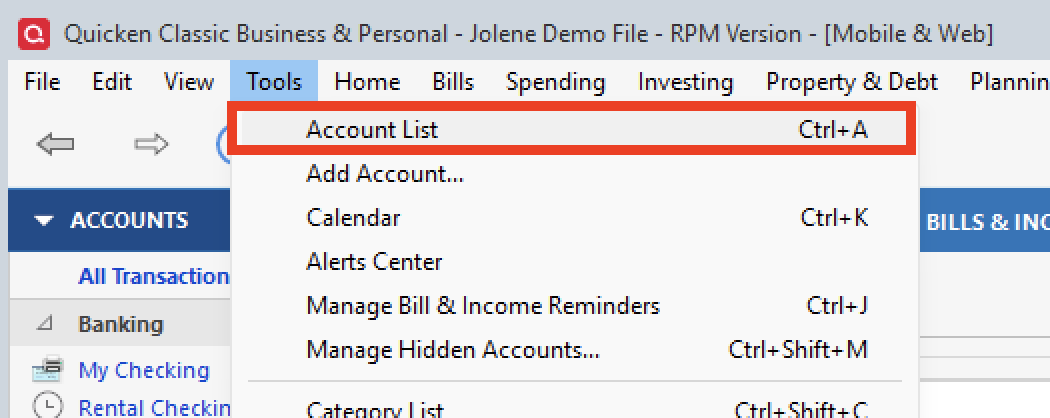
- Select Tools > Account List
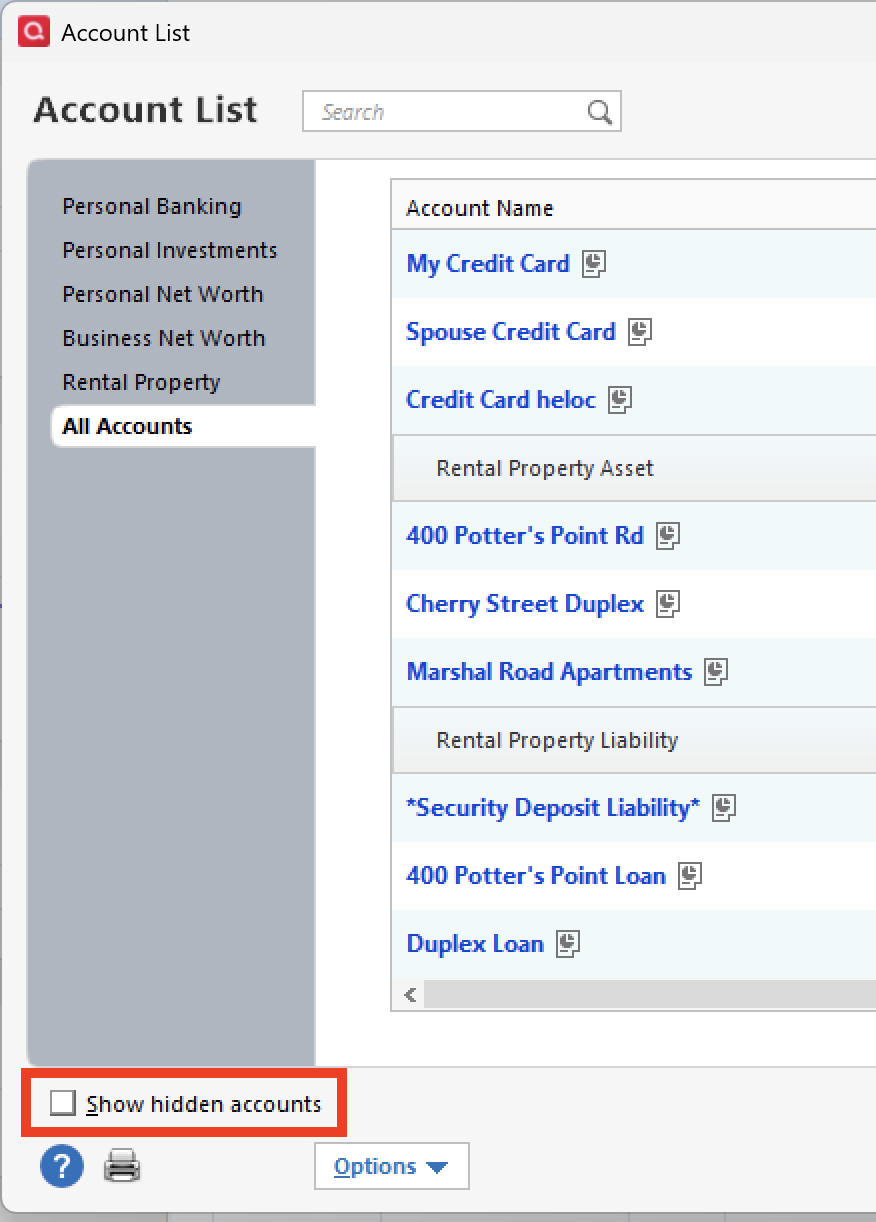
- If present, select the Show Hidden Accounts checkbox at the bottom of the Account List
- Select Edit on each account with this error and Deactivate them on the Online Services tab
- When finished, close the Account List.
Second, reactivate the accounts:
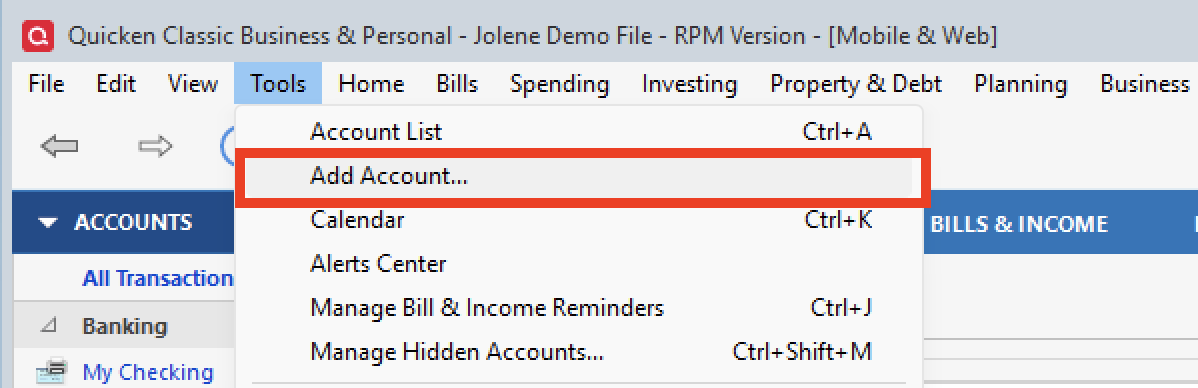
- Select Tools > Add Account
- Complete the flow of re-adding the deactivated accounts to Quicken, using your bank login credentials and answering any security questions.
- When you reach the screen listing the accounts discovered at the financial institution, use the Action drop-downs to re-link your accounts:
- For accounts you want to re-link, select Link to existing account and choose the corresponding account to re-link with.
- Select Add to Quicken for new accounts you didn't previously track in Quicken.
- For accounts you don't want to link or add, select Don't add to Quicken.
If these steps do not resolve the issue, please contact Quicken Support directly for further assistance. They will be able to take a closer look and escalate the issue if needed.
Is the Citi error you are referring to the yellow box error?
Thank you!
Quicken Alyssa
Make sure to sign up for the email digest to see a round up of your top posts.
-1 -
- Where is your data file located? On Hard Drive under the Documents > Quicken Folder
- Is your file being synced/backed up by any third-party services like Dropbox, OneDrive, or Blackblaze? NO
- Can you explain how you are using Quicken on two computers? N/A
Typically, if you've deactivated or deleted an account and then restored a Quicken backup file, you'll receive a CC-800 error. Did not do this.
Is the Citi error you are referring to the yellow box error? Yep. The Citi Card Accounts were all downloading properly so I've left that alone just to see if it goes away on its own. I'm aware of the "fix."
One element of this error I've never quite grasped is the "backwards" progression of the error into previous backups.
I went into the Backups folder, used Widows Copy to make a copy of a backup from yesterday, (where the problem didn't present.) Then I re-named the copied file, I edited the file extension to simply ".QDF", I shut down the modem and router, and I opened the file. Obviously there could be no "sync" to the cloud.
That file opened with the same 19 Accounts showing the red circle with the line though it.
My impressions was that the CC-800 error was a result of a "cloud" problem and that simply opening a good backup in the usual fashion - connected to the Internet - would corrupt the just-opened file because of the sync process. But I must be wrong about that.
Maybe you could explain?
So now I'm off the disconnect and re-connect 19 Accounts.
0 -
Well that was a long, long afternoon of trying to get things fixed. In a few instances it was fairly easy and in others it was more of a hand-to-hand fight to get things right.
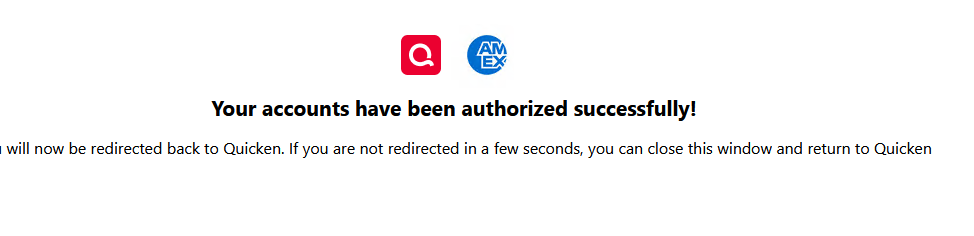
Encountered a couple of instances with the first download after re-establishing downloading where the Opening Balance got changed, got tangled up a bit with the multi-armed labyrinth of Citi Bank credit cards where the first download brought in transactions associated with a different credit card and a weird experience where with a group of Schwab accounts. In the latter case page telling me I was done with Schwab and could close the page or wait to put back into Quicken came up looking like this:
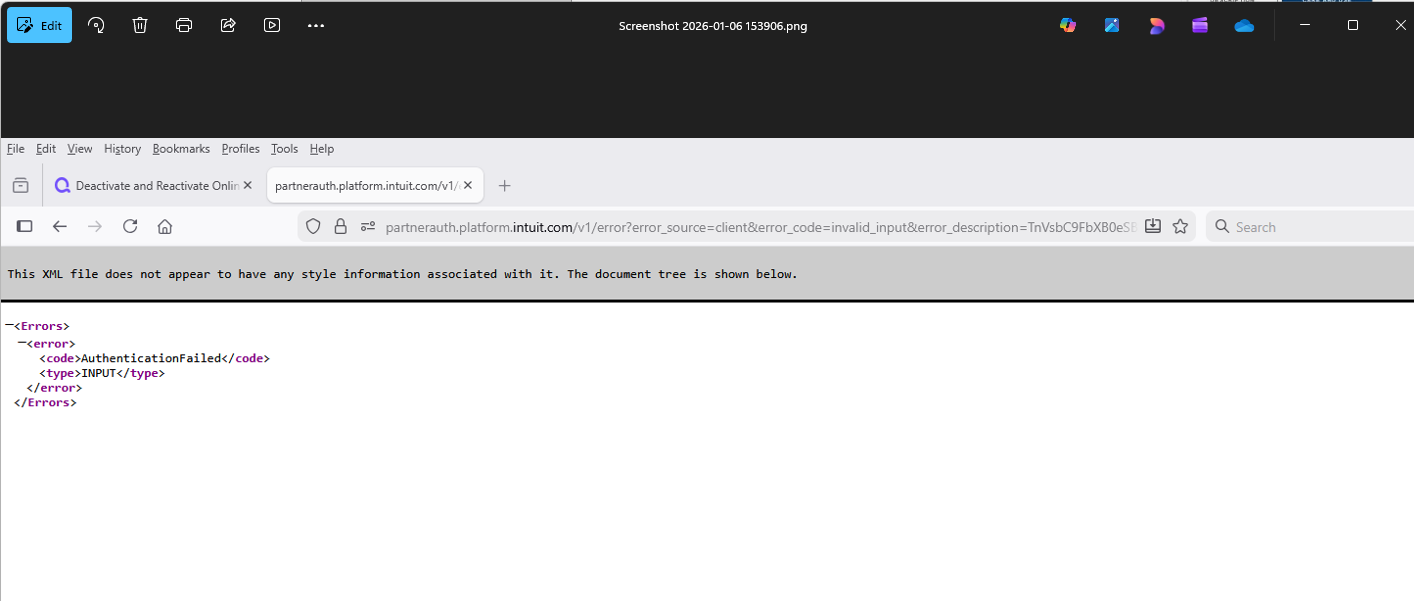
and upon returning to Quicken I WASN'T asked what account at Schwab went with what Account in Quicken, and yet there was a transaction for that day in one of the Schwab Accounts. Seemed odd and I'll have to see if things work OK tomorrow.
0 -
Today (January 7) I have the same problem - ALL of my accounts have CC-800 errors. Local hard drive file that worked fine last time I updated a few days ago. File was NOT restored from backup and is NOT being copied/synced. Very frustrating to have to reconnect all accounts and then audit for accuracy. I see very little reason to continue paying the annual quicken tax if I have to manually fix my accounts every few weeks - I would be better off just manually entering transactions.
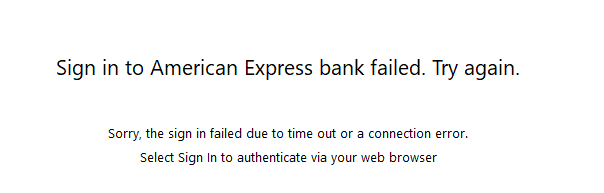
UPDATED: Now the re-authorization process is failing. I signed in successfully, got the Success message from bank, then Quicken says sign in failed. I am so completely frustrated with Quicken's repeated failures.
 0
0 -
I am using two different computers, one lap top and the other a desktop, with Quicken installed on hard drives of both. Started with the same datafile on both months ago, but there may be slight differences in categories, payee names etc. now. The files have not been restored from back up files recently nor accessed from cloud or remotely.
In my opinion, the problem occurs when Quicken sync one of the files with the cloud and not the other. I am not sure what Quicken is syncing, because Quicken claims that data files are not stored in the cloud!
I have followed the procedure you recommend for restoring accounts lot of times, but repeated occurrences make the process very frustrating and time consuming.
1 -
Hello All,
Thank you for continuing to update the discussion with your progress, though I am sorry to hear the recommended troubleshooting steps did not resolve the issue.
We will be forwarding this issue to the proper channels to have this further investigated. However, we request that you please navigate to Help > Report a problem>Send to Quicken within your Quicken program and submit a problem report with log files and screenshots attached in order to contribute to the investigation.

It would also aid the investigation to include a sanitized file when submitting the problem report. A sanitized file is a data file that removes personally identifiable information so you can comfortably share this file with the Quicken team.
Please let us know once you have sent them over so we can get them added to the ticket. The more problem reports we receive, the better. I do see that some of you already sent them, and I have already added those.
We apologize for any inconvenience in the meantime!Thank you.
[CBT-1002]
Quicken Alyssa
Make sure to sign up for the email digest to see a round up of your top posts.
0 -
Another flavor of the CC-800 problem that seems to be cropping up more often lately.
On Jan 1, I restored from backup, which I've done scores, if not hundreds of times over the last 20 yrs. When I opened the file, every account, of every type, from every FI had the error. I chalked it up to some weirdness related to Quicken flipping the calendar to the new year. But then it happened after another restore 10 days later. I'm bringing it up in this thread bc, up until 2 weeks ago, I've only seen the CC-800 problem a couple of times, and on those occasions, its been limited to one account, or 1 financial institution. Seeing it on every account in the file, after a simple restore, was disturbing, and time consuming to fix. Reading about CC-800 errors occurring is multiple situations is disturbing, and time consuming to fix. As someone wrote up-thread, "perhaps a new quicken flu is spreading". I hope not, because this is a bad one.
In case the questions come up: I was running Quicken Premier (WIN) r65.17 at the time of the first incident, and r65.29 at the second. I have a single file, stored on my laptop drive, and I don't use the mobile app.
I've sent an incident report to Quicken support.
0 -
Thank you for adding to this discussion.
As outlined in the Support Article that addresses CC-800 errors, restoring a backup is known to cause this error. To resolve this:
First, you'll need to deactivate the affected accounts:
- Select Tools > Account List
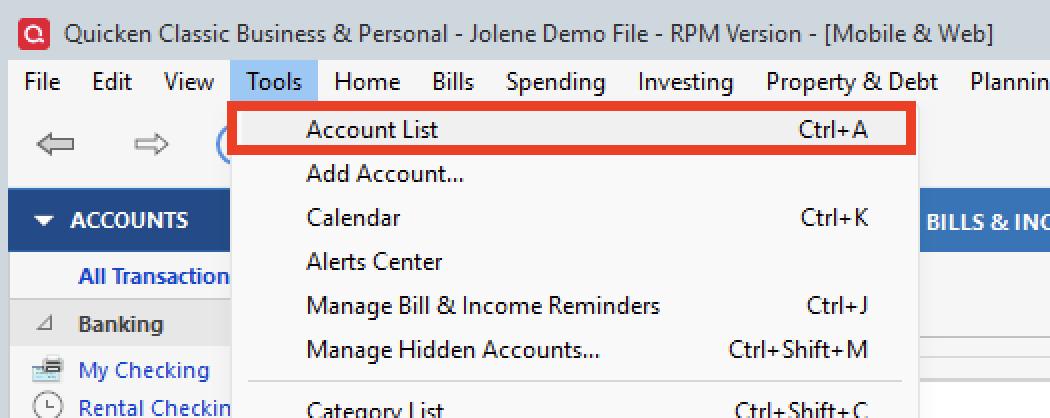
- If present, select the Show Hidden Accounts checkbox at the bottom of the Account List
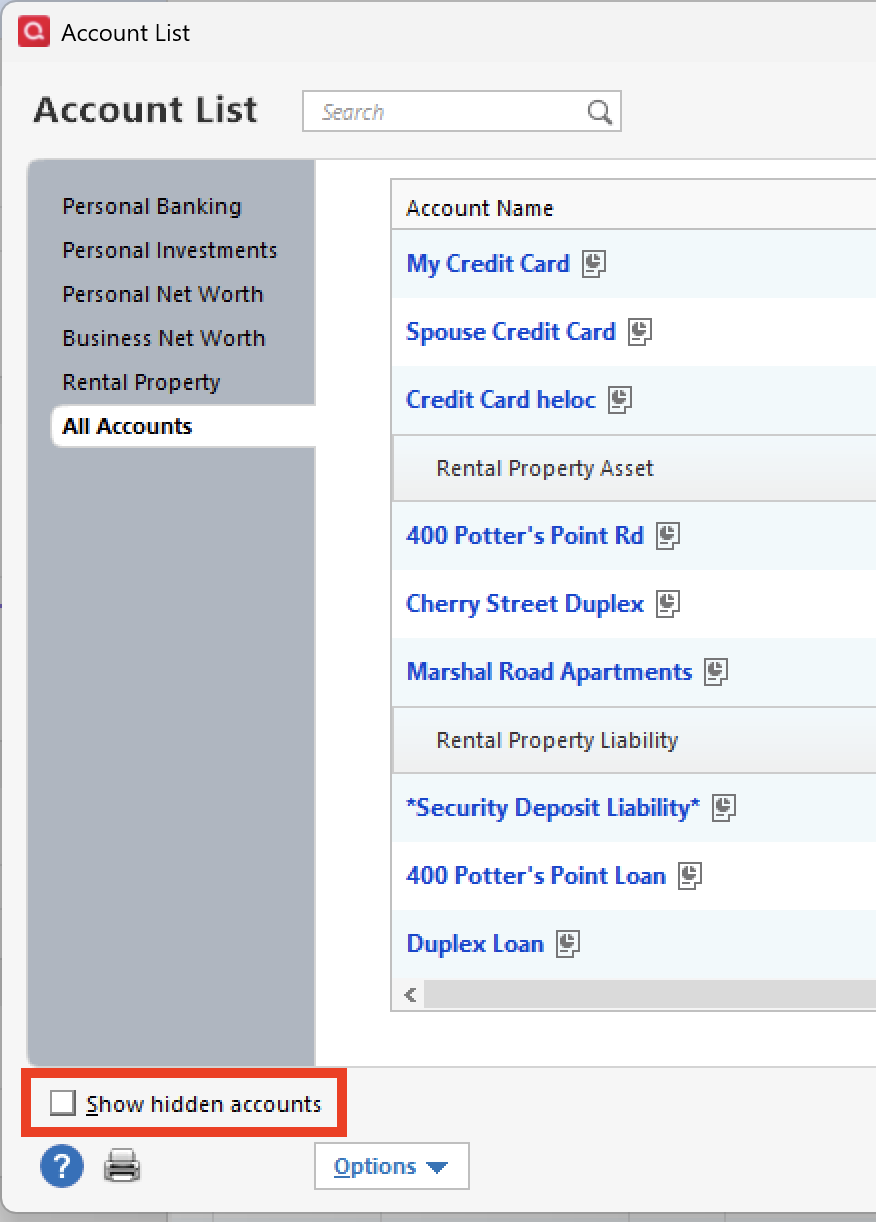
- Select Edit on each account with this error and Deactivate them on the Online Services tab.
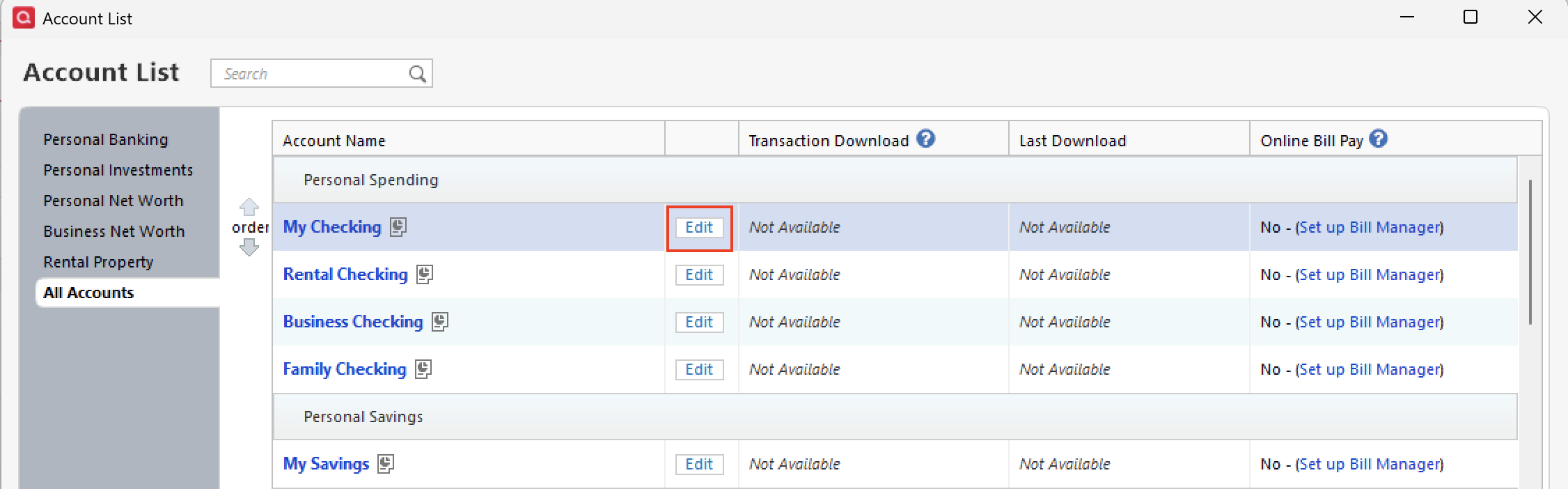
- When finished, close the Account List.
Second, reactivate the accounts:
- Select Tools > Add Account
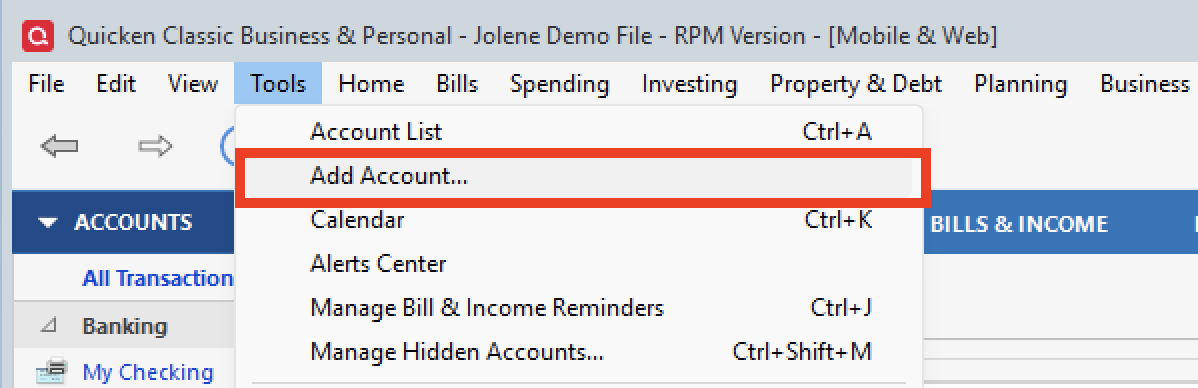
- Complete the flow of re-adding the deactivated accounts to Quicken, using your bank login credentials and answering any security questions.
- When you reach the screen listing the accounts discovered at the financial institution, use the Action drop-downs to re-link your accounts:
- For accounts you want to re-link, select Link to existing account and choose the corresponding account to re-link with.
- Select Add to Quicken for new accounts you didn't previously track in Quicken.
- For accounts you don't want to link or add, select Don't add to Quicken.
If the issue persists, please go to Help>Report a problem>Send to Quicken and send over your log files. Let me know once you have, so I can add you to the escalation ticket.
Thank you!
Quicken Alyssa
Make sure to sign up for the email digest to see a round up of your top posts.
0 - Select Tools > Account List
-
Thank you for your reply. I know how to fix the problem, that's not the issue. As I said in my post, what prompted me to write is the fact that I've done many, many restores in the past and what I described has never happened before. Seeing that others are experiencing varying types of CC-800 errors, it stands to reason that a new bug may have worked it's way into the code. I thought I'd add my voice to the chorus to provide the mods, and hopefully the techs, with a more expansive view of the problem so as to help them identify the cause.
2 -
Thank you for following up and clarifying that!
Thank you for providing insights that may help others and aid in our investigation.
Much appreciated!
Quicken Alyssa
Make sure to sign up for the email digest to see a round up of your top posts.
0 -
We think that the root cause of the CC-800 errors you are receiving is due to the same data file being used on two computers. For example, resolving issues in File A, causes problems in File B, resulting in a repeated loop.
To help break the loop, we recommend copying the data file from the computer where the issue was most recently resolved over to the other computer and then continuing to use that single file. This should prevent the same problem from repeating.
If their goal in using two computers is to enter transactions and view current balances across devices, usingthe Web Companion may be a more convenient option for you.
I have sent you a direct message. Please navigate to the inbox in the top right-hand corner of the Community page and check your inbox.

Please try the following steps for your American Express accounts:
- Create a backup of your Quicken file first.
- Deactivate all American Express accounts in Quicken.
- Select the Tools menu and select Account List....
- In the Account List, select the account you want to deactivate, and then click Edit.
- In the Account Details window, click the Online Services tab.
- Click Deactivate next to the service you want to disable.

- Click Yes to the message confirming if you want to disable this service. Note: If you do not receive this message, additional information is available below.
- Click OK to the confirmation message.
- If you have an investment account that is linked to a cash account, you need to deactivate the online services from the investment account, which will automatically deactivate the linked cash account.
- Important: If you are deactivating/reactivating an account to fix an issue, you'll need to deactivate all the accounts with the affected financial institution that you have activated in Quicken (including hidden ones). Once they're all deactivated, then you can follow the steps to reactivate.
- Revoke Quicken’s third-party access from the AMEX website.
- Reactivate the accounts in Quicken.
- Go to Tools > Add Account.

- Select the bank for the deactivated account(s). If prompted, select the connection method.
- Enter your credentials and click Connect.
- When the list of located accounts appears, choose LINK next to each account you want to reactivate.
- Click Next, then Done on the last prompt.
- Go to Tools > Add Account.
Let us know how it goes!
Quicken Alyssa
Make sure to sign up for the email digest to see a round up of your top posts.
0 -
I have tried your recommendation several times recently and in the past. I copy the data file from the computer that does not show the error to a USB drive and then install it on the other computer. But CC-800 error pops up any case. Even this morning, my Bank of America accounts showed the error and had to be reactivated. I have reported this issue to Quicken several times over the past 1-2 years, but the problem keeps popping up. Very frustrating.
0 -
I'm now encountering this issue. I'm having it on both of my computers. More details below.
I've been a Quicken user for almost 40 years (starting with MS-DOS versions) and have never been more upset with the company. The proposed fix will be very time consuming for me, and it isn't clear how to prevent a recurrence.
For context, I use Quicken on two different computers. I keep the data file synced by using backup and restore to a shared local network drive location. Quicken has always done the "restore" to the default local data file location, and warns me that I'm overwriting the existing file. I do not use mobile or cloud services or the web to manage my Quicken data and never have. I have zero interest in interacting with Quicken through the web. I have "sync" turned off under "Mobile and Cloud Services" preferences. I've never wanted to keep any of my Quicken information in the cloud.
This method has worked just fine for years. Obviously Quicken broke something since there has been no change in my usage patterns and the problem started with my latest One Step Update. So Quicken. Please let me know how you are going to fix this without me having to re-add all of my accounts.
After the recent PNC Direct Connect debacle and now this you guys really need to clean up your internal processes for testing code. And you should be offering partial rebates when your services fail so spectacularly.
0 -
Hello again,
The main point the team is trying to get across is that you can only use this file on one computer. On the second computer, you should be using Quicken on the Web. Are you saying that is what you are doing and still receiving the CC-800?
I think the issue with your setup is the shared network drive. Using Quicken in this way can cause damage to a data file, and in some cases, a CC-800 can be a sign of a damaged file. Are you saying the backup is on a shared drive, but it gets restored locally?
Quicken data files should be stored locally and not accessed by any third-party services like OneDrive, Dropbox, or Carbonite. You can save backups externally, but if you are going to restore them, they should be moved locally first. Is this what you are doing?
The default location for a Quicken data file on Windows is C:>Users>username>Documents>Quicken, and that is where we recommend keeping it.
Thank you.
Quicken Alyssa
Make sure to sign up for the email digest to see a round up of your top posts.
0 -
I am not using or never used Quicken on the web. I have downloaded Quicken to two different Windows 11 computers. Then the same original QDATA data file (not backup file) was transferred from one to the second computer via USB drive. Both computers are being used independently with no mix up of files. Until the end of the were not many problems. Early this year something changed. I can only perform one step update on one of the computers. If I try to update on the other computer afterwards, CC-800 error appears most of the time. Also note that I am not using Quicken on both computers at the same time. It is one or the other. Any way, the new year has been very frustrating with the use of Quicken and has consumed so much time deactivating and resetting accounts. I hope Quicken will fix this issue soon to keep subscription customers.
0 -
Thank you for following up and for summarizing everything.
I understand how frustrating this situation is, especially since this did not cause issues in the past. After reviewing this with our escalation team, they confirmed that the errors you are experiencing are expected when the same Quicken file is used on two different computers. While it may have worked previously, this setup is now the root cause of your ongoing issues.
At this point, if the file continues to be used on both computers, the errors will continue to occur. The recommended solution from the escalation team is to use the Quicken desktop software on your primary computer and access your data on the secondary computer using Quicken on the Web.
If you would like, I’m happy to provide step-by-step instructions to help you set this up.
Thanks again!
Quicken Alyssa
Make sure to sign up for the email digest to see a round up of your top posts.
0 -
Thank you for your response. I do not understand though, why Quicken has to remove good features from old versions every time a new version is introduced. For about the past 15 years, I have been able to do one step update on two different computers without any problems. Since we do not have another option, please provide step-by-step instructions to use the Quicken desktop software on primary computer and access data on the secondary computer using Quicken on the web.
0 -
I've posted elsewhere that I have the same problem as govindank and I too have started having problems just this month . I do not accept that only one computer Plus data file should be the only one that can perform a one step update since you need password to access the account and another password to access the online update. If this is a feature it is a bad feature and it's mostly a bug or laziness by the coders to fix it. Quicken on the Web is not a proper substitute because it is extremely limited.
Many of us are very uncomfortable with the idea of our whole financial data sitting on a Quicken server when not even Microsoft and Apple or even our government can keep our data safe
0 -
Hi Alyssa, you say
"The recommended solution from the escalation team is to use the Quicken desktop software on your primary computer and access your data on the secondary computer using
Quicken on the Web"Is this the final official response? I need to know if you're still going to be working on this or if this is it so I can start looking for an alternative way of working
0 -
We opened a checking account with Wells Fargo. It is acct (reacted) This acct is in my wife's name as the primary acct (redacted). Iam mentioned on the account. We have anew credit card through USAA. Number is (redacted)/ Tell me are these accounts connected to my Quicken account
(Edited to delete complete credit card numbers)
This post is available to the public and you don't want those CC number and wife's name out there.
0 -
Hello All,
Thank you for continuing to update this thread with your progress.
This issue has been escalated internally and is still being worked on. We do not have an ETA as to when it will be resolved.
If you have not already done so, and would like to contribute to the investigation of this issue, you can go to Help>Report a problem>Send to Quicken from within your Quicken software and send over your log files.
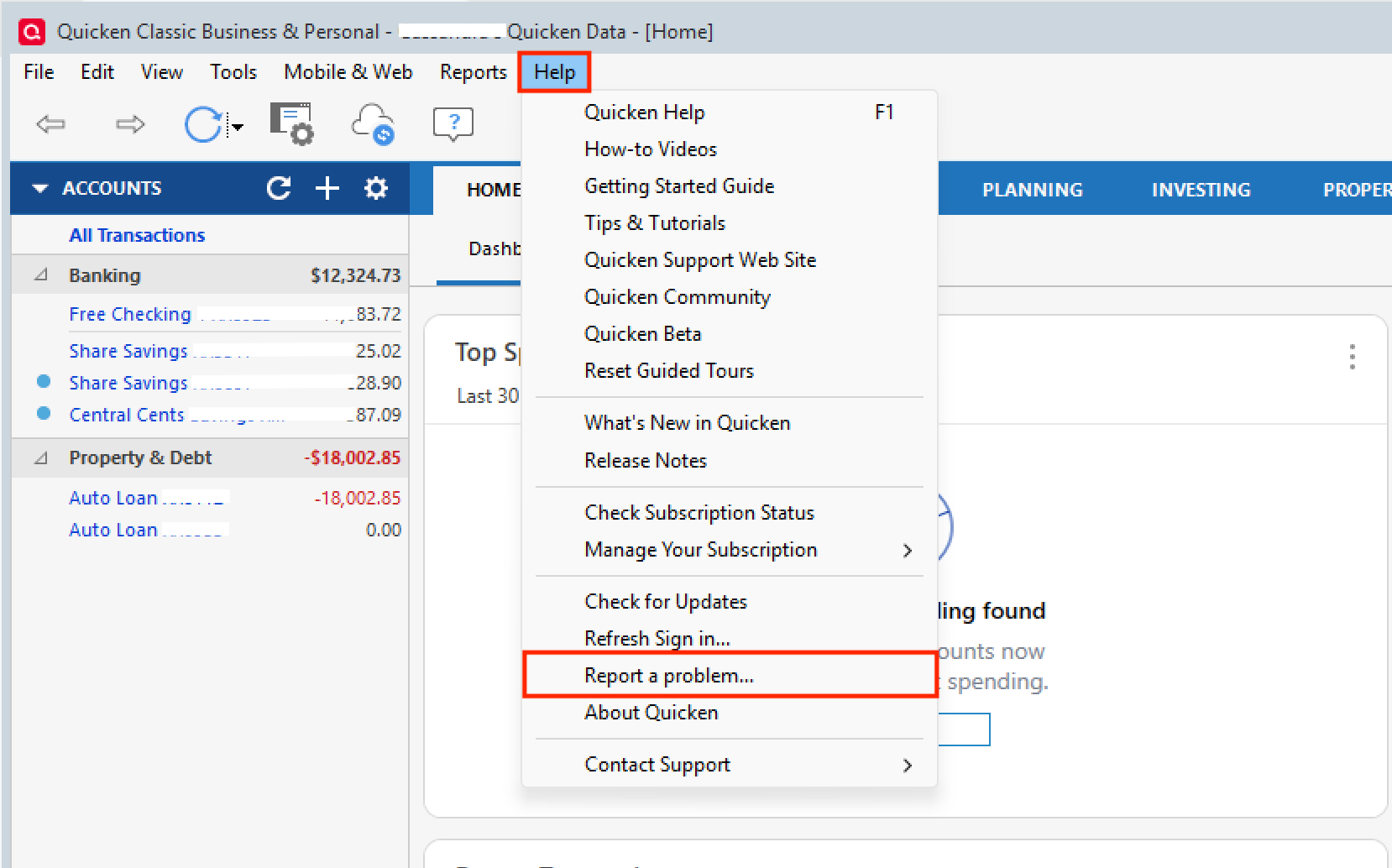
If you do send these over, let us know so we can get them added to the escalation ticket.
Thank you!
[CTP-16114]
Quicken Alyssa
Make sure to sign up for the email digest to see a round up of your top posts.
0 -
@Quicken Alyssa Your explanation is inconsistent with the trouble I've experienced. I'm using Quicken exactly as you suggest I should. You replied to my post as follows: "I think the issue with your setup is the shared network drive. Using Quicken in this way can cause damage to a data file, and in some cases, a CC-800 can be a sign of a damaged file. Are you saying the backup is on a shared drive, but it gets restored locally?"
YES THAT IS EXACTLY WHAT I DO, AS I SAID IN THE EARLIER POST.
You continued: "Quicken data files should be stored locally and not accessed by any third-party services like OneDrive, Dropbox, or Carbonite."
I DO NOT USE THOSE SERVICES OR ANY OTHER CLOUD SERVICE WITH MY QUICKEN FILES, AS I SAID IN MY EARLIER POST
You continued: "You can save backups externally, but if you are going to restore them, they should be moved locally first."
ARE YOU LITERALLY SAYING THAT I SHOULD NOT RESTORE BACKUPS FROM ANYWHERE OTHER THAN THE LOCAL DRIVE? THAT I NEED TO COPY THE FILE LOCALLY BEFORE I RESTORE IT? I"VE NEVER DONE THAT OVER MANY YEARS OF USING QUICKEN AND NEVER HAD ANY TROUBLE RESTORING DIRECTLY FROM A LOCALLY MOUNTED NETWORK DRIVE.
You continued: "The default location for a Quicken data file on Windows is
C:>Users>username>Documents>Quicken,and that is where we recommend keeping it."AND THAT IS WHERE I'VE ALWAYS KEPT MY DATA FILE. I only use the shared network drive for backup and restore. If I'm switching to the other computer I back up to the network drive and then restore from that location on the other computer. I never open the backup file except to restore the local copy. This method has worked fine for years. Your suggestion that this is the problem is inconsistent with my experience.
I SUGGEST YOU READ USER POSTS MORE CAREFULLY BEFORE RESPONDING.
-1 -
Today, for the first time, I experienced the CC-800 error on 4 of my many accounts in Quicken (AMEX, USAA, Fidelity NetBenefits, Mercedes Financial) while doing my weekly Quicken OSU. I suspected something was up during the OSU when it spent a longer-than-usual time "syncing" to the Quicken cloud. I was able to clear each of the CC-800 errors by Resetting each account.
Reading all of the above posts, it appears the issue stems from restoring a complete backup file to a different computer. My complete backup files are written to a thumbdrive. Although I've been doing this practice FOR YEARS, now all of the sudden it isn't "allowed" by Quicken anymore unless one wants to Reset each account every time a complete backup file is restored to a different computer. Why this change all of the sudden?
In my case, I primarily use Quicken on my home desktop computer. My Quicken Active File resides on my desktop's hard drive. I do daily Complete Backups of my Quicken file to a thumbdrive.
When I travel and I am away for a week or more, using my thumbdrive, I restore my latest Quicken complete backup file from my desktop to my laptop, to be used while I am traveling. While traveling and using my laptop, the Quicken Active File resides on my laptop's hard drive and daily complete backup files are written to my thumbdrive.
When I return home, using my thumbdrive, I "restore" the latest complete backup file to my desktop. As I already stated, this hasn't been an issue for me until today (my previous "restore backup" to my laptop/desktop was probably back in December 2025 with no CC-800 issues). And there is never an instance when both desktop and laptop Quicken active files would be open at the same time.
Quicken Alyssa mentions in her January 28 post that Quicken On The Web should be used in cases such as mine when a second PC is needed for keeping a Quicken file up-to-date. In my case, I do not always have a web connection when I'm traveling (RV-ing) AND I also avoid when possible and I am extremely cautious about using any web based products as a general rule. For me, this is an unacceptable option.
Is Quicken still working to correct this issue? A reply/update from one of the Quicken moderators would be appreciated.
0 -
I'm not sure the issue per se stems from using a backup, as Quicken Alyssa stated that the problem occurs "when the same Quicken file is used on two different computers."
I've copied the actual "live" file from my PC to a laptop and then back to the PC dozens of times over the years without problems, until I got hit hard with the CC-800 error as I posted above on Jan 6th.
I agree that using Quicken On The Web simply is not a solution.
0
