Zero totals in Actual but correct details sub-report

When I click on the "0" in my budget report, I see a sub-report that correctly lists all the transactions I'm expecting —
I followed the AI instructions on how to fix.., All the transactions are categorized as "Income" and not as transfers, and the report settings are set to include all transfers. AI is at a dead end, does someone else have some insight? I have validated the file. Help..
Comments
-
Hello @Paul Smith2,
Thank you for letting us know you're seeing this issue. To help troubleshoot, please provide more information:
- When did you first notice this issue?
- Is this happening in the Current Budget report, Historical Budget report, or both?
- Do you see the same thing in the Planning tab when viewing your Budget, or do the actuals reflect correctly there?
- Is this happening with all categories in your budget?
- If not, then which specific categories are affected?
I look forward to your response!
Quicken Kristina
Make sure to sign up for the email digest to see a round up of your top posts.
0 -
The report was correct 12/31/2025. I did a year end summary and printed it for my records.
The problem is happening in a historical budget report I created last year (2025). There have been no changes in the budget report since it ran successfully at the end of 2025.
The specific category is "social security" — which as I mentioned in my posting is classified as "Income" in the "Personal Income" group. All the other categories work fine. The totals are the same as the printed out version I put in my paper archive.
When I change the budget setting to "Current Budget" and adjust the timeframe to 1/1/2025 to 12/31/2025 ; Go back to the 2025-1 budget I was using at the time — the same problem occurs in the "Social Security" category only.
The "advanced" settings in the report that worked fine were: Transfers: include all; subcategories: show all; Categories: Budgeted only
I'm currently running on R65.1.65.29
0 -
Additional comment: my 2026 cash Flow budget has the same category — social security and it recently downloaded from the US treasury. The transaction was found in the budget report as expected.
0 -
Thank you for your replies,
Do you keep your Quicken file directly on your local hard drive? Is the file synced with any cloud service, such as OneDrive, iCloud, or Dropbox?
I notice that you sync your file with the Quicken Cloud. Have you tested to see if turning cloud sync off helps? You can do that by navigating to Edit>Preferences>Mobile & Web.
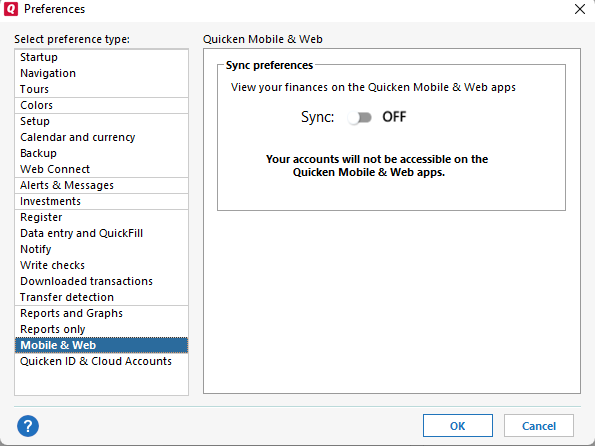
Thank you!
Quicken Kristina
Make sure to sign up for the email digest to see a round up of your top posts.
0 -
Kristina — I changed the folder into which I backup from Dropbox to the local drive on this laptop.. Rebooted .. the subject report is still messed up — reports social security as zero for the year 2025 but shows all the correct deposits into that account. The transactions in Quicken are a split transaction showing positive entries for Social security as well as negative transactions for Health Insurance and medical:Perscription drugs.
The AI "rabbit hole" I went down explained that if any of the transactions in the split were transfers, then Quicken would fail to include all of them in reports. None of them are transfers unless something else is happening that is not visible to me.
I'm trying to validate my taxes with turbotax. The Quicken tax planner currently shows totals for the Social Security income in 2025 as expected. This cash flow report worked fine on 12/31/2025. Social Security income was currently correct in the Tax Report summary page for 2025.
Help!!
Paul
0 -
Thank you for your reply,
My apologies for the delayed response. I did not receive a notification that you had posted a reply.
Is this happening only in the historical budget report? If so, is it happening in a saved report, or do you see the same issue when generating a new historical budget report?
Thank you!
Quicken Kristina
Make sure to sign up for the email digest to see a round up of your top posts.
0 -
Kristina
The problem is happening in the 2025 Cash Flow report I generated. It is not happening in the corresponding 2026 Cash Flow report which has the same format. The zero sum displayed in the 2025 report has all the expected transactions displayed when I click on the "0" sum. I'm not exactly sure what you mean by "historical budget report". Clearly the 2025 report is "historical" in the sense that the data is a year old — but I used it all year in 1985 and the totals were non-zero. I'm using the 2025 report for preparing my 2025 taxes and the numbers there are important…
Paul Smith
0 -
Thank you for your reply,
Your earlier posts led me to believe you were looking at budget reports.
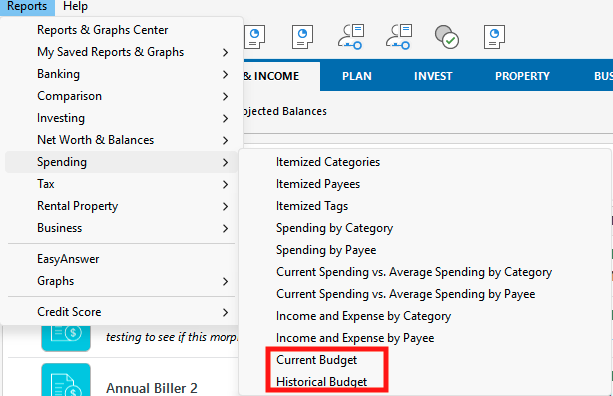
What format/settings are you using for the 2025 cash flow report? I haven't been able to replicate the issue in my file.
Does this happen in newly created cash flow reports for 2025, or is this happening only in a saved report? Is there a specific format that seems to trigger the problem?
Thank you!
Quicken Kristina
Make sure to sign up for the email digest to see a round up of your top posts.
0 -
Kristina — Your questions caused me to open up my saved reports for 2024, 2025. The same problem occurs in them — social security totals = 0 but when I click on the reports, all the expected deposits appear. The 2026 report (current report) has the correct sums.
The social security account consists of a series of split transactions. The gross amount which I call Social Security, and then two subtractions — one from my category of insurance and another from my category medical.
My report is itself a "cash flow" report. The social security category is "income" whereas the other two transactions are obviously expenses.
I'm not sure what the difference is between the historical report and the current report — but clearly there must be something.
Paul
1 -
Thank you for your reply,
To clarify, are these transactions associated with a paycheck reminder?
Thank you!
Quicken Kristina
Make sure to sign up for the email digest to see a round up of your top posts.
0 -
No — They are a stand alone transaction not associated with a paycheck
0 -
Thank you for your reply,
How is the transaction entered in your register?
- Is it a memorized transaction?
- Do you have an income reminder created for it?
- Is it a manual transaction, or does it download from the financial institution?
- If it downloads from the financial institution, does it match with any reminder?
- Do you edit the transaction at all?
I look forward to your response!
Quicken Kristina
Make sure to sign up for the email digest to see a round up of your top posts.
0 -
Kristina
It is a memorized transaction and there is a monthly income reminder created for it
It syncs with a downloaded transaction from MSSB — however that transaction only includes the total amount. The details inside the transaction are from the memorized transaction from "Manage Bills and Income Reminders" tool.
I do not edit the transaction. It downloads from the "Manage Bills and Income Reminders" tool and then syncs with the download from the MSSB account.
There may be another clue as to what is going on. When I changed the end date 0f the report from the end of March to the end of April recently, the social security total showed up as zero. Previously it showed the correct total! When I clicked on the zero, all the transactions were there!
I changed the dates of the report back to May 30 and the total was correct. I then changed the date of the report to "all dates". This went all the way back to 2023. A new line showed up in the "Personal Income" section of the report that was not in the corresponding 2026 budget. I switched back to the April budget (1/1/2026 - 4/30/2026) and the correct totals for social security reappeared and the new line disappeared.
While my immediate problem appears to be fixed, there is something strange about the report generation. It appears to me that the journey way back in time reset some report generation parameter…
Paul Smith
0 -
Hi @Paul Smith2 ,
Thank you for your reply and for sharing more details about the issue.
Since this is occurring only with the Social Security category, it’s possible that the category itself may be causing the problem. Before proceeding with any troubleshooting, I recommend creating a backup of your file.
Then, please follow these steps:
- Go to Tools > Category List.
- Click New Category (upper right corner).
- Enter the category name “Social Security 1.”
- Select Income as the category type.
- Click Save.
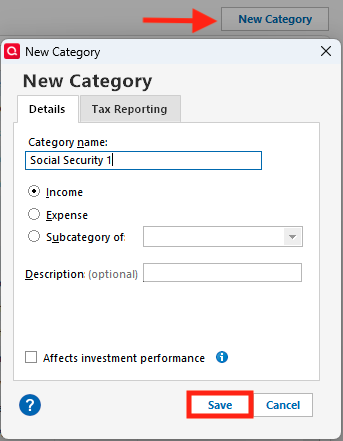
Next:
- In the Category List, locate the original Social Security category that is showing a $0 balance in the report.
- Right-click the category and select Delete.
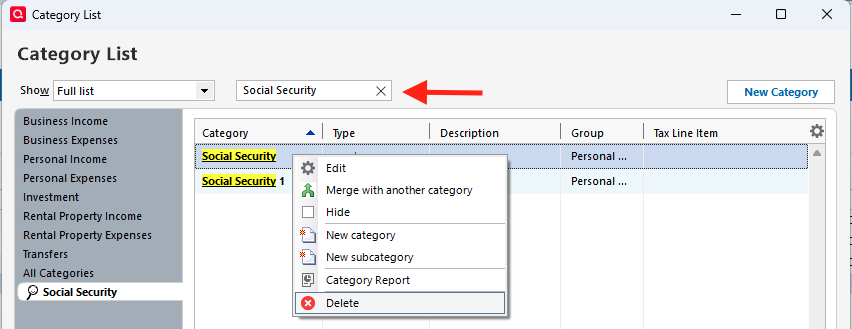
- When prompted “Social Security is in use by a transaction. Are you sure you want to delete it?”, click Yes.
- In the next prompt, select "Social Security 1" from the dropdown menu and click OK.
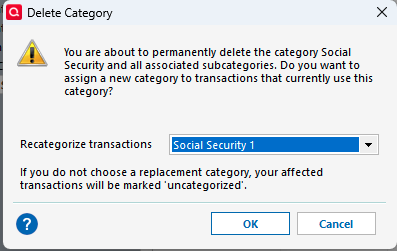
Try running the report again, and make sure the new category is selected in both the budget and the report.
Let me know how it goes!
Quicken Carlos
Make sure to sign up for the email digest to see a round up of your top posts.
0

