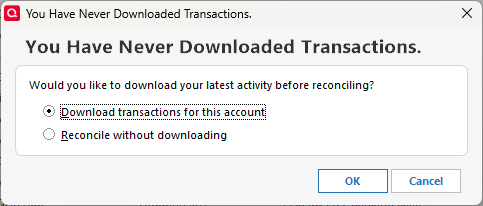
Why is an account not set up to download transactions asking me to download transactions?

I have an account for Cash App. As far as I know, Cash App does not support transaction download to Quicken.
When I go to reconcile, I get prompted to download transactions.
Answers
-
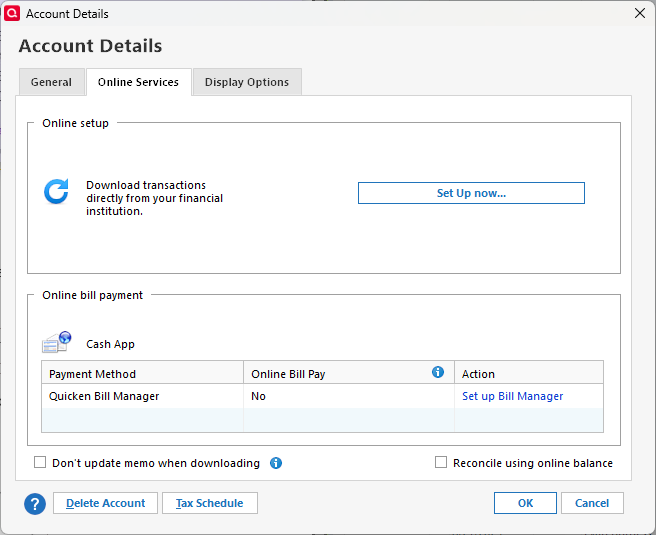
I'm only guessing here but I'd guess that the fact that you've got online bill payment and Cash App associated Quicken somehow expects that the Account should be downloading.
If you disassociate the two does the error go away?
0 -
Online bill payment is not enabled for this account.
0 -
Right, I missed that.
0 -
Hello @Michael Rosen,
Thank you for letting us know you're seeing this issue. To help troubleshoot, please provide more information.
- When did you first notice this issue?
- Do you keep your Quicken file directly on your local hard drive?
- Is your Quicken file synced with any cloud service, such as OneDrive, iCloud, or Dropbox?
- Is this the first time this issue has happened?
- If not, has the reconcile always misbehaved this way for this account?
I look forward to your response!
Quicken Kristina
Make sure to sign up for the email digest to see a round up of your top posts.
0 -
@Michael Rosen ,
when creating your Cash App account, did you attempt to set it up as an online-connected account? Or did you create it as an Offline account and then tried to activate it?
(I'm suspecting that there may be some flags stuck in Quicken as a result of an aborted activation attempt)Try editing account details, General tab and blank out the fields Financial Institution Name, Account Number, Routing ID and Customer ID. See if that makes any difference.
Alternatively try this:
Create a new Cash App account as Offline account, Opening Balance 0.00
Change all transactions in the existing Cash App account that are marked Reconciled to be marked as uncleared.
MOVE all transactions in the existing Cash App account except the Opening Balance transaction to the new account register: Block select transactions. Right-click a highlighted (selected) transaction. Select Move transactions
Update Opening Balance transaction in new register from 0.00 to what the old register showed
If you have created Scheduled Reminders: Edit each of them to point them to the new register
If everything was moved correctly, you should now be able to delete the old register0 -
I just noticed it last week.
Yes, I keep my Quicken file on my local hard drive.
My Quicken file is backed up using Carbonite.
I have not reconciled this account in a while so I don't recall if I noticed this before.
0 -
I don't think I would have been able to set it up as an online-connected account since Cash App is not listed.
Those fields are already blank on the General tab.
I'll try setting up a new account.
Thanks.
1

