Auto loan payment amount and terms changed

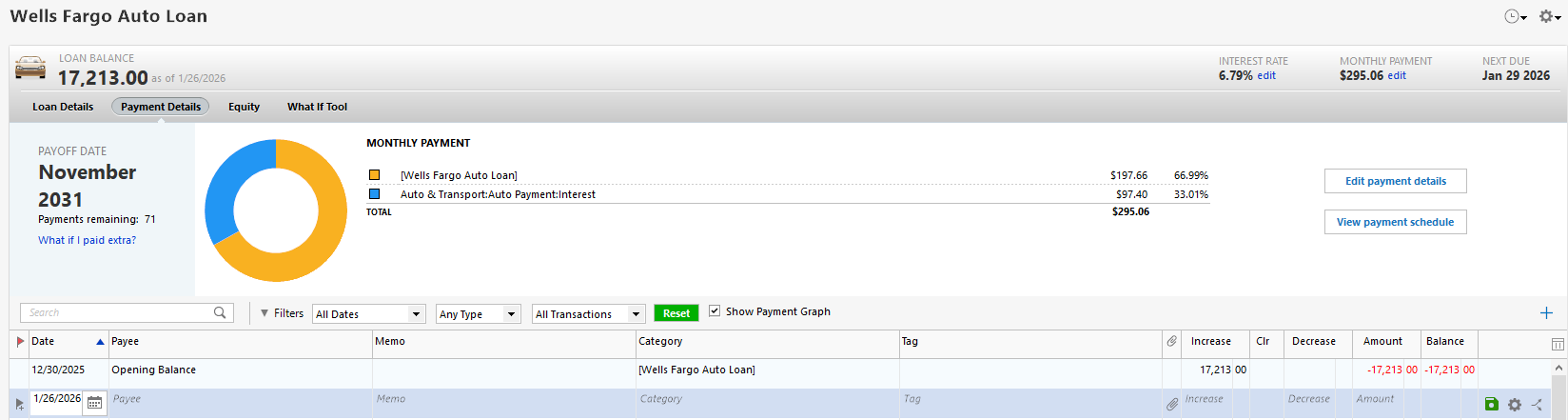
Today I opened Quicken to pay some bills and noticed that the terms for my auto loan were changed to random numbers. The correct payment amount is $291.73, for 72 months, with a payoff date of 12/29/31. That is what Quicken showed the last time I used it. Today, Quicken shows a payment due of $295.06, with 71 months, and a payoff date of 11/29/31. I have not yet made any payments on this loan. The loan is set up manually, not online. Why did Quicken suddenly change the details?
Comments
-
Hello @vgburke85,
Thank you for letting us know you're seeing this issue. Data changing on it's own like that indicates a possible file issue. Do you keep your Quicken file directly on your local hard drive? Is it synced with any cloud service, such as OneDrive, iCloud, or Dropbox?
To start troubleshooting for file issues, I suggest that you try validating your data file. Please save a backup file prior to performing these steps.
Validate:
- File
- Validate and Repair File...
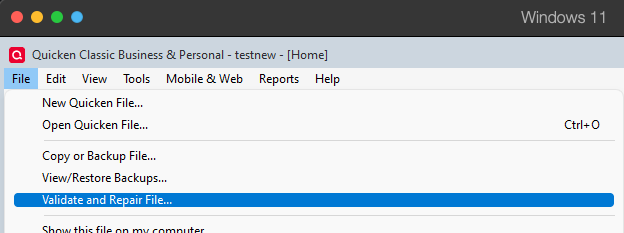
- Validate File
- Click OK
- Close the Data Log
- Close Quicken (leave it closed for at least 5 secs)
- Reopen Quicken and see if the issue persists.
Note - This process will not change the loan account back to the way it was before, but it may be able to identify and correct whatever problem caused the data to change.
Please let me know how it goes!
Quicken Kristina
Make sure to sign up for the email digest to see a round up of your top posts.
0 -
Quicken Kristina
Make sure to sign up for the email digest to see a round up of your top posts.
0 -
How do I fix the auto loan?
0 -
@Quicken Kristina validating the file didn't fix anything.
0 -
Thank you for your reply,
Since validating the file did not resolve the issue, the next step is to restore a backup from before the issue occurred and test whether the issue is resolved in the restored file.
Thank you!
Quicken Kristina
Make sure to sign up for the email digest to see a round up of your top posts.
0 -
@Quicken Kristina I have entered a bunch of transactions since then. How do I fix this without losing everything I have done in the last month or so?
0 -
You said you hadn't entered any payments.
Have you tried going into Edit payment details and correct the numbers?BTW, are you syncing to the cloud, for use with Q Mobile or Q on the Web companion apps?
0 -
Thank you for your reply,
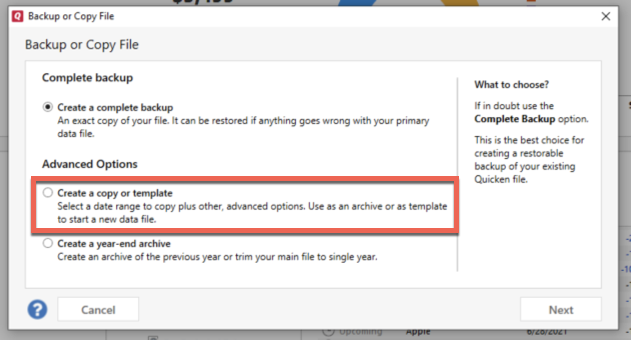
If restoring a backup is suboptimal, you can try creating a copy of your data file, which will rebuild all internal lists and database tables. If successful, you would use the copied file. To create a copy, please navigate to File > Copy or Backup File... > Create a copy or template (see examples below), which will also allow you to select a date range to move forward with.
If you wish to move forward with your entire data file, please check the full date range of your entire data file before copying, so you can enter the correct date range if you do not wish to "shrink" your file by eliminating certain dates. Note: Unless you believe older data is causing the issue, there is no reason to "shrink" your file.
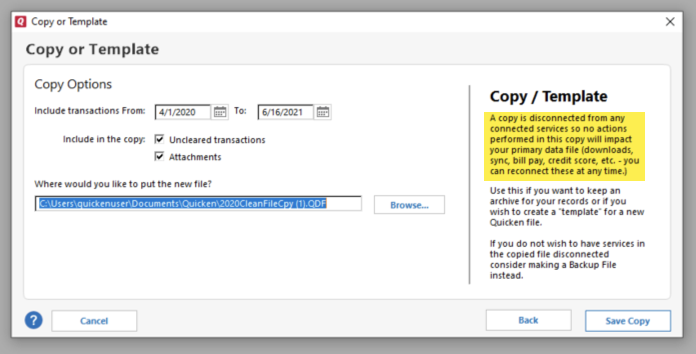
It's important to know that all online services will be disconnected in the copied file, and you will need to sign back in with your Quicken ID and reconnect all of your online accounts, online billers, Quicken Bill Manager services, etc if you plan to use that copied file going forward. The reason for this is that the new copy also creates a new and separate dataset ID.
Please reconnect only what is necessary to confirm if the issue is resolved in the copied file. If the issue is resolved, then reconnect your online services and use the copied file as your main file going forward.
If the issue is not resolved in the copied file either, then feel free to switch back to your original file. For instructions on switching between Quicken files, please click here.
Thank you!
Quicken Kristina
Make sure to sign up for the email digest to see a round up of your top posts.
0 -
Hello @vgburke85,
We haven't heard back from you in a while. Do you still need assistance?
Check back and let us know! Thank you.
Quicken Kristina
Make sure to sign up for the email digest to see a round up of your top posts.
0 -
Hello again,
Checking in once more before this thread is closed.
Let us know if you still need assistance.Thank you!
Quicken Kristina
Make sure to sign up for the email digest to see a round up of your top posts.
0 -
@Quicken Kristina using a copy didn't fix it either.
0 -
Thank you for your reply,
Since the troubleshooting steps did not correct the issue, I recommend contacting Quicken Support directly for further assistance, as they have tools we can't access on the Community, and they're able to escalate the issue as needed. The Quicken Support phone number can be found through this link here. Phone support is available from 5:00 am PT to 5:00 pm PT, Monday through Friday.
I apologize that I could not be of more assistance!
Quicken Kristina
Make sure to sign up for the email digest to see a round up of your top posts.
0 -
@Quicken Kristina restoring the backup didn't fix it either. It still says the monthly payment is $295.06 and the payoff date is 11/29/31. The correct payment amount is $291.73 with a payoff date of 12/29/31. My paycheck reminders are also wrong. I guess I'll just have to leave it the way it is, because I do not have the time to waste by calling support and going through the same steps again.
0

