cc-800 errors

Hello, I am getting cc-800 errors on all accounts. Using Windows 10, Quicken is updated. I went through all the usual suggested solutions by Quicken. I deactivated and reauthorized every single account. Quicken downloads transactions at that time. Come back later that day and try to update transactions, cc-800 errors again. I finally did an uninstall and reinstall of Quicken. I deleted every file, folder, and anything that had Quicken from my computer. I reinstalled data from a flash drive. I disabled Norton. Nothing works, still getting cc-800 errors.
HELP,
Jim
[Edited-Readability]
Answers
-
Post addition: This started first of year, and I was NOT using a backup file. Jim
0 -
Hello @Jim,
Thank you for sharing this detailed account of your experience, though I am sorry that your troubleshooting steps did not resolve the issue.
I have some follow-up questions for you before we proceed with further troubleshooting:
- How are you opening Quicken?
- Are you using the red square application icon?
- Or are you using an icon that is either red or white, rectangular, and looks like a sheet of paper with the corner folded down?
- Where is your data file located?
- We recommend keeping your file stored locally in the default location (C:>Users>username>Documents>Quicken) to avoid possible damage occurring to your file.
- Is your file being backed up/synced by any third-party services like OneDrive, Dropbox, or Carbonite?
- I know you mentioned disabling Norton, but I don't know if that was a backup service or a VPN/Firewall/Antivirus that you disabled.
Looking forward to your response!
Quicken Alyssa
Make sure to sign up for the email digest to see a round up of your top posts.
0 - How are you opening Quicken?
-
Alyssa,
I use the red square icon with Q in it. I disabled antivirus/firewall/vpn in Norton. I store files in a documents folder I do not use any third party service
0 -
@Jim,
Thank you for following up with those additional details.
Given that you have already done the steps outlined in our CC-800 Support Article, the next step will be contacting Quicken Support directly.
Support is available from 5:00 am PT to 5:00 pm PT, Monday through Friday. Chat support is available 7 days a week.
I apologize that I could not be of more assistance!
Quicken Alyssa
Make sure to sign up for the email digest to see a round up of your top posts.
0 -
Starting January 6th, I also began getting CC-800 errors after almost every Quicken Update. The accounts having errors vary each time. I have a total of 9 accounts across three financial institutions (BofA & M/L, Citi and USAA). Each time I cycle through the "fix it" / reset account options, I am prompted to sign in to each of the providers to reauthorize access. Once reauthorized, when it returns to Quicken, in many cases, the 'nicknames' for the accounts in Quicken are populated, but they are no longer actually "linked to the existing account" in Quicken. I have to scroll through them and link them again. A subsequent Update seems to "un-do" the links again, or in some cases it works as expected. I have not added or changed any accounts in Quicken. Time consuming and frustrating.
Quicken user since 19930 -
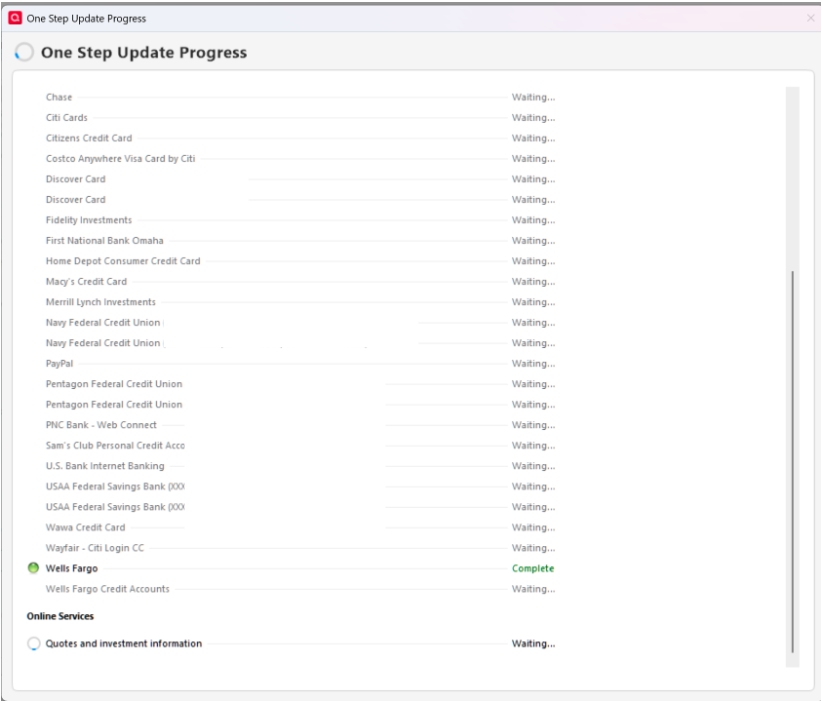
On 1/9/2025 After starting Quicken and running OSU, I received a message that Mobile Web and Cloud were syncing. I don't use mobile web and it is turned off. After the resync completed ALL of my 70+ accounts had a cc-800. I spent the next 2 hours adding the accounts back on. and now my OSU looks like this(see image). The only account that shows completed is my direct connect account, all the others simply show "waiting" until OSU completes. Downloads are happening so I guess OSU is working properly but it appears changes were made by support. Can we know what was changed to make this happen? Not a happy camper…
[Edited - Removed partial account numbers]
Quicken Classic - R66.28, Windows 11 PRO current on updates
My data file is NOT being synced nor backed up.
0 -
I failed to mention that none of my changes from my last Quicken session were reflected in my file when this happened. No manual adds, downloads, etc.
Quicken Classic - R66.28, Windows 11 PRO current on updates
My data file is NOT being synced nor backed up.
0 -
Just wondering! Are these cc-800 errors happening to just Windows users, or are Mac users getting them too? Has anyone tried a system restore to before errors started happening? Could a browser update (Chrome) have caused this? [Removed-Speculation]
[Edited-Readability]
0 -
The CC-800 issue started with my file around 1-6-26. Running Windows 11 Pro and Quicken is Classic. All software is up to date. Every time you do a download and if it's just one account all the others have to be reset.
0 -
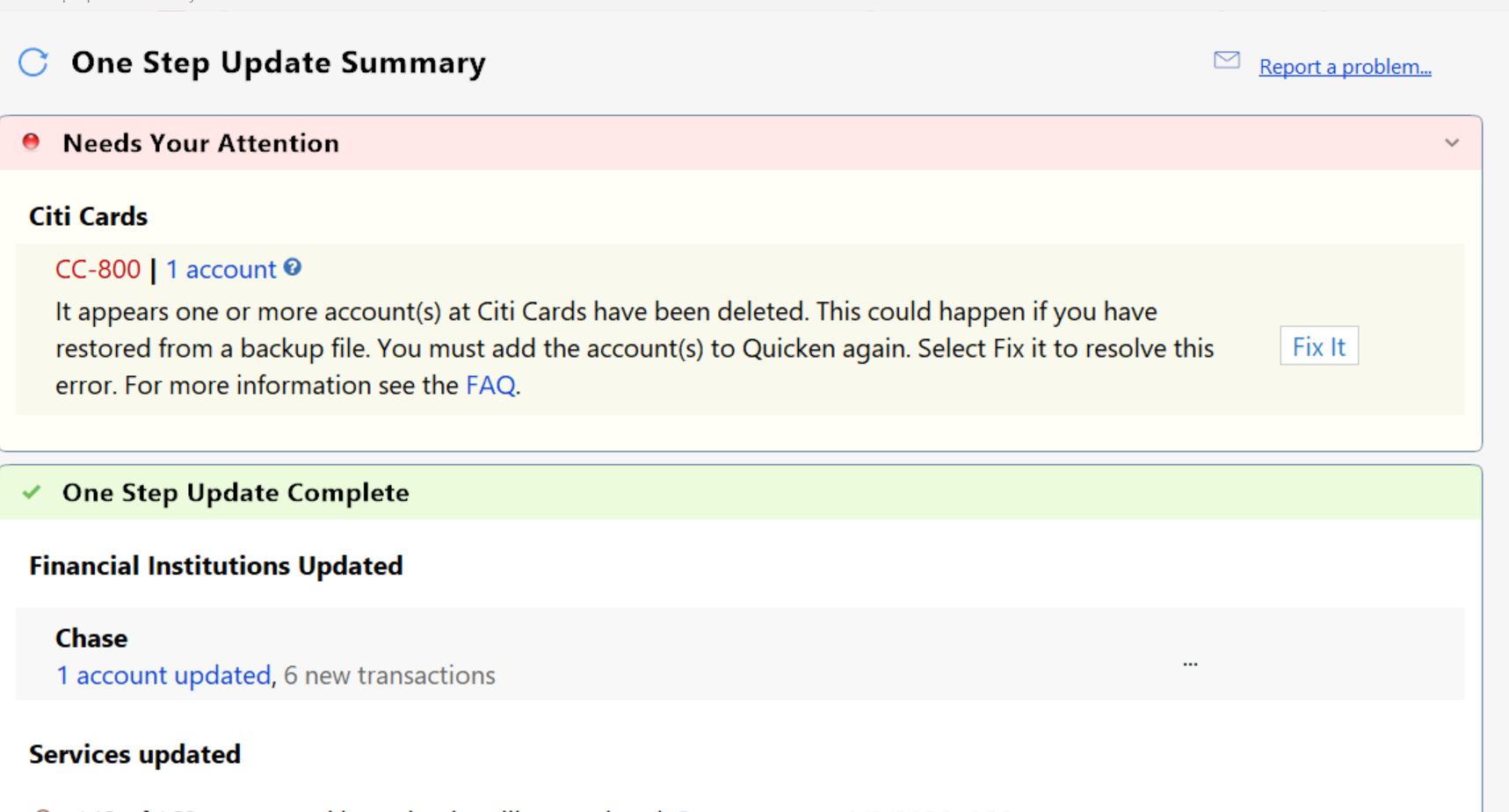
1-12-26 =⇒ CC-800 again today when using OSU on the Citi account even after doing a reset.
 0
0 -
Hello All,
Thank you for continuing to update the discussion with your progress, though I am sorry to hear the recommended troubleshooting steps did not resolve the issue.
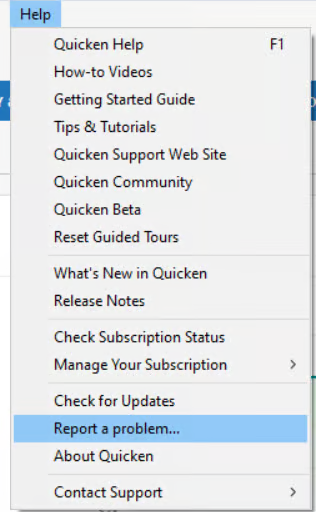
We will be forwarding this issue to the proper channels to have this further investigated. However, we request that you please navigate to Help > Report a problem>Send to Quicken within your Quicken program and submit a problem report with log files and screenshots attached in order to contribute to the investigation.
It would also aid the investigation to include a sanitized file when submitting the problem report. A sanitized file is a data file that removes personally identifiable information so you can comfortably share this file with the Quicken team.
Please let us know once you have sent them over so we can get them added to the ticket. The more problem reports we receive, the better. I do see that some of you already sent them, and I have already added those.
We apologize for any inconvenience in the meantime!
Thank you.
[CBT-1002]
Quicken Alyssa
Make sure to sign up for the email digest to see a round up of your top posts.
0 -
Just did a report a problem and the file is too large to upload. See link in body of message.
1 -
Thank you for following up.
I will check it out and get it added to the escalation ticket.
Thanks again!
Quicken Alyssa
Make sure to sign up for the email digest to see a round up of your top posts.
0 -
Subject line was CC-800
0 -
Thank you, I found it.
Your logs have been added. Given that the file was too large to upload, we won't worry about the sanitized file for now, unless the escalations team requests it.
Thanks again!
Quicken Alyssa
Make sure to sign up for the email digest to see a round up of your top posts.
0 -
There is a link in the body of the message!
1 -
Thank you for coming back and letting me know!
Quicken Alyssa
Make sure to sign up for the email digest to see a round up of your top posts.
0 -
Still no solution for the cc-800 errors. For my own sanity ,I have decided to add accounts once a week instead of daily. But wait Quicken has added a new wrinkle. The last two times I have reset the accounts, it has changed the opening balance on 2 checking accounts. The first time I scrolled through all transactions until I checked the opening account balance. I remember reading someone else had same problem. Solution: I added the correct opening balance to the memo line on next account transaction. [Removed-Rant]
1 -
I am having the same problem, but with both checking and brokerage accounts. Have worked for hours to eliminate the problem with no luck.
0 -
Same problem for 3 days now. I reconnect all the accounts, fix the balance and next update all those online accounts become disconnected again
0 -
Got this today!!!
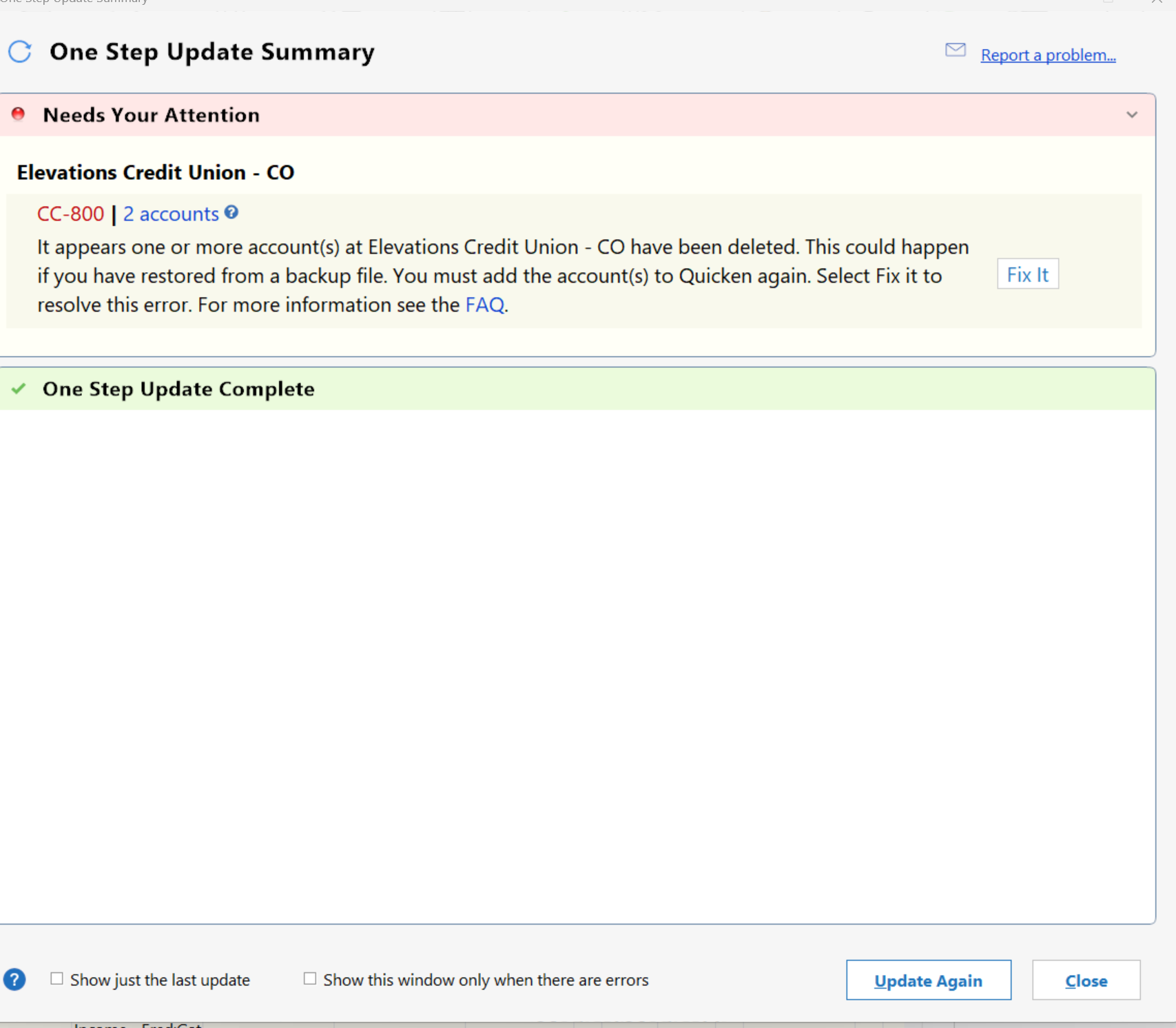
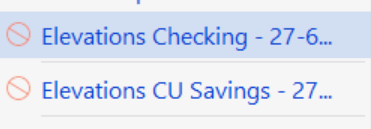
Did the reset with Elevations and now Chase got a CC-800 on it's download:
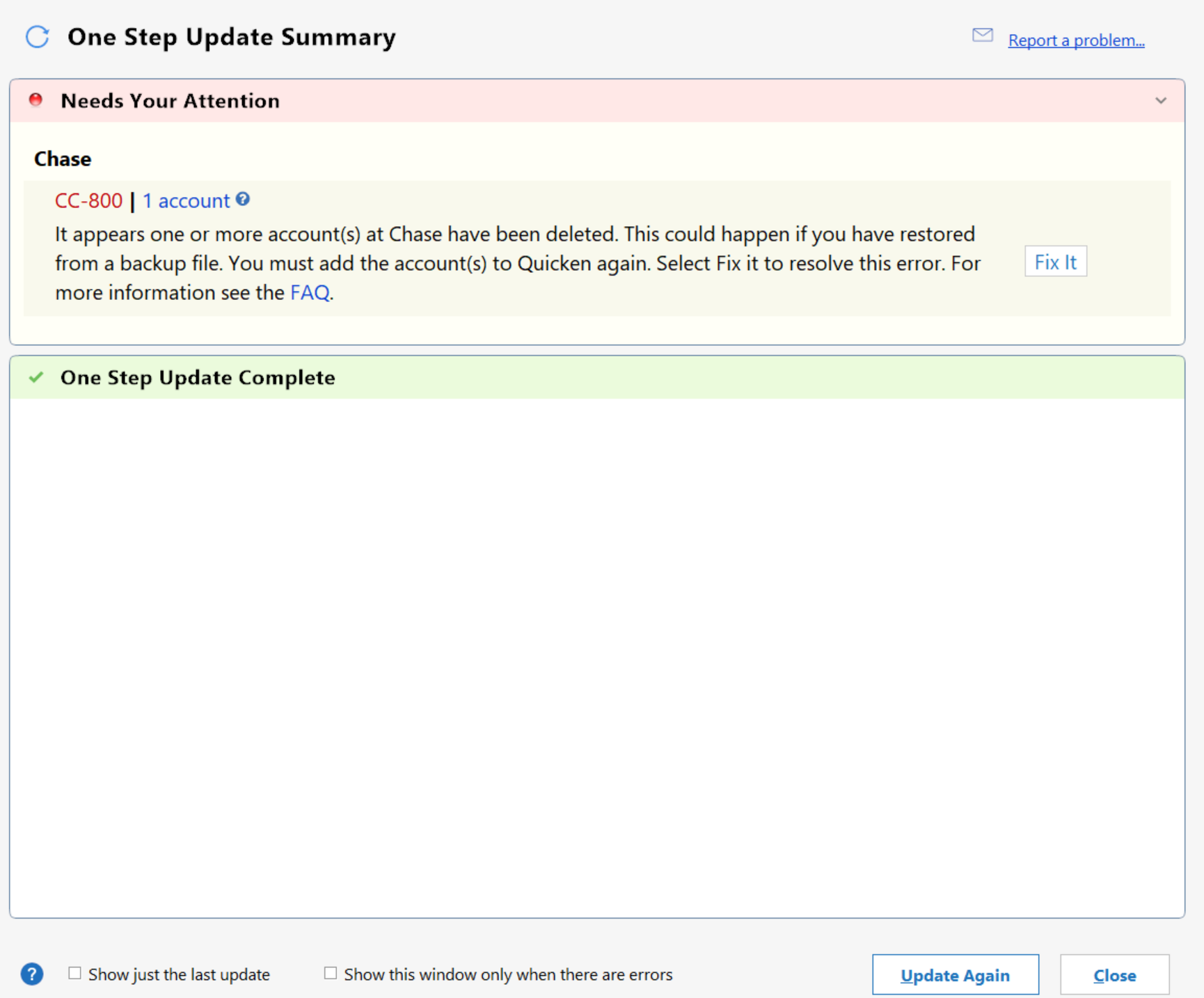
Have done a Report-A-Problem on both
0 -
Hello All,
Thank you for adding to this discussion.
Thank you for the additional information. I will add it to the ticket.
@Jim,
Were you able to speak with Quicken Support? If not, please go to Help>Report a problem>Send to Quicken within your Quicken program and submit a problem report with log files and screenshots attached in order to contribute to the investigation.
It would also aid the investigation to include a sanitized file when submitting the problem report. A sanitized file is a data file that removes personally identifiable information so you can comfortably share this file with the Quicken team.
Please let us know once you have sent them over so we can get them added to the ticket.
@Steve G Z & @ysg26,
Please answer the following:
- How are you opening Quicken?
- Are you using the red square application icon?
- Or are you using an icon that is either red or white, rectangular, and looks like a sheet of paper with the corner folded down?
- Are you using Quicken on more than one computer?
- If so, is it the same file on both computers?
- Where is your data file located?
- We recommend keeping your file stored locally in the default location (C:>Users>username>Documents>Quicken) to avoid possible damage occurring to your file.
- Is your file being backed up/synced by any third-party services like OneDrive, Dropbox, or Carbonite?
Looking forward to your responses!
Quicken Alyssa
Make sure to sign up for the email digest to see a round up of your top posts.
0 - How are you opening Quicken?
-
- How are you opening Quicken?
- Are you using the red square application icon?
- Red square shortcut on desktop
- Are you using Quicken on more than one computer?
- Yes. Computer A is Windows 10 with extended security support. Computer B was Windows 10. Transferred data files back and forth for years with no problems. Backup files also worked on both. Upgraded Computer B to Windows 11 and the problem began. However once in a while the file transfers and updates work with no problems (like yesterday I thought you had fixed it). Same problem results whether I use the main data file or restore from backup file.
- Where is your data file located?
- We recommend keeping your file stored locally in the default location (
C:>Users>username>Documents>Quicken) to avoid possible damage occurring to your file.
- We recommend keeping your file stored locally in the default location (
- Is your file being backed up/synced by any third-party services like OneDrive, Dropbox, or Carbonite?
- No online 3rd party. I backup nightly using Macrium to aa USB drive. I transfer files between computers using local Windows network. Same syntax as you indicated. Backup files are in various other locations in addition to the default one.
- I used to use Windows Briefcase in Windows 7 to do the same thing.
1 - How are you opening Quicken?
-
I am also experiencing this issue (with a dozen different accounts - all bank accounts and one DELETED account) and have gone through the recommended steps without any success. Windows 11, fully updated. Quicken Classic Business & Personal. Cannot send sanitized file as it is too large. I have walked through the same steps as Jim.
- How are you opening Quicken?
- Are you using the red square application icon?
Red square shortcut on desktop
- Are you using Quicken on more than one computer?
No.
- Where is your data file located?
- We recommend keeping your file stored locally in the default location (
C:>Users>username>Documents>Quicken) to avoid possible damage occurring to your file. - I have always used the same location since 1995, I believe, only experienced this type of error a couple times over the years.
- We recommend keeping your file stored locally in the default location (
- Is your file being backed up/synced by any third-party services like OneDrive, Dropbox, or Carbonite?
No
Ed
0 - How are you opening Quicken?
-
1/28/26 - - Same issue here. Iwas was getting CC-800 errors after 1/6/26 and eventually got all accounts reconnected after wasting many hours over multiple days. Downloads have been working for the last week. Then, his morning, ALL banks, credit unions, credit cards, brokerage accounts got CC-800, except Goldman-Sachs. REALLY frustrating to not be able to do my work and have to try and fix this again and again. Please fix this system problem.
0 -
Things went smoothly today. No account disconnects. Also transferred data file from a W10 pc to a W11 pc and did online updates on both with no problems. Hope things are back to how they used to be. Thanks to Quicken if they fixed it permanently
0 -
Persistent CC-800 errors across many or all accounts that are connected with EWC or EWC+ can be an indication of some corruption of the Cloud Account and/or the runtime.dat file. If this is the case, the normal troubleshooting methods often do not work or provide only temporary fixes.
Those of you who are still experiencing this might want to consider doing the following. Many who have experienced this type of issue in the past (including myself) have found that this process truly resolved the issue.:
- If you have not already done so, enter and save the Opening Balance transaction dollar amount into the Memo field. Do this for each Spending account (i.e., checking, savings, credit card, etc.). This is not a necessary step to take but it is a proactive step that can greatly help in identifying and fixing some account balance issues should they occur….more on this below.
- Back up the data file.
- File > Copy or Backup File > Create a copy or template > accept the Quicken suggested file name (the same name as the file being copied but with "Cpy" added to the end of it) or give it a unique name of your choosing > Save Copy > when prompted open the copied file. This process creates a totally unique data file, unique Cloud Account and unique runtime.dat file. It will also break all online services (download connections, Quicken Mobile/Web, download quotations, Zillow house value, credit score, etc.) but the data, Preferences, settings and saved customized reports will be unaffected. If there is any communication corruption, Cloud Account corruption or runtime.dat file corruption they generally will not be copied over in the copied file. NOTE: This copy process does not impact the original data file, Cloud Account and runtime.dat file in any way.
- In the open copied file: You will need to set up all of your accounts for downloading again. It is recommended to use Add Account instead of Set Up Now to do this. When prompted, make sure to carefully LINK the downloaded data to the correct accounts that are already in Quicken.
- Check the Account Balances for each connected account. If they are not correct, check the Opening Balance transaction dollar amount. If they are not in agreement, change the dollar amount to match what was previously entered/saved in the Memo field.
- If the Account Balance is still incorrect: Scroll backward through the register looking for duplicate transactions. If any are found, save the original one and delete the duplicate. If any dupes are present they will most likely occur within the last 90 days.
- If you use Mobile or Web, you will not be able to link with your previous setups so you will need to set them up, again, now.
This is a very low risk process. If this copy process does not resolve the issue for you or you do not like the results you can always go back to the original data file (or that backup file you created at the start of this process) and everything will be as it was before starting the copy process. So the worst is that it will take some time to complete the process above but everything with the original file will not be impacted at all.
If, however, this resolves the CC-800 errors issue for you then you can used the copied file as your primary data file going forward.
Quicken Classic Premier (US) Subscription: R66.23 on Windows 11 Home
1 -
I tried the data file transfer to a 3rd PC also running w10. And the same disconnect happened.
Therefore I can eliminate the problem has anything to do with transfer between W10 and W11.
Summary:
- PC A data is linked to all accounts and can update all accounts several times with no problems
- Transfer either data file or backup file to PC B and perform an online update - works ok sometimes
- Back to PC A which has remained untouched and perform an online update - all accounts disconnected (EXCEPT Capital One cards)
1 -
Just so I am clear: You are transferring the data file from one computer to the next and not leaving a data file copy on the previous computer, right? There should be only one active copy of a data file and that file (or a backup of it) is what should be moved from one file to the next. Using an earlier dated data file on a different computer can often result in connection issues and possibly data integrity issues.
Quicken Classic Premier (US) Subscription: R66.23 on Windows 11 Home
1 -
The original computer will have the data file but Quicken will be closed and not running until the data file is updated back from the other second computer. Been doing this for years ever since Windows Briefcase was a thing updating files both ways. There is always only one active file which is being worked with
1

