Figured out why account bar balances not matching register and online balances

There are bunch of discussions on this topic and I read them all. They were all closed without a valid solution provided. Instead all that was offered was default responses having to do with mistakes by the users or file corruption.
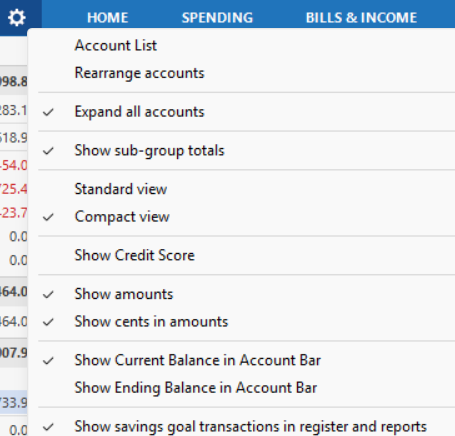
Guess what!!! It is a GUI bug. The issue is caused when the Show savings goals transactions in register and reports is not selected in the account bar settings. When this is not selected, all accounts that currently have or in the past had savings goals associated with them show the wrong balance on the account bar. Check this option and everything is fixed.
Note that that you can fix accounts with current savings goals in those account settings themselves but that option no longer is available for accounts that had a savings goal in the past but no longer have a savings goal. You can only fix those by checking the option on the account bar settings.
This issue needs investigation and fixing by the Quicken team. At least now you have a workaround.
Comments
-
Hello @JohnBigManStone,
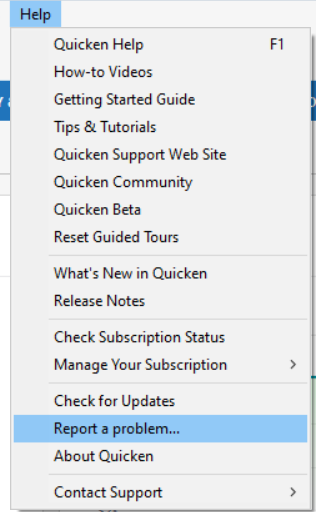
Thank you for letting us know about this issue. I tested in my Quicken and see the same issue. I forwarded this issue to the proper channels to be further investigated. In the meantime, if you haven't already done so, please navigate to Help > Report a problem and submit a problem report with log files attached in order to contribute to the investigation.
While you will not receive a response through this submission, these reports will help our teams in further investigating the issue. The more problem reports we receive, the better.
We apologize for any inconvenience! Thank you.
(CTP-16159)
Quicken Kristina
Make sure to sign up for the email digest to see a round up of your top posts.
0 -
Interesting, @JohnBigManStone, and thanks for the info. We just had the same issue with our Quicken Deluxe 2017 UI this morning. Amounts in the registers accurate; balance amounts in accounts bar inaccurate.
We are long-time Quicken users since early 1990's, and we have never used savings goals.
We have every historical account ever created listed in our accounts bar, even old checking accounts and credit cards that have been closed for decades, all showing zero balances since they were closed over the years. But this morning many of them were showing phantom balances, and we were really thinking they were data from old transactions years ago.
SO HERE'S THE WEIRD THING: We were on the verge of simply restoring yesterday's backup when the strangest thing happened. We were both staring at the screen planning our next step when the balance values in the Accounts window began updating one by one — one every 10-15 seconds — until they were all correct. Took about 2-3 minutes before the displayed values were correct. We were 100% hand of keyboard and mouse while the values auto-corrected.
No idea why this happened, we are just happy that it self-corrected and now appears accurate. We will keep a close eye on this for possible future occurrences.
ONE POSSIBLE CLUE: We use OneDrive to mirror our laptop files, which means that copies of our Quicken data files and the backups are stored locally AND then copied and synched in OneDrive. I have been reading a lot lately about OneDrive synch delays, especially for large files. I was suspecting that there was some effect there.
Not a solution, but maybe a clue for Quicken support if they decide to try and address this.
0 -
Hello All,
Are you still experiencing this issue?
If so, could you please follow the steps outlined below to submit new log files?
Once submitted, let us know so we can update this ticket.
Thank you!
Quicken Alyssa
Make sure to sign up for the email digest to see a round up of your top posts.
0

