Paycheck is automatically entering twice

I have my paycheck set to remind me to manually enter the check into my checking account every two weeks. I have noticed over the past several months that it has been entering a second deposit that does not have a category of "—Paycheck—", but rather "—Split—" with some unspecified accounts for accounts in the split transaction window. How can I remove this auto entry? I have do the Validate file and Super validate file, but that does not seem to fix it. I am using Quicken Classic Permier on Windows 11.
Thanks
Comments
-
Hello @daryleridley,
Thank you for sharing your experience! To help troubleshoot, please provide more information:
- You mentioned you noticed this over the past several months. Do you recall when the issue started?
- What is triggering it to automatically post?
- For example, is it automatically matching to your paycheck when the transaction downloads into your account?
- Do these duplicate deposits both enter into your register at the same time?
- Does your file sync with the Quicken Cloud?
- You can check this by navigating to Edit>Preferences>Mobile & Web.
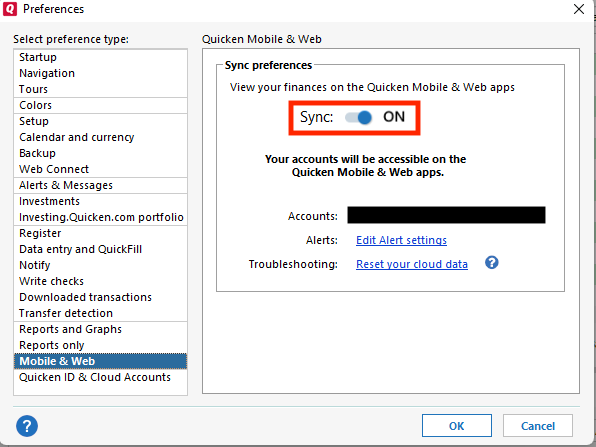
- You can check this by navigating to Edit>Preferences>Mobile & Web.
I look forward to your reply!
Quicken Kristina
Make sure to sign up for the email digest to see a round up of your top posts.
0 -
I think it was around October that it started. I kept thinking I had a second reminder setup, but I can never find it. I did see other post that show this started in Sep with an update. I also contacted Quicken Support and they confirmed this is problem they are working on to fix.
I have no idea what is triggering it, hence why are asking.
Both deposits enter at the same time. One with Paycheck as category and the other as Splits.
I don't sync with Quicken Cloud. I determined that caused too many issues if I synced with the cloud.
1 -
Thank you for your reply,
Back when you contacted Support, there was a known issue with duplicate bills showing up when authenticating billers. That may be why Support told you it was a known issue. That issue has since been marked resolved though.
This behavior sounds like it may be a file-specific problem. I suggest that you try validating your data file. Please save a backup file prior to performing these steps.
Validate:
- File
- Validate and Repair File...
- Validate File
- Click OK
- Close the Data Log
- Close Quicken (leave it closed for at least 5 secs)
- Reopen Quicken and see if the issue persists.
Note - This will not change any reminders which have already gone into your register (those will need to be manually corrected), but it may be able to prevent it from happening in the future.
Thank you!
Quicken Kristina
Make sure to sign up for the email digest to see a round up of your top posts.
0 -
I have done the Validate and Repair File and also the Super Validate and neither of those have changed the issue of seeing a second paycheck.
1 -
Thank you for your reply,
If you haven't already done so, make a backup of your file, then delete and recreate the paycheck reminder.
Please let me know how it goes!
Quicken Kristina
Make sure to sign up for the email digest to see a round up of your top posts.
0 -
I have read that if I do that, it removes the paycheck history. Is that true? I really don't want to corrupt all past checks.
https://community.quicken.com/discussion/7947996/paycheck-detail-history-getting-deleted-if-future-reminder-is-deleted-edit?utm_source=community-search&utm_medium=organic-search&utm_term=delete+paycheck+reminder+budget
0 -
Thank you for your reply,
It should not delete the history. However, I have seen some posts saying that it did, which is why it's a good idea to make a backup of your Quicken file prior to deleting the paycheck reminder.
Thank you!
Quicken Kristina
Make sure to sign up for the email digest to see a round up of your top posts.
0 -
So, today is payday and I paid more attention to this. I noticed that the correct paycheck reminder entered was the only one when I started Quicken. It appears that when I do a "One Step Update Settings", it then loads the phantom paycheck as a split transaction with "Unspecified Accounts" in the Categories. I don't sync to the cloud, but have seen suggestions of turning it on and then unchecking accounts to remove the accounts. Should I try that?
1 -
Having the exact same problem you describe. Recent bug that was introduced. I have not found a workaround other than to manually delete the extra paycheck entered as split transaction
1 -
I turned on the sync to Mobile & Web, let the 37 accounts sync (took over an hour). I noticed the sync added several of the transfers that are phantom entries from previous paycheck splits back from November when this started. I removed those entries and made sure my accounts balanced back to the online account. Then unselected all accounts and synced again. After doing this, I validated the file and it found several of these reminders and removed them. Now I just have to wait to see if they appear again on the next paycheck. I will follow up and let you know.
0 -
Thank you for the follow-up,
To clarify, you mentioned that you found several more of the transactions after validating your file. Were they added during the validation process?
Thank you!
Quicken Kristina
Make sure to sign up for the email digest to see a round up of your top posts.
0 -
No, the validating process found several "scheduled transactions" that it corrected. They looked like the paycheck items along with a few others. We will see if that really fixed it this coming Friday.
1 -
Following this thread - I am having the same issue. My is compounded in that I have splits off my paycheck to pay to other accounts. Those are also getting duplicated. The only thing I noticed lately is that my paycheck (and splits) that are valid are correct for my current account. The 'phantom' pay (splits) is for last year's amount, and nothing updated in the splits to reflect changes this year. I noticed this about October 2025 and have been manually removing the duplicate entries. I have found that I MUST delete the phantom before I can delete the splits.
0 -
Hello @SarahRF,
Thank you for letting us know you're also seeing this issue. Have you tried the troubleshooting mentioned earlier in this discussion?
If not, please do so.
Is the issue is persisting, or did the corrections made during the validation fix it?
Thank you!
Quicken Kristina
Make sure to sign up for the email digest to see a round up of your top posts.
0 -
I did not see the additional paycheck entry yesterday on payday. I think the process of enabling the mobile & Web sync, then disabling the accounts that had been checked to sync, then syncing again, and then validating the file, fixed the issue.
I will say I did notice that my paycheck in the reminders showed a net zero in the reminders the day before. I have seen it where I would have to tab through the amounts to get it to show a dollar figure in the net income. I decided to just delete it and recreate the paycheck again, so that could have also fixed it. Hope this helps those who are having the same issue.
I know it can be frustrating.
[Edited - Readability]
1 -
Thank you for the follow-up,
I'm glad to hear the issue seems resolved.
If the issue returns or if you need further assistance, please feel free to reach out!
Quicken Kristina
Make sure to sign up for the email digest to see a round up of your top posts.
0

