My quicken can no longer update my account (Q Win, Canada)

Quicken can no longer update my account. Yes, my bank has new website, but I have had this error for over 5 business days now.
Quicken Windows, Classic Deluxe
Answers
-
To update my question, Version R65.20, Canada Edition, Windows 10 Enterprise
0 -
Hello @Jen N,
Thanks for reaching out!
Since your bank recently changed its website, Quicken will only be able to restore connectivity once the financial institution submits the updated URL and connection information to Quicken. This process must be completed by the bank—Quicken cannot manually update or override the URL on our end
You can also find more details on this process in this support article, section titled “How can I fix an incorrect Homepage URL?”.
However, to help look into this further, please let us know the name of the financial institution you are attempting to connect with, as well as the exact error message/code you're receiving.
Thank you!
-Quicken Anja
Make sure to sign up for the email digest to see a round up of your top posts.0 -
Hello again,
We haven't heard back from you in a while. Do you still need assistance?
Thank you!
-Quicken Anja
Make sure to sign up for the email digest to see a round up of your top posts.0 -
Hi,
Sorry, just looked at message now. The bank is Vancity Credit Union, also called Vancouver City Savings Credit Union
0 -
@Jen N Thank you for those details!
I took a look at the connection on our end, and I can see that your Vancity accounts are returning an FDP-102 (which translates to a CC-502 in Quicken Windows).
As you mentioned, your bank has recently updated its website. This specific error usually indicates that the bank's servers—or the specific pathway Quicken uses to communicate with them—are undergoing maintenance or updates to align with their new system.
How to handle this:
- The first step is to check for Alerts. However, we do not currently have any open Alerts for this financial institution.
- With no open Alerts, the next step would be to refresh the connection:
- Open the transaction register for the account with the error message.
- Click the Gear Icon in the upper right of the register and select Update Now.
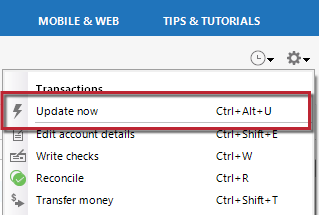
- Follow the on-screen instructions to complete the update.
- Repeat these steps for each account with this error.
- Avoid Deactivating: We recommend not deactivating and reactivating the account right now, as this can sometimes complicate the connection while the bank is still finalizing their server changes.
If the issue persists for more than another business day, please contact Quicken Support directly for further assistance or escalation if needed.
Thank you!
-Quicken Anja
Make sure to sign up for the email digest to see a round up of your top posts.0 -
Hello @Jen N,
I just wanted to check back in with you. Were you able to try the steps outlined above, and has there been any change with the connection since then?
If the issue is still persisting, have you had a chance to contact Quicken Support so they can review the connection in more detail or escalate if needed?
Please let us know how things are going or if you still need assistance—we’re happy to help however we can.
Thank you!
-Quicken Anja
Make sure to sign up for the email digest to see a round up of your top posts.0 -
Hello again,
Checking in once more before this thread is closed.
Let us know if you still need assistance.Thank you!
-Quicken Anja
Make sure to sign up for the email digest to see a round up of your top posts.0 -
Hello again,
Due to the lack of response, I went ahead and closed this post.
If you still require assistance, please feel free to start a new post.
Thank you!
-Quicken Anja
Make sure to sign up for the email digest to see a round up of your top posts.0
