Linking Discover Bank Account after Capital One Merger

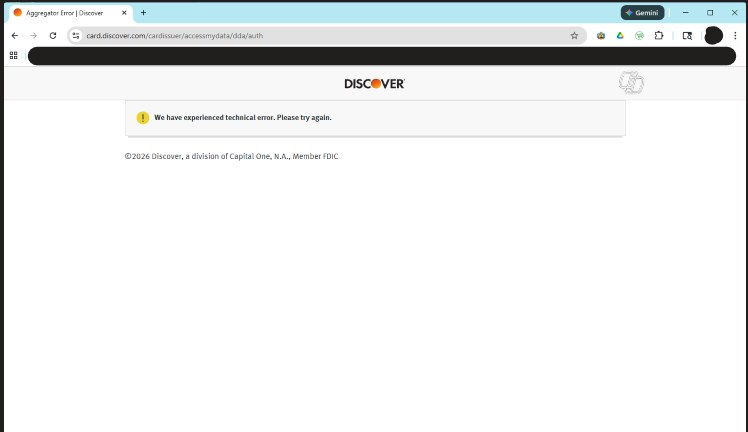
Capital One has now taken over Discover Credit Card, and I was able to successfully link my Quicken Discover Card account to the new Capital One account. But as of now, Discover Bank Checking and Savings are staying on the Discover website. Quicken has asked me to update the Discover account information, but when I try to log in with my Discover account username and password, it just gives me an error message.
We have experienced technical error. Please try again.
So as of now, I can download my credit card activities via Capital One, but I can't do anything with my Discover bank accounts.
Comments
-
Hello @bpurcell,
Thank you for letting us know you're encountering this issue. To help troubleshoot, I checked our internal tools, and can see what looks like a successful connection to Discover Card. Were you able to successfully connect?
I look forward to your response!
Quicken Kristina
Make sure to sign up for the email digest to see a round up of your top posts.
1 -
As I said, my Discover Card has been successfully ported to Capital One, and I can update my credit card through Capital One. What I can't do is get updates for Discover Bank Checking and Savings.
I tried removing the old account links and start fresh. When I try to link my checking and savings accounts to Discover, only Discover Card, not Discover Bank, comes out as an option. If I try to connect through Discover Card and log in, I get the error I showed above.
1 -
I have the same problem. I can link to the ported Capital One and update. Discover bank does not connect. The only institution available to select is Discover Card which points to card.discover.com.
When presented with the discover authorization page (card.discover.com) it defaults to credit card account. I select banking. This fails.
The message is: We have experienced a technical error. Please try again. @2026 Discover a division of Capital One, N.A., Member FDIC
Quicken: You need to check this yourselves. Please try connecting to discover with a banking account you will get the same error. If this is a problem with Discover, you need to post this where the problem is noted and update it as you get information.
2 -
Please review. I have tried several posted methods without success. Discover Bank is not listed as an institution. Discover Card does not link. See my post from 1-30 for more details.
2 -
Same problem for me with Discover Bank. My Discover Card still can connect and download transactions to Quicken but the Banking side of Discover no longer works. This includes Checking Account, Savings Account, and CD Accounts. Also Fidelity Accounts are having errors with transactions downloaded into Quicken again and several times I am being asked to reauthorize my online accounts with all my online accounts I use in Quicken. I understand several institutions have changed their systems over the past few months but Quicken seems to be lagging behind in solving these problems.
2 -
Hello All,
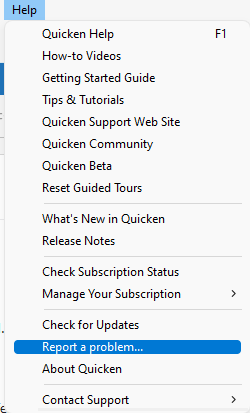
The issue with Discover Bank no longer showing as an option to connect to has been reported to our teams for further investigation and resolution. To contribute to the investigation, please navigate to Help>Report a Problem and send a problem report with log files attached.
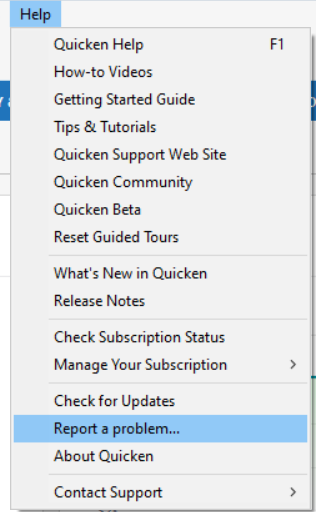
While you will not receive a response through this submission, these reports will help our teams in further investigating the issue. The more problem reports we receive, the better.
We apologize for any inconvenience! Thank you.
(CTP-16153)
Quicken Kristina
Make sure to sign up for the email digest to see a round up of your top posts.
1 -
I reported this same problem previously. Other logins that still have Discover Card accounts (not yet migrated to Capital One) reconnect/reauthorize without any issues. However, the login that includes a migrated Discover Card and additional bank accounts cannot reconnect or reauthorize those bank accounts. The issue appears isolated to that specific migrated-login scenario.
2 -
Hello @WillPlum,
Thank you for sharing that information. To clarify, are you saying that if your accounts have been migrated to Capital One, you are not able to view your Discover Bank accounts through any of the Capital One connects and the Discover Card connection does not work either?
I look forward to your reply!
Quicken Kristina
Make sure to sign up for the email digest to see a round up of your top posts.
0 -
The only thing I see is my Discover Card in Capital One (now migrated). No Discover Bank accounts transferred (yet). I see the Discover Card online on CapOne and the Discover Card download is reestablished connecting to Capital One in the Quicken setup. So the Discover Card in my account is migrated and working fine everywhere. Online on Discover.com, the Discover Card has a link to go to Capital One now and that also works fine. I did have a prior account on Capital One. The Discover card just appeared under that login so that was nice once migrated.
For my Discover banking accounts, I only see the Bank Accounts on Discover.com. These Discover Bank accounts are broken in the Quicken download. I tried the normal steps to fix the connection(s) and get that error above on the Authorization page. I see them fine on Discover.com but not at all on the Capital One site. I assume they will transition at some point.
All that being said, my son's Discover card and bank accounts have not migrated. He uses a different ID etc. We see both his Discover Card and Discover Bank accounts on Discover.com. They also still work fine in Quicken download. Thought it might be helpful for folks debugging the larger issue of transferred accounts. He also does not have a prior Capital One account like I did with a different Store card.
1 -
Thank you for the additional information,
I'll pass that information on to our teams. If you're willing, would you please provide screenshots showing that you're not able to connect your Discover Bank account(s) using the Discover Card connection (please redact any personal information). If needed, please refer to this Community FAQ for instructions on how to attach a screenshot. Alternatively, you can also drag and drop screenshots to your response if you are not given the option to add attachments.
Thank you!
Quicken Kristina
Make sure to sign up for the email digest to see a round up of your top posts.
0 -
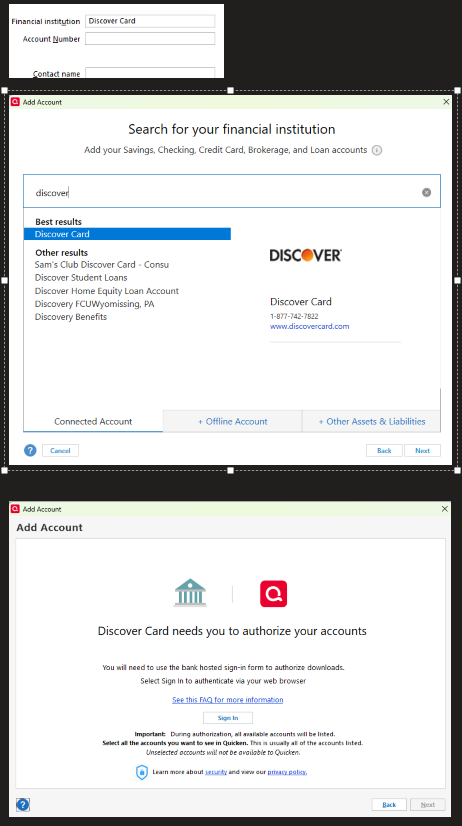
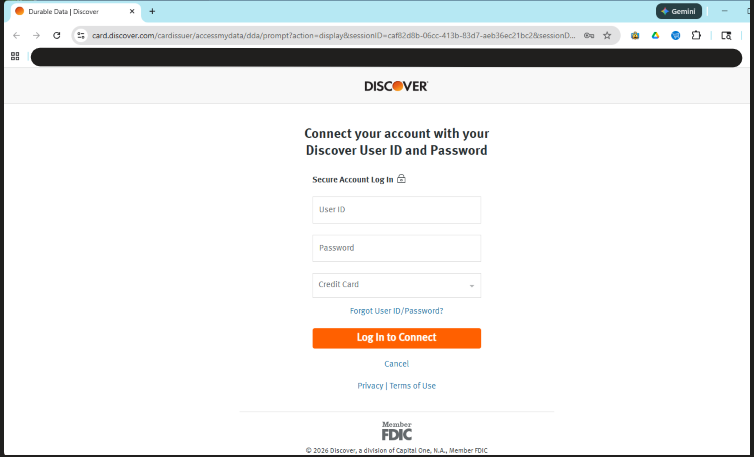
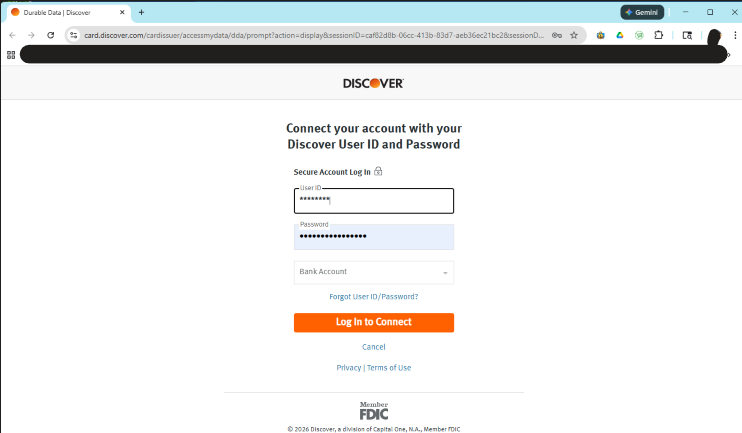
Happy too. Below are the step by step screen shots. I tried with both Chrome and Edge as default browsers. Same results. Note here too, my initial steps were to "Reset Account" and not "Deactivate". The Reset Account seemed to Deactivate the Discover Bank account I was working in vs resetting it. I tried on the other account and same thing happened so you see Financial Institution is editable and the Account number is now gone. That is not normal behavior for Reset Account if the connection is broken..(it should take me to my Account detail window and prepopulate the userid and password from the Password Vault). It then goes to the Search for institution page.
Note Discover Bank is not in this list any longer and it was there in the past. The Discover sign-on info below works with direct online login to Discover, but not on the next to last screenshot below. I get that final Aggregator Error page.
I also signed out of Quicken.com within Quicken and logged back in to be sure to reset any tokens. Same results.
I'm happy to continue to debug with you. Over a decade using Quicken here and am familiar with institutional migrations in my career. I have not reached out to Discover or Capital one at this point.
 0
0 -
Same issue - Discover bank existing accounts are prompted to re-auth at card.discover.com.
Discover card != Discover Bank.
0 -
I also have the same issue, tried authorizing my savings account through both "Credit Card" and "Banking" choices. Same error message noted from others (We have experienced technical error. Please try again.).
0 -
Thank you for your replies,
Thank you for providing the additional information, screenshots, and the problem report with log files attached. It will help our teams further investigate the issue.
Thank you for letting us know you're also impacted by this issue. To help our teams investigate this issue, please navigate to Help>Report a Problem and send a problem report with log files attached.
While you will not receive a response through this submission, these reports will help our teams in further investigating the issue. The more problem reports we receive, the better.
We apologize for any inconvenience!
Thank you.
(CTP-16232)
Quicken Kristina
Make sure to sign up for the email digest to see a round up of your top posts.
0 -
Hello All,
Following up on my earlier post, there is now a Community Alert for this issue. You can bookmark the alert, linked below, to get updates and to know when the issue is resolved. If you do not see the bookmark icon at the upper right, please make sure you are logged into the Community.
Thank you!
(Ticket #12234320)
Quicken Kristina
Make sure to sign up for the email digest to see a round up of your top posts.
0 -
It's been well over a month now since this problem was first reported. It's very disappointing to be forced into a new connection method that is broken. Are we getting any closer to this being resolved??
1 -
Hello @zachrosing,
Thank you for reaching out! There are no new updates yet. If you haven't done so already, I recommend bookmarking the Community Alert to receive notification of any updates, once available, and to know when the issue is resolved.
Thank you!
(Ticket #12234320/CTP-16232)
Quicken Kristina
Make sure to sign up for the email digest to see a round up of your top posts.
0 -
Discover Bank no longer supports Quicken.
[Removed - Duplicate Post/ Edited - Readability]
0 -
Today I was finally able to successfully re-link my Discover savings account in Quicken and download transactions.
On a whim I decided to try going through the process, chose "Credit Card" not "Bank Account" option to log in at Discover. Account details shows Financial Institution: Discover Card Connection Method: Express Web
2 -
Thank you for the follow-up,
I'm glad to hear you were finally able to reconnect your account! Thank you for sharing how you were able to do it.
Hopefully, it will help others encountering the same issue!
Quicken Kristina
Make sure to sign up for the email digest to see a round up of your top posts.
0 -
This also worked for me today. Yesterday, Discover customer service told me Quicken support had been discontinued and I would need to start manually entering my transactions. So what's going on? Will this stop working again?
0 -
Hello @zachrosing,
Thank you for reaching out! The last update we received is that you should be able to connect both banking and credit card accounts using the Discover Card connection option in Quicken.
I hope this helps!
Quicken Kristina
Make sure to sign up for the email digest to see a round up of your top posts.
0 -
I am now getting past the “We have experienced technical error. Please try again”. However after approving the authorization agreement, I clicked the button to "Connect Now" for the bank account on the Discover web site and received an HTTP error status 400. Eventually Quicken times out. When I log into my Discover account online, it shows that access for Quicken is allowed. However no connection has been setup in Quicken.
I only have a Discover bank account, not a Discover credit card account.
Please see discussion 7972116 for screen shots.
Thanks!
Bill
0 -
@tompfr - Thanks that worked!
I switched my default browser back to Chome again and it still seems to connect. In a couple of days I should have more activity on the account and then I'll know for sure if everything still works.
Thanks for your help on this!
Bill
0 -
Thank you for sharing,
I'm glad to hear the information @tompfr provided helped you get your account connected!
Quicken Kristina
Make sure to sign up for the email digest to see a round up of your top posts.
0 -
Glad to hear it worked!
BTW, as far as I know, the default browser setting will not affect your normal one step updates to download transactions. The only time I've seen it matter is during the Discover re-authorization process when I got the HTTP 400 error.
0 -
Hi @tompfr,
Thanks for your reply.
You’re correct that the default browser setting does not affect the normal One Step Update when downloading new transactions. However, it can impact the authorization process.
Glad to hear you were able to connect your accounts! If you run into any errors, please let us know @Mr.BillQuicken Carlos
Make sure to sign up for the email digest to see a round up of your top posts.
0 -
When I follow the Quicken prompts to reconnect Quicken to my Discover Bank credit card account, I get a website error message (see attached screenshot). I called Discover Bank, and they claim the problem is on the Intuit end. They could not help me at all.
0 -
All of a sudden I can't download my Discover card transactions. I can get my wife's Discover card transactions to download. I go in to online services for my card and it says "Set Up now…". I try to do that and I get an error (see attachment). I've tried 3 different web browsers and get the exact same error. Cleared history and cookies and no change. Looking at a post before me ,I see I'm not alone with this problem. Any help would be appreciated
0




