Vanguard Download Issue - Two Entries Per Transaction

In the past, the Vanguard download created a Reinvest entry and reconciliation worked fine.
Today, for the first time, all Reinvest entries had a corresponding DIV entry. This equated to more cash being in the account.
For now, I deleted the DIV transactions and accepted the Reinvest entries and this worked fine.
Quicken - Please address with Vanguard as I assume this is not just me.
Thanks,
Comments
-
Hello @Dom1,
Thank you for letting us know you encountered this issue. To help troubleshoot, please provide more information:
- Do you connect to Vanguard using Direct Connect?
- You can check how the accounts are connected by navigating to Tools>Account List. The Transaction Download column next to the account should show if it's connected and what connection type you're using.
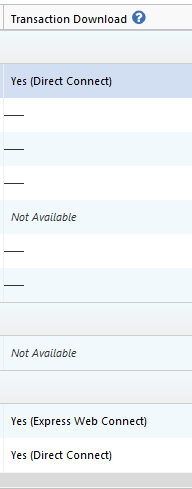
- You can check how the accounts are connected by navigating to Tools>Account List. The Transaction Download column next to the account should show if it's connected and what connection type you're using.
- Were reinvest transactions the only ones that had this problem?
- You mentioned it started today. Did all of the problem transactions come in during the same One Step Update, or did this happen over multiple updates?
- Is this affecting multiple accounts with Vanguard?
- If you have multiple Vanguard accounts, but only one of them is affected, did the same type of transaction download correctly in any of the other accounts?
I look forward to your reply!
Quicken Kristina
Make sure to sign up for the email digest to see a round up of your top posts.
0 - Do you connect to Vanguard using Direct Connect?
-
Hi Kristina,
Answers Below:
- Do you connect to Vanguard using Direct Connect? Yes, I use direct connect.
- Were reinvest transactions the only ones that had this problem? Reinvest were the only transactions I had for various Vanguard accounts.
- You mentioned it started today. Did all of the problem transactions come in during the same One Step Update, or did this happen over multiple updates? Just this last one step update which I do for end of month.
- Is this affecting multiple accounts with Vanguard? Yes, all accounts.
- If you have multiple Vanguard accounts, but only one of them is affected, did the same type of transaction download correctly in any of the other accounts? All transactions for all accounts had two transactions appear in Quicken where I typically only have one.
All my accounts have come in as Reinvest in the past without issue. Sample of the two entries.
 0
0 - Do you connect to Vanguard using Direct Connect? Yes, I use direct connect.
-
Add me to the list. I've got the same (or similar) problem.
Previously, for dividends reinvested, Vanguard would send one transaction, ReinvDiv. Now they send 2: ReinvInt (interest, not dividend) AND Div. This creates 2 problems. The Div transaction improperly increases my accounts' cash balances and it is recording the other transaction as interest instead of dividends.
I download my transactions in a QFX file (as I've been doing with Vanguard for years). I have 2 Vanguard accounts and my partner also has 2 accounts. All 4 accounts are affected by this problem. I think it first occurred about 2 weeks ago.
Any solutions??
0 -
Thank you for your replies @Dom1 & @LeaningTower,
For further assistance, I recommend reaching out to Quicken Support directly. They have access to tools we can't access on the Community, they're able to escalate as needed, and they'll likely need to review the logs to confirm if this change is due to the data being sent to Quicken, or due to a change in the way Quicken is handling that data. The Quicken Support phone number can be found through this link here. Phone support is available from 5:00 am PT to 5:00 pm PT, Monday through Friday.
I apologize that I could not be of more assistance!
Quicken Kristina
Make sure to sign up for the email digest to see a round up of your top posts.
0 -
Thank for the response. I'll wait until end of month download to see if anything changes.
1 -
Having the same issue - just downloaded and had 2 transactions where there should only be one.
0 -
Hello @BLB,
Thank you for letting us know you're also seeing this. For further assistance, I recommend reaching out to Quicken Support directly. They have access to tools we can't access on the Community, they're able to escalate as needed, and they'll likely need to review the logs to confirm if this change is due to the data being sent to Quicken, or due to a change in the way Quicken is handling that data. The Quicken Support phone number can be found through this link here. Phone support is available from 5:00 am PT to 5:00 pm PT, Monday through Friday.
I apologize that I could not be of more assistance!
Quicken Kristina
Make sure to sign up for the email digest to see a round up of your top posts.
0 -
Add me to the list. Vanguard downloads that should be single entry Dividend Reinvest transactions are shown in Quicken as two transactions: a) an income dividend payment added to the account cash balance and b) a separate interest re-investment of the dividend amount. So the share balance is correct but there should not be any cash balance.
I also made a .csv download, there are two entries, a dividend received of, say, $10 and a matching dividend reinvestment of -$10. I don't know why Quicken is assuming an interest re-invest.
0 -
Hello @lemj,
Thank you for letting us know you're also seeing this. For further assistance, I recommend reaching out to Quicken Support directly. They have access to tools we can't access on the Community, they're able to escalate as needed, and they'll likely need to review the logs to confirm if this change is due to the data being sent to Quicken or due to a change in the way Quicken is handling that data. The Quicken Support phone number can be found through this link here. Phone support is available from 5:00 am PT to 5:00 pm PT, Monday through Friday.
I apologize that I could not be of more assistance!
Quicken Kristina
Make sure to sign up for the email digest to see a round up of your top posts.
0
