Struggling to get brokerage account added - placeholder discrepancies..??

Video: https://www.loom.com/share/3b00762353ff47aabb793217854bde9b
Summary
I've always setup my brokerage account as a basic asset account, and then I manually add transactions to keep a general balance, but it doesn't properly show me cost basis and profits, etc.
I'm trying to get the brokerage account added to Quicken and connected so I can remove the manual one and use it properly going forward.
I was able to add/connect it, but it only went back to 9/23/24 when the account was actually opened in April of 2023.
As such, it created placeholders for the stock holdings that it didn't have purchase entries for. I'm now trying to get this all cleaned up.
First, I updated the opening balance date to reflect 3/31/23 since my first transactions were in April of that year.
I then went to my checking account and updated all of the transfers I had from there into my manual account so that they would reflect being transferred into this newly connected account instead. That propped up the cash balance in the account as expected.
Now I'm trying to get everything prior to 9/23/24 caught up, so I'm going through each statement to enter any Int/Div income and the stock purchases to offset the placeholders for those.
I was able to get the first two months reconciled after adding some small interest payments, and it correctly updated my cash balance.
However, starting with the 6/30/23 statement, Quicken is fighting me for some reason.
On that statement I have a withdrawal, some Div income, and some stock purchases (that would offset the placeholders.)
My cash balance is correctly up to the date when I try to enter the first div deposit. When I do this, Quicken is adding a "balance adjustment" as a negative amount which offsets the amount of the deposit, so the cash balance doesn't increase at all.
This happens again for the next Div income on that same statement, and also for the stock purchase.
For some reason it keeps adding these adjustments for everything instead of following the actual cash balance showing up in the register. So it adjusts to offset the exact amount of the deposit/purchase, and the cash balance just stays the same.
I can't for the life of me figure out how to resolve this. The adjustments are linked to the actual deposit, so if I delete the adjustment the deposit gets deleted too.
For the Div income deposits, I found that if I just enter those as "Deposit" with the Div category instead of "Income", then it doesn't add the adjustment. However, that feels weird to have to do that, and it also doesn't fix the problem where the stock purchase continues to add adjustments instead of reducing the cash balance.
I'm at my wits end. Any information on this would be greatly appreciated. Thanks!
Answers
-
Hello @Andrew Angell,
Thank you for reaching out!
In the video, it looked like you still had the placeholders and automatic adjustments in your register from when you first connected the account. Have you tried deleting those, just in case these unwanted entries are being created to try to force the account to match the current values from the financial institution?
If that doesn't correct the issue, then I recommend that you check for file issues by validating your data file. Please save a backup file prior to performing these steps.
Validate:
- File
- Validate and Repair File...
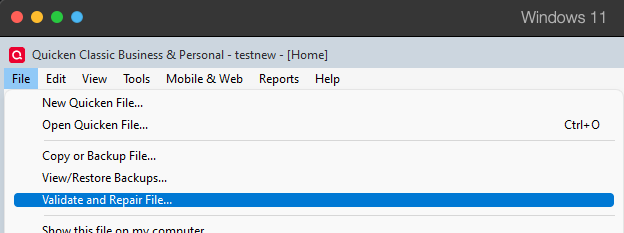
- Validate File
- Click OK
- Close the Data Log
- Close Quicken (leave it closed for at least 5 secs)
- Reopen Quicken and see if the issue persists.
I look forward to your response!
Quicken Kristina
Make sure to sign up for the email digest to see a round up of your top posts.
1 -
@Andrew Angell and @Quicken Kristina There is nothing unusual about what you are seeing. Thank you for documenting it so clearly Andrew.
This problem often arises in cases like this, when you are trying to resolve Placeholders by entering missing transactions. It happens when you enter a transaction such as a Bought, Sold, or Div that would affect the cash balance and there are one or more Placeholders for that security on a later date.
Quicken creates a Cash Balance Adjustment just before the transaction you entered which prevents the cash balance from changing. The transactions are linked. If you try to delete the adjustment transaction, it deletes the transaction you entered as well. It has worked that way for years. I don't know why Quicken does that, but it is apparently by design.
To prevent this from happening, you must delete the Placeholder first. Then it will let you enter transactions that affect the cash balance and delete any adjustment transactions that are already present. If there are multiple Placeholders for a security, is usually best if you work backwards in time so that you only need to delete one Placeholder at a time.
Always back up your data file before changing historical transactions, in case something goes wrong or the result is not what you expected.
QWin Premier subscription2 -
I did still have the placeholders there. For some reason I didn't think to try deleting those. I wound up creating a new manual investment account and just manually entered all the transactions across all the statements. Now I'm fully reconciled to the current date and I like having the actual investment account instead of the way I had it before.
I have other Quicken files I need to do something similar in, so I'll follow your feedback there. Thanks again!
1 -
Thank you for the follow-up,
I'm glad to hear the issue is resolved, and thank you for sharing how you resolved it!
If you need further assistance, please feel free to reach out!
Quicken Kristina
Make sure to sign up for the email digest to see a round up of your top posts.
0 -
@Quicken Kristina I would not say that the issue is resolved.
@Andrew Angell had to enter all the transactions in his account manually to work around the problem. It sure would be nice if at a minimum the Help and other documentation on Placeholders described accurately what we users must do to resolve Placeholders if there are missing transactions that would affect the cash balance.
It would be even better if Quicken did not insert the Cash Balance Adjustments in the first place, or at least explained why it does that.
QWin Premier subscription0

