Need to change credit card # on account without syncing to the Cloud

I use Quicken Classic Deluxe R65.29 and have 22 years worth of history. I do not sync my accounts to the Cloud. I prefer to use the registers manually EXCEPT for my US Bank Visa card. For this account I retrieve transactions from my bank directly by creating a ,qbx file for a certain period. These transactions are then downloaded directly into Quicken for my review.
I recently had to change my US Bank (USB) credit card due to fraudulent activity. I now have a new USB Visa card. I tried to deactivate the old Visa so that I could change the credit card number in Quicken. However, when I do this Quicken is trying to sync and alot of old, incorrect transactions are being populated. Very frustrating as I would like to keep my correct history.
This has affected both my USB credit card account and my USB checking account. The account registers end up with incorrect entries as soon as I try to deactivate.
I have restored my backup file so that the data is now correct. I've tried to turn off cloud sync everywhere possible, however every time I try to 'deactivate' I'm back to having incorrect data in both my USB checking and USB Visa accounts.
I'm stuck at this point. Can someone point me in the right direction?
Answers
-
Hello @Maressa,
Thank you for reaching out! To assist with this issue, please provide more information. What process are you using when you deactivate the problem accounts? At what point in the process is the incorrect data entering the register?
I look forward to your response!
Quicken Kristina
Make sure to sign up for the email digest to see a round up of your top posts.
0 -
@Maressa ,
the process of reactivating an account for One Step Update transaction downloading does indeed cause between 60 and 90 days' worth of transactions to be downloaded from the bank.
If you don't want that to happen, you should not activate the account at all, especially since you stated that you usually download a QFX file from the bank with a range of transactions.If you do activate the account and receive a truckful of downloaded transaction right into your registers, to "minimize the damage" I recommend you turn off "Automatically accept downloaded transactions" for this account before activation. This way, you can manually review and accept or delete downloaded transactions, one at a time, before they hit the register, causing problems.
As far as QFX file downloading is concerned: I'd rather you activate the account and keep downloading using One Step Update or "Update Now" from the account register's Actions gear icon. This process knows how to only download new transactions from the bank since the last update.
You should download transactions daily, or at least once a month, to keep your account up to date, and to avoid gaps in the download of older transactions beyond those 60 - 90 days.BTW, once activated, the account number, as stored within Edit Account Details, General tab, is most likely not the complete credit card number, but only a portion of it. The bank determines what to store in Account Number.
Once activated, this field and a few others will be grayed out and you won't be able to change them for as long as the account is activated. If you want to, store the full card number in the Comments box.Where are the "Auto-accept downloaded transaction" settings?
There are two places where this is controlled in Quicken for Windows:- Globally, for all accounts, in Edit / Preferences / Downloaded Transactions
- For each account individually, the global setting can be overridden from the Edit Account Details screen, Online Services Tab. Look for blue text "Automatic Entry is: ON / OFF". Click the text to change the setting.
0 -
@Quicken Kristina I am going to TOOLS/ACCOUNT LIST. I went to the EDIT button for my Credit Card account and then the ONLINE SERVICES Tab. Then I Deactivated the account as my next step was going to be to Reactivate the account with the new credit card number. As soon as I Deactivate the account, Quicken begins a sync of all transactions—-not what I wanted. I think that the unwanted transactions date back many years so it would be hard to find the problem. Additionally, this is affecting my Checking account.
I really just want my bank to give me a QFX file that the Quicken software will recognize, but the software needs to know the correct account number.
Is there a way to tell Quicken to NOT update my transaction ledgers whenever the software is connecting?
Should I just set up a new credit card account? But then, I still will have the same issue that Quicken is overriding what is in my registers.
Thanks for your advice : )
0 -
Thank you for your reply,
To clarify, when you try to deactivate the account, it triggers a One Step Update to run? Does the One Step Update window come up? If it does, do you have the option to cancel the update?
One thing that should prevent newly downloaded transactions from going directly into your register is if you turn automatic entry off. There are a couple ways to do that.
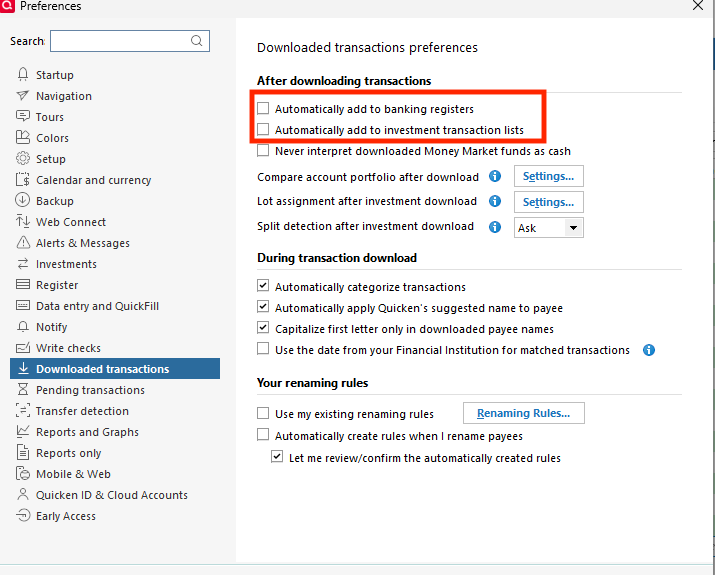
To turn off automatic entry for all banking accounts, navigate to Edit>Preferences>Downloaded transactions and remove the checkmark from "Automatically add to banking registers". If you want to turn it off for investment accounts also, make sure "Automatically add to investment transaction lists" is also unselected.
If you're wanting to turn automatic entry off for just the problem accounts, then navigate to Tools>Account List and click the Edit button next to the problem account. In the window that comes up, select the Online Services tab. There will be a blue "Automatic entry:" link.
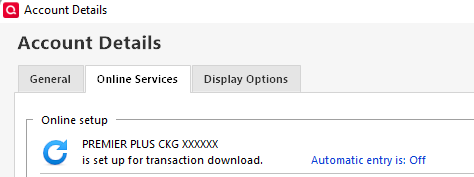
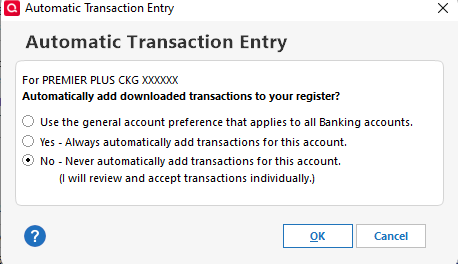
If it says Automatic entry is: Off, then transactions shouldn't be going into that account register automatically. If it says Automatic entry is: On, then click the link, and you should see a window giving you the option to turn it off.
I hope this helps!
Quicken Kristina
Make sure to sign up for the email digest to see a round up of your top posts.
0 -
@Quicken Kristina . Hi there. Thanks for your quick reply.
To answer your first question, when I try to Deactivate an account, it does not pull up a "One Step Update" window. However, it pulls up a window that says it is connecting to the cloud and then when I look at my account register, the balance is extremely too large. I started trying to find the problem and found one missing transaction from 2017. However, there must be other issues. But the bottom line is that Quicken is trying to update this account.
My General preferences for "Downloaded transactions", does not have the boxes checked for automatic entry. I've also checked each account individually and Automatic entry is already turned off.
Can you think of another way for me to change the CC account number? Or should I just try to set up a new Visa account? (of course, I still have to hope that setting up a new account won't trigger Quicken to run another update : ( )
0 -
Thank you for your reply,
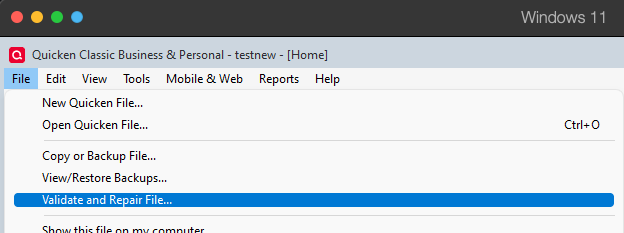
Since you already have automatic entry turned off, these transactions shouldn't be popping up in your account register like that. That makes me suspect there may be a file-specific issue causing this behavior. Please try validating your data file. Please save a backup file prior to performing these steps.
Validate:
- File
- Validate and Repair File...
- Validate File
- Click OK
- Close the Data Log
- Close Quicken (leave it closed for at least 5 secs)
- Reopen Quicken and see if the issue persists.
If the issue does persist after running the validate, then please try adding the account as a new account rather than linking to the existing.
Please let me know how it goes!
Quicken Kristina
Make sure to sign up for the email digest to see a round up of your top posts.
0

