Huntington Bank OL-292-B error

I know this issue has come up in the past, but for the last 4 days I've been unable to update my Huntington Bank accounts. OL-292-B Quicken is unable to complete you request as the request was invalid.
When I attempt to reset the account, I get "Quicken could not complete the account reset."
Anyone else experiencing this issue with Huntington Bank in the last few days?
Comments
-
I'm getting this same issue with my Huntington account, Jeanderson, but it's only been the last 2 days. It began when I tried to make a Discover payment via my Huntington bill pay as I've done countless times before. It gave me innocuous error message saying it was a 'bad command' (or some such). I'm hoping this is a Huntington problem that gets fixed soon. Strange that only you and I are having this problem. I would assume there'd be many more Quicken/Huntington bank users in the same situation.
1 -
Hello All,
Thank you for taking the time to report this issue!OL-292 errors generally indicate that Quicken isn’t receiving the expected response from the financial institution during the update process. As a first step, I recommend reviewing this OL-292 support article, which outlines the standard guidance for this error.
In short, the recommended steps are:
- Wait and try updating again the next business day
- Make sure Quicken is fully up to date by going to Help > Check for Updates
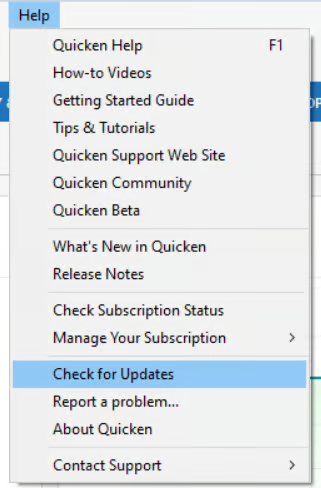
If the error continues after that, the article explains that the next step would be to contact Huntington directly and ask to speak with an online services specialist, as Quicken doesn’t have access to their servers to resolve OL-292 errors on our end.
Additionally, we will also be forwarding this issue to the proper channels to have this further investigated on our end as well. However, we request that you please navigate to Help > Report a problem within your Quicken program and submit a problem report with log files and screenshots attached in order to contribute to the investigation.
It would also aid the investigation to include a sanitized file when submitting the problem report. A sanitized file is a data file that removes personally identifiable information so you can comfortably share this file with the Quicken team.
While you will not receive a response through this submission, these reports will help our teams in further investigating the issue. The more problem reports we receive, the better.
We apologize for any inconvenience in the meantime! Thank you.
(CTP-16196)-Quicken Anja
Make sure to sign up for the email digest to see a round up of your top posts.1 -
I am as well Saturday 1/31/26. I would guess there are others, but who don't bother to check-in on the forums. Hopefully fixed by monday…..
1 -
I've been receiving this error on Huntington connections for about 4 days now. I have other financial institutions that are connecting without issue. I've tried resetting the Huntington online services with no luck.
1 -
Another observation: For the past 2 days I experimented and found that if I tried updating the Huntington account multiple times during a 15-29-minute Quicken session, I would not get the error on one attempt at most. Makes me think that Huntington recently did a system update and still has some glitches. I think it would be best if Quicken communicated with the Huntington techies to try to resolve this irksome issue. I should also note that I also tried all the potential solutions in the above-cited support article with no positive results.
1 -
I am also a Huntington Bank customer and started running into this issue on Saturday 1/31/2026. I waited to try again on Sunday but got the same error.
On Sunday evening, I removed all connections from my Huntington bank accounts and set them up again using the Express Web Connect. This worked for downloading bank data, but it doesn't support Bill Pay which I rely heavily on.
On Monday (yesterday), I called Huntington. They pointed me to an option on my profile titled "Financial Management Tools Access" and turn it on. Weirdly, it was turned off even though everything was working fine. In any case, turning it on DID NOT make a difference.
Tuesday (today), I called Quicken Support and they told me since I'm using Direct Connect, the error is on the Huntington side. The connection error I receive in the logs is:
20260203 09:11:24: The server does not recognize a request from the application. Try again now, or wait and try later.
20260203 09:11:24: QFN: End send to https://ofx.huntington.com/Ofx/process.ofx, netstatus 14I'm on a call right now with Huntington and they said they're creating a ticket for this.
0 -
@dashrendar : Thanks for calling Huntington. Was about to do the same.
1 -
Ok, this is weird.
I restarted my computer.
And it worked! TWICE. What the hell?
Can you try restarting your PCs and see if it makes a difference?
PS: I already opened a ticket with Huntington, but wondering if it was a Windows 11 issue with networking/communication all along?
0 -
Hello everyone,
Thanks for all the detailed updates—especially to @dashrendar for taking the time to test different scenarios and for sharing the logs and Huntington’s response.
It does appear that this issue may be intermittent, and we appreciate you sharing that a full system restart allowed the update to complete successfully in your case. While this isn’t something we can confirm as a permanent fix, it’s definitely worth trying for anyone still encountering the OL-292-B error.
That said, the ticket for this issue remains open, though we do not have ETA at this time. Thank you to all who have submitted Problem Reports with logs so far—your details and files have been added to the ticket.
Thank you!
-Quicken Anja
Make sure to sign up for the email digest to see a round up of your top posts.1 -
Okay, it's definitely intermittent.
I ran it again just now without restarting, it completed successfully.
I ran it a second time, and it failed.
I ran it a third time, and it failed.
I turned off Norton Auto-Protect and Smart Firewall.
I ran it a first time, it completed successfully.
I ran it a second time, it failed.
I ran it a third time, it failed.
I turned ON Norton Auto-Protect and Smart Firewall.
I ran it a first time, it completed successfully.
I ran it a second time, it completed successfully.
I ran it a third time, it completed successfully.
Honestly, I don't know if Norton has anything to do with it. It just seems to be intermittent. I was just trying to see if it was triggered/affected by something else.
0 -
@dashrendar I appreciate you being so thorough with these tests!
Based on the intermittent behavior you're seeing—where it works once and then fails multiple times regardless of your firewall or restart status—it strongly suggests that the Huntington servers are occasionally dropping the connection or failing to "handshake" correctly with Quicken.
Since you've proven it's intermittent:
- Don't feel the need to keep adjusting your Norton or system settings. Since it worked with them both on and off, your local setup likely isn't the culprit.
- The "Wait and Try" approach is best. If it fails, waiting an hour or two is more likely to yield a successful connection than repeated immediate attempts.
We'll keep monitoring this until the connection stabilizes.
Thank you again for the legwork!
-Quicken Anja
Make sure to sign up for the email digest to see a round up of your top posts.0 -
I too am getting theOL292B error code on download but only with my personal accounts. My huntington business accounts download without issue. I have called Huntington and they said i was the 3rd caller of the day yesterday Feb 3 but as of yet i haven't gotten a fix to the problem.
If any of you get a resolution to this please share your wisdom
0 -
Hello @Cwood2,
Thanks for reaching out!
I have gone ahead and merged your post with this active thread regarding the Huntington Bank OL-292-B error so we can keep all related reports and updates in one place.
As you can see from the discussion above, several other users are experiencing this same issue, and it appears to be intermittent—working for some accounts or at certain times, while failing for others. We do currently have an open ticket (CTP-16196) with our internal teams and service providers to investigate why Huntington's servers are returning this error.
A few key points from the thread:
- Direct Connect vs. Express Web Connect: Some users have found that switching to Express Web Connect works for downloading transactions, though this does not support Direct Connect Bill Pay.
- Intermittent Success: As @dashrendar noted, sometimes waiting a few hours and trying again results in a successful download, suggesting the bank's servers may be struggling to handle the requests consistently.
- Official Ticket: Your report and the fact that you've already contacted Huntington help strengthen our case. We can also add your details to the investigation. Please submit your log files via Help > Report a problem as instructed in one of my earlier responses above, and let us know once you have done so:
Thank you for your patience!
-Quicken Anja
Make sure to sign up for the email digest to see a round up of your top posts.0 -
Hello Quicken Anja
I have had continued problems with OL-292-B, a phone call with Huntington said it is not on their end, I tried downloading a transaction file and that also failed, restarting my machine did not help.
Please - really important to get this fixed. We are going on about a week now.
0 -
Update: I'm still working with Huntington as a I supplied their Digital Customer Service department with Quicken logs from my computer to troubleshoot the problem. Still waiting on a response from them.
1 -
I am getting the same error with Huntington,
Quicken encountered an online error [OL-292-B]
I also get an
OL-221-A error and from Huntington it says I'm not signed up for PC banking! I have been for years but I dont know how to get my files to download from the bank. Help!
0 -
Hello everyone,
Thank you all for the continued updates and for sharing what you’re seeing—this is still being actively investigated, and while we do not have an ETA available on resolution, we appreciate everyone’s patience.
@Lynncal—thanks for chiming in! Please navigate to Help > Report a problem in Quicken and submit a problem report with your log files attached. If possible, including a sanitized file would also be helpful, though optional.
For anyone else who has not yet submitted logs and is still experiencing the issue, we also encourage you to do so, as the more reports we receive, the better we can correlate the data during the investigation.
Thank you again for your patience while we continue working with Huntington on this.
-Quicken Anja
Make sure to sign up for the email digest to see a round up of your top posts.0 -
Thursday 2/5 3:45 PM: Download from Huntington just worked for me. First time in almost a week.
0 -
Same for me - I hope it is fixed!
0 -
@jeanderson & @Michigan User Thanks for the update! Glad to hear it's working for you both now.
Could others in the thread please confirm whether the issue is now resolved for you as well, or if it’s still persisting?
Thank you!
-Quicken Anja
Make sure to sign up for the email digest to see a round up of your top posts.0 -
It's functioning properly again for me…today. 👍️
0 -
@Geoff_O Glad to hear that! Thanks for the update.
-Quicken Anja
Make sure to sign up for the email digest to see a round up of your top posts.0 -
No response from Huntington after I supplied them with the information and files.
However, I tested several times yesterday and again today. No errors whatsoever.
I think the issue is resolved.
0 -
@dashrendar Thanks for the update! Glad to hear it's resolved for you.
-Quicken Anja
Make sure to sign up for the email digest to see a round up of your top posts.0 -
Working for me now (2/9/2026).
0 -
It's working consistently for me as well. Huntington must have fixed it.
0 -
-Quicken Anja
Make sure to sign up for the email digest to see a round up of your top posts.0
