Bank of Hawaii Update Problem

When trying to get the latest transactions for my account, get a message stating that Bank of Hawaii needs to send me an authentication code via text. The number they want to send the auth to is not my number. Because of this, can't get the latest account data. Bank of Hawaii says that it is a known Quicken problem and directed me to contact Quicken.
[Edited-Readability]
Comments
-
Hello @SubicSquid,
Thank you for sharing your experience. I have moved your post into a Windows category, as it appears you are a windows user.
While this is not currently a known issue, I did check your connections internally and can see you are getting a CC-585 error.
This usually means your financial institution has added a new security feature that requires your attention before your account can be updated. Follow the steps below; these are also in the article linked above.
Refresh your online account information
- From your account register, select the Actions gear icon at the very top of your register (Ctrl + Shift + N).
- Select Update Now.
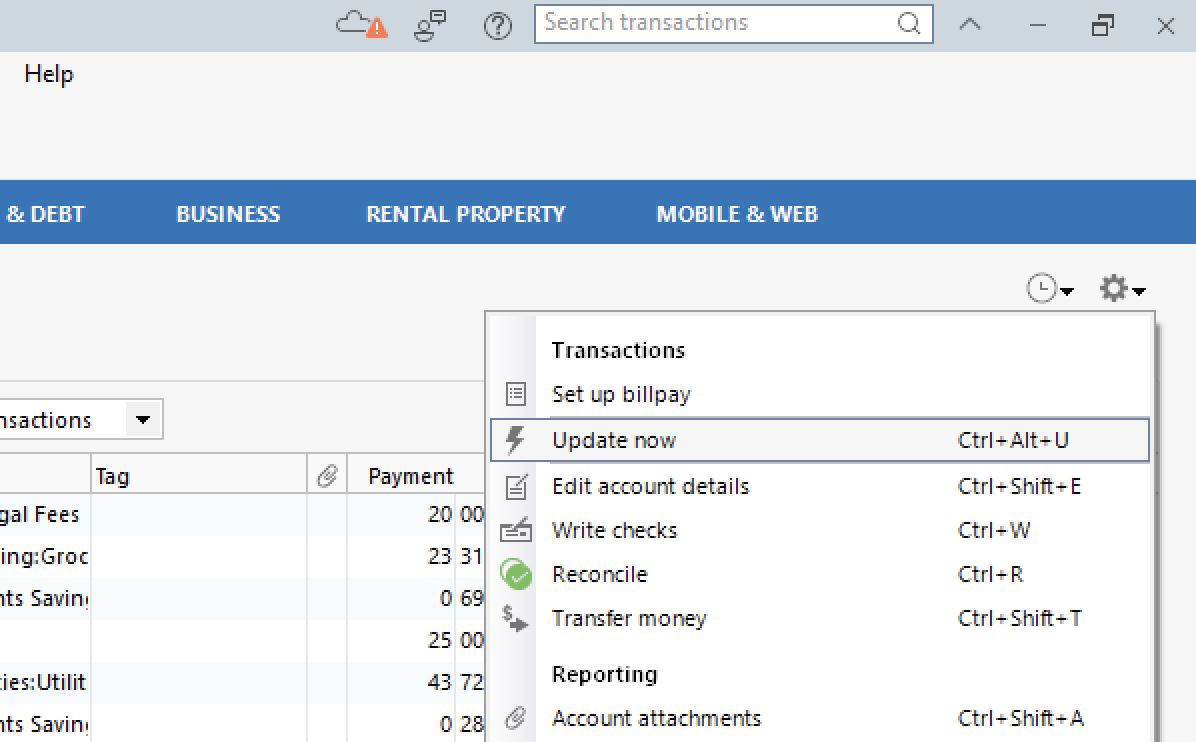
- Follow the on-screen instructions to complete the update.
- Repeat these steps for each financial institution experiencing this error.
Visit your financial institution's website
- Sign in to your financial institution's website.
- Navigate to the page where you view your account information.
- When you encounter the new web page that requires your response, fill out the requested information and dismiss the screen. If you have the option to not display the page or ask you again, select that option. If you do not, the error may continue to occur.
Note: Some financial institution websites may have this new security requirement located in your inbox or message center.
If these steps do not resolve the issue, please reach out to Quicken Support directly for assistance. They can investigate further and process an escalation if needed.
Thank you!
Quicken Alyssa
Make sure to sign up for the email digest to see a round up of your top posts.
0 -
I am also having this same issue. I am not receiving any error code, I am able to log in to the Bank of Hawaii website without issue and without a requirement for any additional security. I did try both to reset the account and to deactivate the service and set up again. In both cases, I am getting a verification request from the BofH website for additional information to phone numbers which are not mine.
0 -
At the BofH website, are there any Profile Settings where you can set up, verify or change phone numbers and security settings?
IMHO, that would be the first thing I'd look for.0 -
Of course there is, profile is correct….
0 -
So, if your customer profile at the bank's website indicates the correct 2FA phone number, I'd say it's time to contact Quicken Support on the phone during posted hours of operation and request help. Let them do a screen share session with you to review the situation on your computer, to determine the nature of the problem and to figure out how to fix it. This may have to be escalated to higher support levels for research and locating the source of the problem.
0 -
I also have the same problem as the first poster (SubicSquid). I've done everything…reset the services, deactivated and recreated the online service a number of times. I thought it was just me, but I think this an issue between Quicken and Bank of Hawaii. Right now, the only recourse is for me to force the transfer of data manually by going to the BOH website and download a quicken formatted file. The password that's used in the online service setup is correct, as I am able to log on to the BOH website.
0 -
Hello @likeke,
Thank you for adding to this discussion.
After reviewing your profile, I can see you are running into a login-related issue. Please reach out to Quicken Support for assistance resolving this.
Please let us know how it goes!
Quicken Alyssa
Make sure to sign up for the email digest to see a round up of your top posts.
0

