I can't find "Tools" in Q classic

I'm running Classic for Mac, 8.4.2 on Mac OS 26.2 on a Macbook M3. I just added AmEx accounts to Q, and about 1/3 of the categories are bizarrly wrong. In Q help, I found instructions tellime me to go to Tools > Category List. However, I cannot find a Tools menu despite two long attempts clicking on every dropdown menu I could find on any page.
Thanks for any suggestions.
Brian Preston
Answers
-
Quicken Mac doesn't have a Tools menu, that's a Windows thing. You can see a list of your categories in Quicken Mac by opening the Categories window from the Window menu.
0 -
Now I'm even more confused. That is not my question. I was in Quicken for Mac and asked how to fix a new download from AmEx credit cards to a new banking file that labeled scores of entries incorrectly. Is there a way to select and edit the entries to reflect the correct categories. The response from Quicken Classic: 1. Go to Tools > Category List. 2. Right click the incorrect category and choose Edit. Change it to the correct category name. 3. Change it to the correct category. 4. Click OK and Q will update all. Then I see at the bottom of my printed conversation, this again is for Q for Windows. When I read an alternate method it would change the category name for everything in that category, which is not what I want to do.
How do I do this in Q Classic for Mac, and how is it that when I'm in Quicken for Mac and asking for help online I get Quicken for Windows responses? Multiple entries for a transaction were labeled "Internet". I do not want to change the name of the category, since Internet is valid for other transactions. I want to select about 30 of the same transactions labeled Internet that should have a different label. Thanks for your first suggestion.
0 -
I don't know where you asked your question — via Quicken Help on the Help menu? On the Quicken Support page with there "Quick Assist" AI-generated responses? somewhere else? — or exactly what you asked, so I can't speculate on why you got an answer regarding Quicken Windows. Rather than worrying about that right now, you could just accept the correct answer you received here, which is that anything referencing the "Tools" menu refers to Quicken Windows and not Quicken Mac. (If you'd like to try to get to the bottom of why you received a wrong answer, please describe what you clicked or where you went to ask the question, and what the wording of your question was; we can try to figure out if you were in the wrong place or if there is something wrong in Quicken's help data which needs attention.)
If I understand your latest post correctly, you don't want to change the name of the Internet category, but you want to change some transactions which currently have the Internet category to a different category. Is that correct? In Quicken Mac, you can edit the category for multiple transactions at once by selecting the ones you want to change*, then selecting Transactions > Edit Transactions (or Command-E, for "Edit"); In the Transaction Info window which pops up, find the Category field and change it to whatever your desired category is, then press OK. It doesn't matter whether the transactions you select all currently have the same category or have different categories; doing this mass edit will assign them all the category you select.
(*To select multiple transactions in Quicken Mac, you can select contiguous transactions by clicking on the first one, then Shift-clicking on the last, or you can select discontiguous transactions by clicking Command-click on each transaction you want to include. You can also use the Search box to first narrow your register to transactions with "Internet". Then you can select the ones you want, or if you want most but not all, you can Select All and then Command-click on the ones you don't want to change.)
Quicken Mac Subscription • Quicken user since 19930 -
Would you please show a Quicken Classic screen and put an arrow on where to access whatever gives us the tool option to disconnect an account?
[Edited - Readability/Disruptive]
0 -
Hello @Berylsbissell,
Thank you for clarifying what you need! It's a good idea to backup your file prior to disconnecting the account. For instructions, please see this article: .
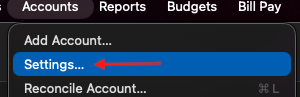
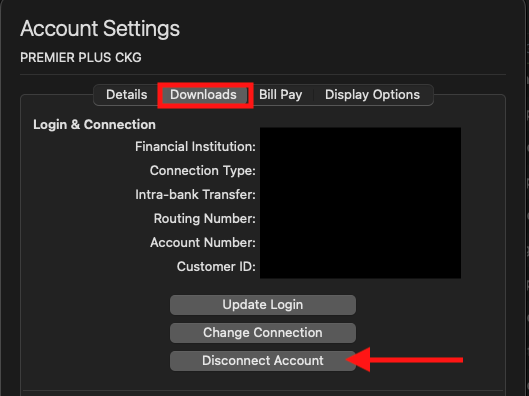
I hope this helps!
Quicken Kristina
Make sure to sign up for the email digest to see a round up of your top posts.
0 -
@Brian Preston I don't want your original question to get lost due to another question someone posted in this thread. You were asking: "I want to select about 30 of the same transactions labeled Internet that should have a different label." Did you see my reply above about how to edit the category of multiple transactions at once? Did that resolve how to do what you wanted, or are you still needing help doing something in Quicken Mac?
Quicken Mac Subscription • Quicken user since 19930

