Quicken thinks an IRA withdrawal is an IRA purchase

I am retired, and I have scheduled monthly withdrawals from Vanguard IRA's.
These are set up in quicken as transfers FROM Vanguard TO my bank account. When I enter it via scheduled bills and deposits, I get a flag question that asks "Do you want to record this as a 2025 or 2026 IRA deposit?
I can't close the dialog box without entering one or the other. It's not a deposit to the IRA, it's a withdrawal from it. It's more annoying than anything, it doesn't appear to be affecting any of the tax reports or anything like that….but it's weird.
Am I the only one?
Comments
-
Try deleting that scheduled transaction and set it up the other way around as a scheduled deposit to the bank account first. Especially if they take any tax withholding out of the IRA withdrawal.
I'm staying on Quicken 2013 Premier for Windows.
0 -
Hello @h stansfield,
We haven't heard back from you in a while. Do you still need assistance?
Were you able to give @volvogirl's suggestion a try?Check back and let us know! Thank you.
-Quicken Anja
Make sure to sign up for the email digest to see a round up of your top posts.0 -
@h stansfield and @Quicken Anja I see the same behavior with my IRA distributions prior to April 15 each year. Although selecting the current year and clicking OK is a relatively simple workaround, it is an annoying bug and is easily reproducible. The process below is necessary to use in order for Quicken to record the distribution and withholding so that they appear in the Tax reports and Tax Planner..
I would summarize the problem as follows:
1) Set up an Income reminder to record the distribution in a banking account for the net amount of the RMD as a positive number.
2) Split the Category in the Reminder:
- Line 1 of the split: Category = the IRA account name in [square brackets] for the gross amount as a positive number. This will create a transfer from the IRA.
- Line 2 of the split: Category = the Fed tax withholding category that you use, as a negative number.
- Line 3 of the split: Category = the State tax withholding category that you use, as a negative number.
- Total of the split: Must equal the net amount of the deposit.
3) Accept the Reminder.
If the deposit is made between Jan. 1 and April 15, you will see a dialog titled “Confirm Your Contribution Tax Year”, even though this is a distribution and not a contribution. Select the current year, not the default of the previous year, and click on OK.
The problem also occurs if you enter transaction directly, without using a Reminder.
[correction 2/9: The confusing dialog appears if the deposit is made to either a banking or investing account, not just banking accounts.]
QWin Premier subscription0 -
Hello @Jim_Harman,
Thank you for the detailed write-up and for clearly outlining the steps to reproduce this behavior—it’s very helpful.
Could you please provide screenshots showing:
- The Income Reminder setup, including the split categories
- The “Confirm Your Contribution Tax Year” dialog that appears when recording the transaction
Thank you again for your help!
-Quicken Anja
Make sure to sign up for the email digest to see a round up of your top posts.0 -
@Quicken Anja here is an even more detailed description of the steps to reproduce this problem along with screen shots.
This problem appears even if the transaction is entered directly in the receiving account prior to 4/15. Here is what the directly entered Split transaction looks like:
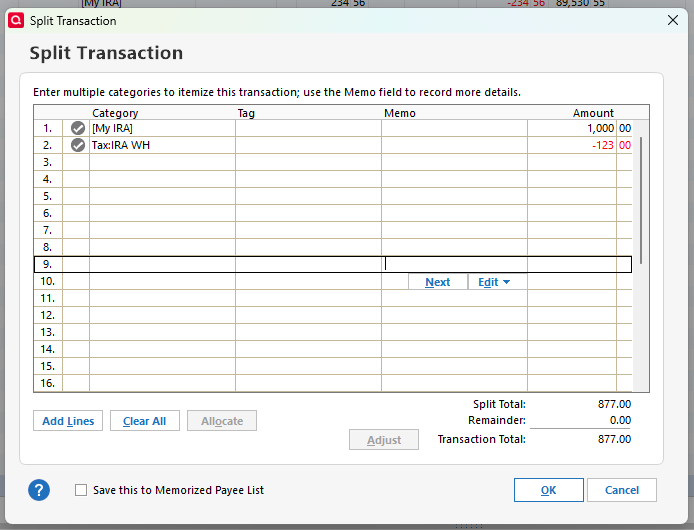
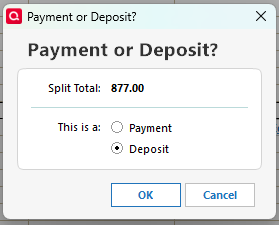
When I enter the transaction, Quicken asks if it is a payment or deposit. I select Deposit and click on OK
When I enter the transaction by clicking on the green Enter icon, I get the problem dialog:
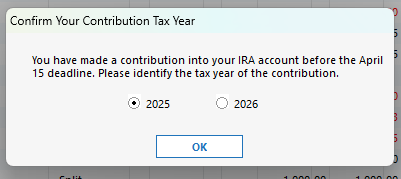
It is asking about a contribution even though this is a distribution. Also it defaults to last year. If I accept the default, the distribution appears on the 2025 Tax reports.
Note that per IRS regulations, except for the first year you take Required Minimum Distributions (RMDs), you must take the RMD before Dec. 31.
If I select 2026 and click on OK, the transaction is entered correctly.
-,-,-,-,-,-,
To set this up as a Reminder, I click on Manage Manual Bills and Income and select Add > Income Reminder and set it up as shown
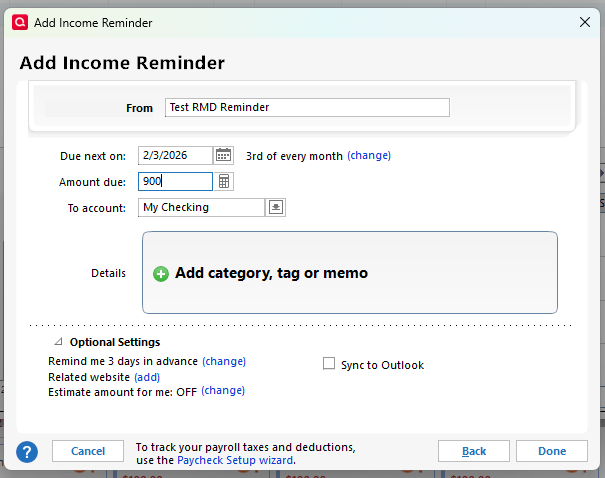
I click on Add Category, Tag, and Memo and again set up a split like this
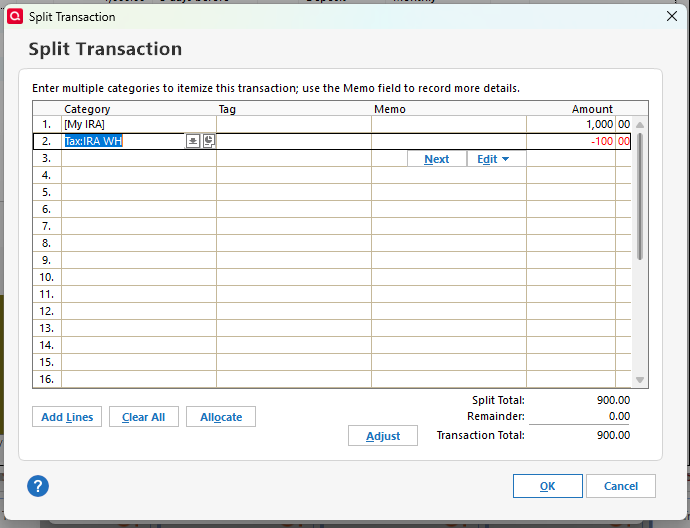
I click on Done to save the Reminder.
When I Enter the Reminder, I get the same "Confirm your contribution tax year" dialog as above.
QWin Premier subscription1 -
Hello @Jim_Harman,
Thank you for the extremely detailed write-up and for taking the time to document the steps and screenshots so thoroughly—this is very helpful and clearly outlines the behavior you’re encountering.
We’ll be forwarding this issue to the appropriate teams for further investigation. In the meantime,could you please submit a problem report directly from within Quicken so our teams can review the relevant log files and data?
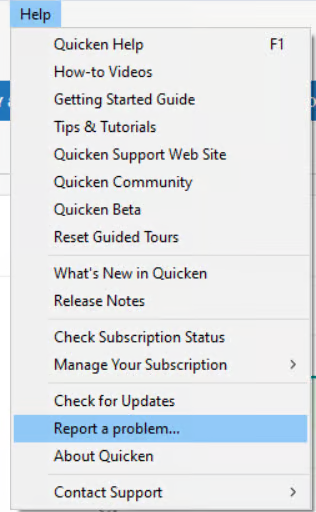
If you don't mind, please also include a sanitized file with your submission.
Let us know once that is done.
Thank you!
(CBT-1019)-Quicken Anja
Make sure to sign up for the email digest to see a round up of your top posts.0 -
Report sent with sanitized file.
Please try this yourself and confirm that you can follow my instructions and replicate the issue.
Note that this issue could be resolved without any code changes by changing the title of the dialog to "Confirm your transaction tax year" and the text to say "You are entering a transaction in your IRA account before the April 15 deadline. Please identify the tax year." It would be best if the default were the current tax year, not the previous year, because IMO that is the more common case.
Also please confirm that the report has been received and post the tracking number for this issue.
QWin Premier subscription0 -
@Jim_Harman Thank you for your patience while I worked through this. It took a few tries on my end—I needed to correct some category setup first—but I can confirm that I was ultimately able to replicate the behavior exactly as you described.
I can also confirm that your problem report with the sanitized file was successfully received—all your files have been attached to the ticket, and the issue is being tracked under CBT-1019.
We appreciate you taking the time to not only document the steps and provide screenshots, but also to test and articulate potential improvements to the dialog behavior.
Thanks again!
-Quicken Anja
Make sure to sign up for the email digest to see a round up of your top posts.0



Categories
- All Categories
- 18 Product Ideas
- 34 Announcements
- 246 Alerts, Online Banking & Known Product Issues
- 19 Product Alerts
- 518 Welcome to the Community!
- 682 Before you Buy
- 1.5K Product Ideas
- 55.7K Quicken Classic for Windows
- 16.8K Quicken Classic for Mac
- 1K Quicken Mobile
- 834 Quicken on the Web
- 127 Quicken LifeHub